 Grace Cornish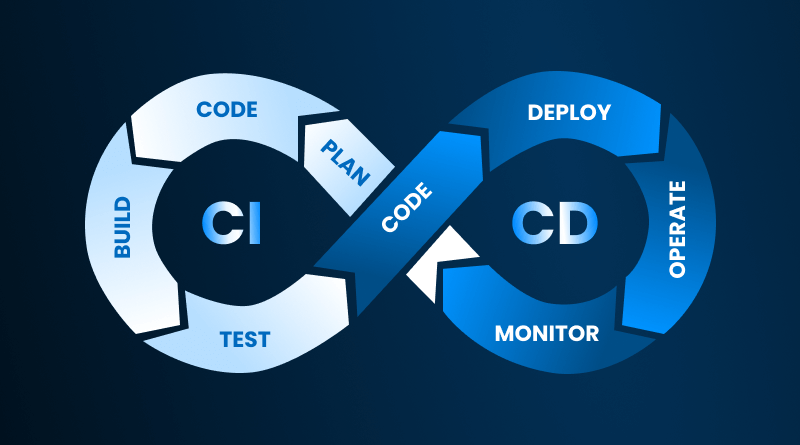
Software development teams are not what they used to be back then about 5-10 years ago. It was only possible for the top-performing software development teams to deploy their new releases multiple times in a single day.
Currently, it is estimated that up to 75% of all IT software development teams can also release code multiple times during the same working day.
The question is, “What about your team?” Do they still take several weeks and/or months to deploy small code changes? If your team still does this, don’t feel bad, as this issue affects the majority of all software development teams today.
This is why we have Continuous Integration (CI) and Continuous Delivery (CD) pipelines.
A CI/CD pipeline is a direct route from where you have written your code on your laptop to where it has been deployed on your web hosting environment (your production server).
Visualize a CI/CD pipeline like a large and continuous “conveyor belt” at a manufacturing plant. You place your code onto one end of the belt, and it will pass through some checks (validation, testing, packaging) until it reaches the end of the conveyor belt, which is where you would notify your users that they can download and use your updated version of your code. So no need for panic at the last minute and no fears of breaking your application with these changes!
This blog will give you the information about the CI/CD pipeline and demonstrate how to effectively use the CI/CD pipeline as a way to build software faster and with less stress.
Table Of Content
What is CI/CD Pipeline?
The intention of CI/CD pipelines is straightforward: they allow teams to quickly develop higher-quality software in less time, with reduced risk. CI/CD pipelines automate processes to a greater extent than they’re able to today without CI/CD pipelines.
The CI/CD pipeline is a set of different workflows used by a team during CI/CD. To clarify, CI refers to code integration, and CD refers to code delivery/deployment. Every time a developer adds a piece of code to the code repository, CI systems will automatically check and validate this code for conformity and accuracy.
The second phase of the CI/CD pipeline is called CD (Continuous Delivery or Continuous Deployment). In this phase, all completed and verified pieces of code can either be immediately deployed or automatically made available to end-users once they have been approved for release.
When CI and CD are utilized together, organizations are able to identify issues earlier on in the development life cycle and significantly reduce the amount of manual work required, while simultaneously providing confidence to the marketplace that new software will be able to deliver timely updates.
CI/CD Pipeline: Key Practices of a Successful Development Environment
In order to appreciate CI and CD, an understanding of DevOps is essential. DevOps containers focus on collaboration among many people involved in software development. Hence, it allows development teams, operations teams, and other stakeholders instrumental to the software development and operation process to communicate effectively and work collaboratively.
This collaboration helps to plan, build, test, and deploy software much faster than ever before, without the “delays” associated with traditional software development and methodologies.
There were multiple differences between how software was developed before CI and CD became popular. Previously, developers typically created large and lengthy feature branches while they developed in an isolated manner. After they finished developing their feature, they merged it into the main/master branch of the product. As a result, this created a lot of merge conflicts between multiple developers merging their code.
This resulted in many developers waiting several hours or even days to resolve these merge conflicts. In addition, the manual testing process was performed at the end of the testing phase, meaning if any bugs were discovered after completion of the manual testing phase, the time required to fix these bugs greatly increased.
The Benefits of CI/CD
With CI/CD, developers can merge their changes to the main branch more quickly than before. Instead of waiting weeks for their changes to be integrated with the main branch, they now have many small merges at an increasing frequency.
When a developer merges to the main branch, their code is automatically tested to ensure it’s functioning properly. If there’s a failure, they know immediately where to look for a solution. As a result, there are many more successful merges, and developers are being more disciplined in keeping their coding areas clean and organized.
Explaining CI vs. CD in Detail
CI (Continuous Integration) and CD (Continuous Delivery/Continuous Deployment) are the two legs that support the progression of development from coding to product delivery. The difference between CI and CD is simply how much of the process is completed automatically at the end.
1. Continuous Integration (CI)
Continuous Integration (CI) is the starting step in a developer’s progression of development. CI is the process of developers submitting their small code contributions into an established repository (such as Git or GitLab) regularly, rather than waiting until multiple weeks have passed and then submitting their multiple submissions at once. When a developer submits a change to the main repository, the CI system runs through all of its tests in order to validate and verify that the submitted code functions as expected.
After the CI system creates a built version of the code in an artifact format, it triggers automated testing. The intent of automated testing is to confirm that newly added code works with the already existing code. Through automated testing, feedback can be given in real-time to a team; therefore, any issues can be found and dealt with earlier in the developer’s life cycle. The Shift Left Methodology is based on the premise that any issues are found sooner during the lifecycle of software development.
2. Continuous Delivery (CD)
The foundation of Continuous Integration (CI) is Continuous Delivery (CD). After your CI system builds and tests your code, the code is packaged for deployment in Continuous Delivery (CD). While CI prepares you for production, CD prepares you for the actual deployment of your software to production on a daily basis. In a way, you can think of this as preparing a meal by cooking it and then serving it while it is sitting on the counter.
The only additional effort you need to do for Continuous Delivery (CD) is to actually click the button to deploy to production, after your code has been built by your CI, and once you have approved this deployment. This is especially critical for industries where there is a higher potential for negative consequences on patients or consumers from software errors (i.e., healthcare and finance).
3. Continuous Deployment (CD)
Continuous Deployment (CD) represents the highest level of Continuous Integration (CI) through an automated process of putting new code automatically into production without requiring humans to perform any manual steps whatsoever throughout an organization’s software development process. After your code has passed all automated testing processes, the code will automatically push into the environment of the end client.
Many software companies update their software frequently, so they have to respond to their customers’ demands quickly. This means that automated testing plays an important role in maintaining the stability of a production environment. If automated tests pass, the code is considered safe to deploy into production.
CI vs CD vs CD: Compared Overview
| Practice | What It Does | Automation Level | Human Approval Needed | Best For |
| Continuous Integration (CI) | Merges small code changes frequently and runs tests | High | No | All development teams |
| Continuous Delivery (CD) | Keeps code always ready for release | Medium | Yes | Teams needing manual approval like healthcare or finance |
| Continuous Deployment (CD) | Automatically releases code to users | Very High | No | Fast moving companies like SaaS or e commerce |
The Four Essential CI/CD Pipeline Stages
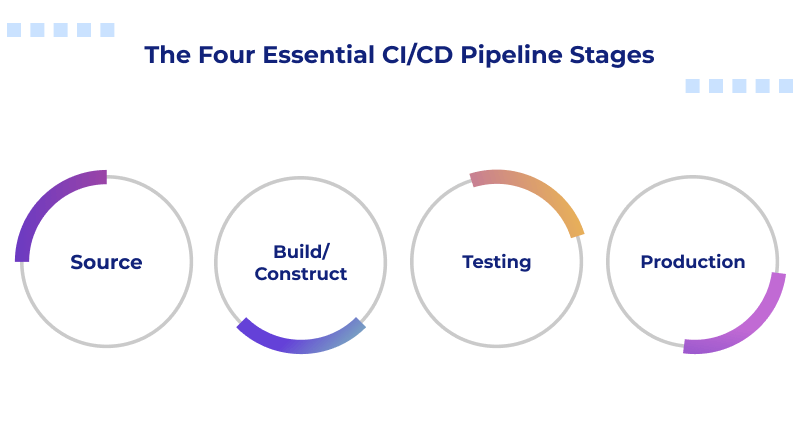
The CI/CD pipeline consists of 4 essential stages, which create a predictable and repeatable workflow from first committing a change to deploying it into production.
Stage 1: Source
The Source Stage is where the CI/CD process begins. Once the developer creates or modifies a file within the Version Control System (VCS, i.e., Git or GitLab), this action triggers the execution of pipeline processes. The Source Stage is responsible for identifying that there is a change in the VCS and preparing for the next stages in the pipeline.
Stage 2: Build/Construct
The build phase is the next stage after Source. The build phase encompasses compiling & packaging code into an executable, production-ready package, and/or Docker image for deployment to the production environment. During this phase, it is important to determine if the build process was successful or unsuccessful.
If the build fails, you will need to find where the failure occurred in the overall structure or the configuration you used to build the application. At this point, the pipeline will stop until you identify a solution to the problems.
Stage 3: Testing
After the build has been successfully built, the pipeline will perform automated tests against the newly built code. Tests will include unit tests, integration tests, end-to-end tests, and regression tests. Tests are designed to test a specific part of the application to identify any potential problems for actual users. A good quality set of automated tests enhances the speed, security, and dependability of a pipeline.
Stage 4: Production
This is the last phase of the pipeline process. The pipeline will copy the tested code to the correct environment, often deploying the final application to specialized services like WordPress hosting or WooCommerce hosting. Pipelines also have additional features available to them, such as the ability to automatically roll back to the previous version of an application if a critical issue with the current version arises, allowing for minimal impact on users.
CI and CD Security: Implementing DevSecOps
It’s important to consider the security implications of any software, especially during Continuous Integration (CI) and Continuous Delivery (CD) processes. Speeding through coding is one thing, but executing without testing is quite another, as there are too many opportunities for security flaws to occur.Even a minor error could lead to catastrophic events; therefore, security must be integrated into every phase of the CI/CD process from day one, regardless of the type of application being developed or deployed. This is referred to as ‘DevSecOps,’ which is the next step in the DevOps evolution.
In the DevSecOps model, security is involved from beginning to end by ensuring that both testing for and establishing security controls are conducted throughout the life cycle of the application. There are two primary methodologies/approaches used to establish the DevSecOps methodology: Shift Left and Shift Right.
The term “shift left” means the introduction of security tests earlier in the lifecycle of an application by allowing developers to utilize resources such as static code analysis, dependency management, and vulnerability scanning as soon as their codes are written. These testing methodologies provide an opportunity to discover, fix, and validate potential security issues while the code is still in the initial stages and prior to full production release. This is significantly less expensive and easier to rectify than waiting until after the complete build is finalized (pre-production testing processes).
“Shift right” refers to the process of validating security following the deployment of an application into a live environment (post-deployment). The DevSecOps process includes continuous performance monitoring, automated penetration tests, and application runtime protection as part of the overall security strategy of an application.
Various modern technologies or tools assist organizations in executing DevSecOps practices with minimal to no disruption to their team members. For example, a container workload cloud hybrid solution like Red Hat Advanced Cluster Security enables organizations to manage security for their container workloads by continuously monitoring vulnerabilities and automatically enforcing security policies on their containers based on security policies from the CI/CD pipeline.
Best CI/CD Pipeline Ecosystem Tools for Beginners
To effectively build a CI/CD pipeline, organizations need the right tools in place as part of their DevSecOps tool ecosystem. Each tool in the CI/CD pipeline has a specific purpose and contributes to creating a clean and predictable workflow when combined with the other tools.1. Version Control Systems
Version control systems allow teams to store, track, and manage changes made to their applications through a single source of truth. Git and GitLab are two of the most popular version control systems that allow teams to use one unified workspace for collaboration on projects. By providing a shared location for code changes, a version control system keeps developers on the same page.
Examples:
- Git
- GitHub
- GitLab
- Bitbucket
2. Continuous Integration (CI) Servers
These are the servers that run CI/CD pipelines. Jenkins is the most commonly used open-source CI server and is known for its ease of use. It continuously checks code and automatically builds, tests, and deploys the code to production, often targeting environments optimized for specific runtimes like Node.js hosting or Laravel hosting. CI servers automate the entire CI/CD process, eliminating the need for manual intervention by developers.
Examples:
- Jenkins
- GitHub Actions
- GitLab CI
- CircleCI
- Travis CI
3. Testing and Building Software
Using tools like Maven or Gradle enables software developers to build and package code. Testing tools such as JUnit and Selenium provide different types of testing that verify whether or not the code was created as anticipated. In addition, these tests allow developers to identify any bugs prior to the code being placed into the production environment.
Examples:
- Maven
- Gradle
- JUnit
- Selenium
- Pytest
- NUnit
4. Orchestrating and Deploying Applications
Docker creates containers containing the applications being created so that they can be accessed from anywhere. Kubernetes provides a way for developers to manage and deploy their containers on a large scale, often across VPS or dedicated hosting solutions. Additionally, Kubernetes facilitates load balancing between virtual machines, resource allocation, and scaling of applications during times of high consumer demand.
Examples:
- Docker
- Kubernetes
- Helm
- Argo CD
5. Streamlining and Automating Cloud-Native Systems
For teams using cloud-native systems, Tekton is an excellent choice. Tekton is a Kubernetes-native framework that enables teams to establish continuous integration (CI) and continuous deployment (CD) pipelines within the Kubernetes cluster. Tekton also utilizes Custom Resource Definitions (CRDs).
CRDs are like all other Kubernetes objects, which allow teams to create their own custom definitions for each of the stages contained within a CI or CD pipeline. Thus, Tekton gives teams a lot more freedom and an extremely clean cloud-native workflow than previous solutions, such as Jenkins.
Similar Reads:
6. Complete Integrated Development Tools
Many cloud hosting providers offer integrated, completely developed toolchains that include both build and deployment automation capabilities with little to no configuration needed.
GitLab CI/CD is one good example of such an integrated platform. GitLab CI/CD provides complete integrated pipelines, free compute time for runners, and powerful issue tracking capabilities. These types of complete integrated toolchains make it easier/faster for teams to both build and deploy.
These solutions come with everything included:
- GitLab
- GitHub
- Azure DevOps
- AWS Code Pipeline
- Google Cloud Build
They decrease setup time, allowing for rapid team performance through low configuration requirements.
Benefits of CI/CD Pipeline Tools for IT Leaders
A robust CI and CD pipeline is more than an upgrade; it is a competitive advantage for businesses. IT leaders are constantly trying to find ways to improve speed, decrease expense, and provide a superior customer experience. A properly constructed pipeline does all three.Efficiency
Speed is by far the most significant benefit. Where deploying applications took hours before, the average deployment now takes mere minutes, which eliminates the repeated manual task and takes away the majority of the workload from IT via automation, thereby reducing the total cost and providing for a more orderly and predictable delivery process.
Quality
As testing is consistent throughout the cycle and feedback is immediate, code quality will improve naturally. Bugs will consistently be detected sooner rather than later, resulting in stable releases, and users will experience less trouble. The quality of the software builds credibility and permits teams to maintain a quality reputation in the market.
Agility
As markets are constantly evolving and becoming more volatile, a CI and CD pipeline enables a team to respond just as quickly. With a CI and CD pipeline, teams can deliver smaller incremental releases frequently and be more responsive to user feedback. Consequently, new features are delivered to the customer in a timely manner, which increases visibility and maintains a competitive advantage.
Strategic Outlook
Companies that develop software today must implement a proper CI/CD workflow to give the team maximum speed and efficiency. The CI/CD workflow ensures that every step of the software development lifecycle is streamlined, automated, and trusted, beginning at the initiation and ending at release.
Continuous deployment goes a step further. It allows teams to deploy new releases as fast as new lines of code are written—this means the team can deploy a complete version without waiting for manual review of the code. As automation increases, team effectiveness increases while also reducing the amount of stress of creating a release; these are all benefits of implementing a CI/CD workflow.
If you’re just starting out with CI/CD, don’t try to do everything at once. Start by building a simple pipeline, then add test automation to your workflow in stages. With this combination of incremental improvements, the speed of development will increase as your pipeline continues to grow. Remember, your ultimate goal is to produce a higher-quality software product in a shorter time frame while keeping the users satisfied.
FAQs
1. Do I have the ability to leverage CI/CD with GitHub?
Absolutely! GitHub supports CI/CD fully via GitHub Actions. Thus, you don’t have to leave your GitHub repository to create automated builds, testing, and deployment processes. Workflows may be created in minutes, allowing the whole pipeline to run within GitHub without the need for other tools.
2. Are CI and CD useful for small projects?
Absolutely. CI/CD can be advantageous for small projects. Implementing automation solutions, even on projects using shared hosting, will assist with saving time, identifying potential problems early in the process, and enabling you to deliver stable code. With automation in place, you can also continue to enhance and develop your project at a quicker pace, eliminating any concerns related to manually deploying your software.
3. Are CI and CD part of DevOps?
Yes, CI/CD is also included within the DevOps realm as part of what DevOps represents. DevOps is centered around collaboration, automation, and speed of delivery. CI and CD provide ways for teams to work better together while being able to roll out new releases more seamlessly by providing automated test/build/release processes.
4. What is a CI/CD pipeline in simple words?
In its simplest form, a CI/CD pipeline is the automated journey of your code from its creation to its ultimate release. A CI/CD pipeline, through automation, will build, test, and deploy your code with very little human intervention. The CI/CD pipeline is like the “smart” system that performs the tasks you would normally do repeatedly, allowing you to spend more time creating new features for your users and customers.