 Grace Cornish
It is common to see visitors come to your website and send requests. But does the process end there? No, before the requests reach your server, there’s a pending decision to determine what to do with this request.
At this stage, it involves the use of reverse proxy servers and Web Application Firewalls (WAFs). As both of these elements are situated in between your client and the web server, one might make the mistake of assuming that they perform the same functions.
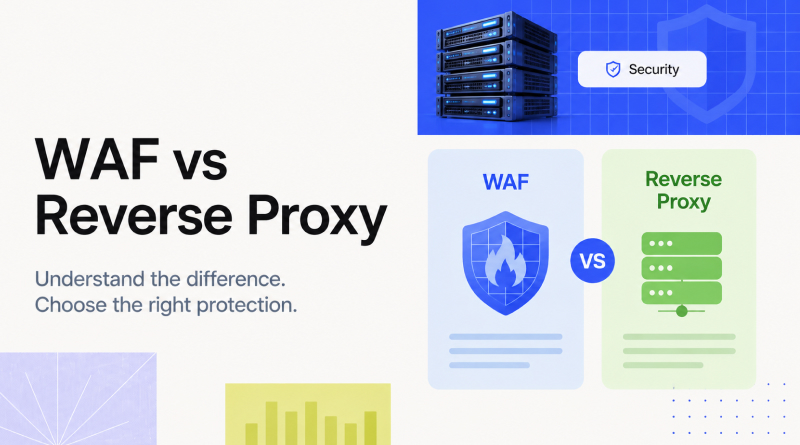
It’s here that we need to understand the difference between a WAF and a reverse proxy. Reverse proxy servers mainly serve to route traffic, while WAFs are designed to fight suspicious applications on the web.
| Reverse Proxy | WAF | |
|---|---|---|
|
Main job
|
Routes, balances, and optimizes traffic | Inspects and blocks malicious web requests |
|
Focus
|
Traffic management and performance | Application security |
|
Looks at
|
Requests and connections | HTTP requests, headers, parameters, and payloads |
|
Typical benefit
|
Better performance, scalability, and infrastructure control | Protection against attacks such as SQL injection and XSS |
WAFs and reverse proxies are not competitors. Instead, a WAF is used in conjunction with a reverse proxy, thus attaining benefits that allow the WAF to monitor the incoming connections and get rid of the cyber attacks before they reach the application server.
Reverse proxy technology allows the application to manage incoming traffic in a more efficient way, while those services that are provided by a WAF focus mainly on identifying harmful requests. Therefore, never treat one service as a replacement for the other. If you do not take into account the nature of both technologies, you may encounter security and efficiency issues.
In this blog, we will understand the differences and similarities between a WAF and a reverse proxy and explain when each of them should be used.
Table Of Content
What is WAF?
A web application firewall (WAF) refers to a security layer that manages the traffic flowing to an application and blocks malicious requests by monitoring that traffic. The WAF is placed in between the users and the application. Thus, it blocks any incoming HTTP/HTTPS requests before they reach the server.
Similar Read: Redirect HTTP to HTTPS
In simple words, WAF acts as a security checkpoint for the application. It filters the requests of regular users, while the ones showing signs of an attack are blocked at the gateway.
Functions of WAF
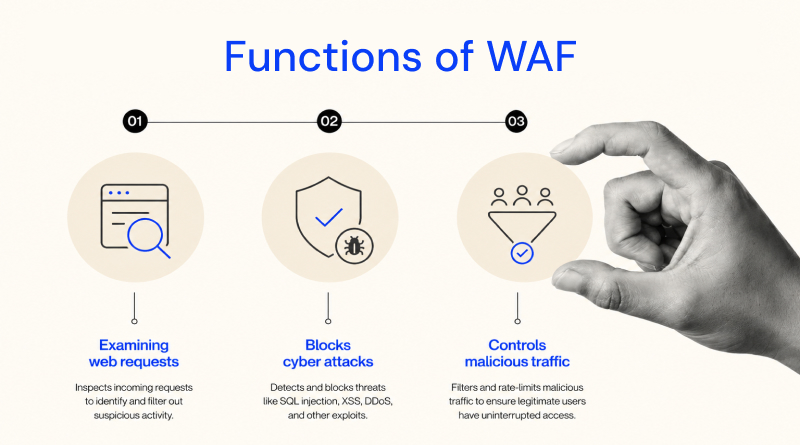
The WAF avoids threats targeting web applications. Some of the functions performed by WAF include:
- Examining web requests: The WAF examines HTTP requests, and thus the headers, parameters, and data sent to an application are under surveillance for detection of suspicious signs.
- Blocks cyber attacks: WAF is capable of protecting applications from attacks, including SQL injection (SQLi) attacks, cross-site scripting (XSS) attacks, and local file inclusion (LFI) attacks, among others.
- Controls malicious traffic: WAF can also perform rate limiting and bot management to control excessive requests directed to an application.
WAF vs. firewall: Key differences
The primary distinction lies in what each of them is designed to check. Classic firewalls were created to control traffic based on details such as IP address, port, or network connection. However, a WAF goes a step further as it analyzes web traffic at the application level (layer seven).
For example, when a request comes with input that checks for SQL injection, the WAF can check this web request and detect any possible attempts. Overall, WAFs are essential for websites where the greatest security threat may be hidden in normal HTTP/HTTPS requests.
What is a Reverse Proxy?
The term “reverse proxy” refers to a server that acts as a gatekeeper. Instead of allowing the client to connect directly to the website’s backend servers, it handles all requests on behalf of the user. When a user sends a request to access the website, the request gets routed through the reverse proxy, which subsequently determines where the request goes.
The reverse proxy is similar to a receptionist who directs a visitor to the right offices. It receives the request from the user at the reception desk and interprets it and sends it to the proper server and then sends the response back.
Functions of Reverse Proxy
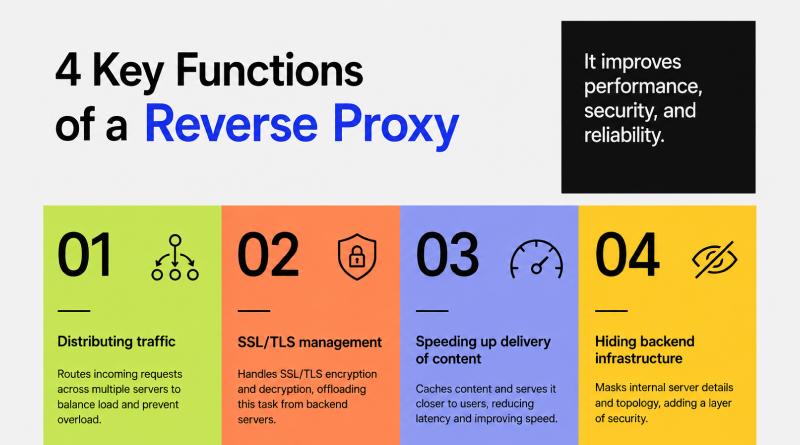
A reverse proxy goes beyond simply forwarding requests; it has other important functions:
- Distributing traffic: A reverse proxy distributes the incoming requests across multiple servers if a website runs on multiple servers. This process is referred to as load balancing, and it prevents one server from getting too many requests.
- SSL/TLS management: A reverse proxy also manages the process of encrypting and decrypting HTTPS requests before forwarding them to the backend server, which is called SSL/TLS termination.
- Speeding up delivery of content: With a reverse proxy, frequently requested files (images, CSS, and static content) can be cached and do not have to be fetched from the backend server every time.
- Hiding backend infrastructure: The visitors access the reverse proxy and not the origin server; thus, the details of the backend servers (including the IP addresses) are not revealed to the public internet.
Example of standard Reverse Proxy
The common forms of technology used in reverse proxies are Apache HTTP Server, Nginx, Traefik, and HAProxy. They are used to manage traffic between end users with better performance, stability, and management.
Related Read: Nginx vs Apache
The reverse proxy is essentially a traffic manager who makes decisions about web service requests and improves efficiency.
How do WAFs use reverse proxy architecture?
WAF and reverse proxy work synergistically. A WAF typically operates in reverse proxy mode, which involves placing it ahead of the application to allow incoming web traffic, while the role of the WAF is to implement a pass through the security structure first before it reaches the backend server. Both are security barriers present at the entrance of the website.
First, the reverse proxy receives the request, and the WAF determines whether the request appears safe enough to proceed.
The Flow of Traffic
1
A user makes the request
A request is triggered by a user who clicks on your website’s URL or interacts with an application.
↓
2
A request comes to the WAF/reverse proxy
The request first arrives at the reverse proxy located ahead of the origin server.
↓
3
WAF checks the request
The WAF analyzes parts of the HTTP request, including the headers, parameters, and the data received.
↓
4
A legitimate request is forwarded
When a legitimate request arrives, it is transferred to the origin server, where the request will be processed and a response is generated.
↓
5
A malicious request is blocked
Similarly, when a malicious request occurs, the WAF detects and stops it before it reaches the application, without the user being aware. In this case, the user receives the blocking error or response depending on the WAF configuration.
Reasons why WAF should be combined with a reverse proxy?
With the WAF reverse proxy combination, security measures are implemented before the application source code is modified. The backend of the website processes the legitimate requests, while the WAF is configured to filter all suspicious requests. Another significant advantage of this combination lies in the reverse proxy’s role, which is defined by its ability to forward traffic. On the other hand, the role of the WAF is to implement application-level security techniques.
To summarize, the reverse proxy does its job of forwarding legit requests, and the WAF does its job of analyzing requests for anomalies. Together they harden your website security and hence are popular.
WAF vs Reverse Proxy: Direct comparison
While now it’s clear both technologies help you strengthen your website, let’s discuss the major difference between a reverse proxy and a WAF. Both technologies can act as intermediaries between users and the application, but they have different functions.
🛡️
WAF vs Reverse Proxy: Feature Comparison
| Feature | 🔄 Reverse Proxy | 🛡️ Web Application Firewall (WAF) |
|---|---|---|
| Primary function | Traffic Routes traffic, distributes requests, and can cache content | Security Inspects web requests and blocks malicious traffic |
| Main focus | Traffic management, performance, and availability | Application security |
| Layer focus | Can operate at Layer 4 and Layer 7 | Primarily focuses on Layer 7 |
| Security role | Can hide backend infrastructure and handle basic traffic controls | Detects and blocks application-level attacks such as SQL injection and XSS |
| Performance impact | Can improve performance through caching and traffic distribution | May add some processing overhead because requests are inspected |
| Common examples | Nginx, HAProxy, Envoy, Traefik | ModSecurity, Cloudflare WAF, AWS WAF |
💡 Quick comparison: A reverse proxy primarily manages and optimizes traffic, while a WAF focuses on inspecting and securing web application requests.
Major distinction factor
The easiest way to differentiate between a reverse proxy and a web application firewall (WAF) is to remember that a reverse proxy directs traffic while a WAF protects web traffic.
As such, a reverse proxy determines the destination of a request and can manage traffic, ensure HTTPS port connections work as they should, or disseminate cached content. A WAF analyzes the web request to assess whether it has indicators of an attack.
Both solutions can coexist perfectly, so a reverse proxy can serve as a basis for a WAF, allowing the combination of traffic directing and application protection operations.
Building your own vs. Buying a managed solution
Once you know the functionality of a WAF, the next step is to implement it. Your options include constructing a WAF on your own or opting for a managed service that deals with most security solutions’ setup and maintenance.
Although both options perform the same, choose one on the basis of your experience, knowledge in the field and the level of control you need.
Self-Hosted WAF
In a self-hosted configuration, a web server like Nginx can be combined with a WAF engine like ModSecurity. This way, you have more control over rules of security and the way the WAF operates.
Advantages
- Complete authority over rules of security and various settings
- More versatility for people who need specific types of security
- Reduced dependence on third-party management services
- Initial costs of software may be low.
Disadvantages
- Need for knowledge of networking and security of servers
- Requires continuous adjustments
- Certain false alarms call for additional investigation.
Remember, this option is beneficial only if you have expertise and experience to run the required infrastructure.
Managed WAF and Hosting
Managed WAF offerings remove the burden of day-to-day technical tasks from businesses, where your web hosting or security provider completely manages the necessary configuration, management, and ongoing updates.
Advantages
- Minimal effort on a regular basis
- The hosting or security provider will take care of security rules enforcement.
- Easy deployment
- Ideal for companies that do not have in-house IT security experts
Disadvantages
- Generally, a subscription or service fee is involved.
- Gives less flexibility on some security parameters
- Relies upon the resources of the provider
This option makes the company effortless and allows for further development of the website without any additional security burden.
Summary
While a reverse proxy and a WAF offer the same security aspect for your website, they perform different tasks. Reverse proxies deal with the way web traffic accesses your servers, facilitating routing, load balancing, caching, and SSL and TLS handling. A WAF, on the other hand, focuses on monitoring web requests and protecting against application-level threats, such as SQL injection and XSS.
The two technologies function in unison, especially with modern development. Most WAFs today are designed as reverse proxies, allowing the monitoring of incoming requests prior to their reaching the application.
Ultimately, every organization must decide for itself which of the two approaches works for it best:
- Those who do not mind managing their servers and security rules should go for self-hosted solutions.
- Companies that want a hands-off safety net should consider using a hosted WAF together with that hosting.
To sum up, a proxy is used for efficient traffic management, while WAF serves its purpose of safety. Understanding the difference between the two technologies allows for a more informed selection of their respective advantages and for implementing them in the most effective manner.
FAQs
1. Is Nginx a WAF or reverse proxy?
Nginx, in contrast, is acting as a reverse proxy, which means it is doing what a normal web server would do, not a WAF. But it can work together with WAF tools such as ModSecurity or NAXSI. Therefore, it makes application security stronger.
2. Can a reverse proxy block attacks?
Yes, of course. But the mitigating power is very inferior to that of a WAF. A reverse proxy can employ security features such as traffic filtering, IP blocking, and rate limiting techniques to remove some types of malicious traffic, but it usually cannot perform detailed analysis of web requests to identify any application-level attacks.
3. Is ModSecurity a WAF?
Definitely. ModSecurity is a free, open-source WAF engine that monitors HTTP requests to identify and block malicious internet traffic. It can be integrated with web servers such as Apache or Nginx to protect web applications from damage.
4. Do all WAFs use reverse proxy?
Nope. The reverse proxy mode is very popular, but it is not the only option to deploy a WAF. WAFs can be deployed inline, using an agent on the app server or by other types of network integration methods, depending on the solution and architecture.
5. What is the difference between load balancer and WAF?
A load balancer is primarily focused on distributing incoming requests to different servers to get the desired performance in reliability and availability. A WAF, in contrast, inspects incoming web requests and denies those that may be from malicious agents.