 Parker Enfield
Every internet connection server is prone to cyber-attackers. When a single node in a network is compromised, entire operations are disrupted. Hence, DMZ mitigates the risk by isolating public-facing services and slowing down cyberattacks.
A DMZ (Demilitarized Zone) is an isolated network segment that bridges the public internet and the private network. It’s where you place public-facing services, web servers, email servers, and DNS servers, so even if the data is breached, your core internal network is protected.
Consider it a controlled buffer zone: accessible from outside, but protected from within. On Linux, you don’t need expensive hardware firewalls to build one. With a machine running three network interfaces and iptables, you can set up a fully functional DMZ that:
- Accepts inbound internet traffic to designated public servers.
- Allows internal network reaching DMZ servers.
- Blocks DMZ servers from establishing connections to the internal network.
The guide walks you through the exact iptables configuration to make that happen step-by-step.
Table Of Content
What Do You Need Before You Start?
Here are the following prerequisites that allow easy setup.
– Hardware Requirements
- Three Network Interface Cards (NICs) paired with a Linux machine.
- Sufficient RAM to handle firewall-level packet filtering.
– Software & OS Requirements
- A Linux distro with IPTable support.
- IPTables installed and accessible. Verify with:
iptables –versionMust have root or sudo privileges on the machine. Most of the iptables commands require root access.
Network Requirements
- The following is a configuration with three different IP addresses for each interface: one for each zone (internet, DMZ, internal).
- Knowing what port and protocol will be used by your DMZ services (such as port 80 for HTTP, port 53 for DNS).
- Connect to the router/gateway settings to set up external traffic re-writing to your DMZ machine.
Knowledge Requirements
- Some knowledge of Linux command-line operations.
- Basic knowledge of TCP/IP networks, subnets, routing, etc. and the flow of packets across networks.
- Fundamental commands of IPTables (rules, FORWARD policies, NAT, and chains).
What is DMZ?
A DMZ (demilitarized zone) is a “special” zone that is exposed to the network and is prone to receive attacks from cybercriminals. This “demilitarized zone in networking” is composed of servers, emails, DNS, and the web, among others; i.e., servers that have to be exposed to the public. For this, you need operating systems like Linux where you can configure the DMZ Linux environment. The best is to never harm any of these, but this situation is utopian, and we cannot simply think that it would never happen, either because we think our security measures are very good or because we think we are good at security. If you are going to execute these processes in the Linux DMZ shared environment, these Linux shared hosting servers are vulnerable to cybercriminals.
What Is A DMZ Server?
DMZ based servers are networked through the DMZ network. The DMZ network acts like a buffer zone between the public internet and the private internal network. Imagine it like a small, controlled island between the wild internet and your company’s local network.
What it Gives?
- Isolation: The DMZ network is isolated from the internal network with firewalls. This creates an extra layer of security. If a hacker were to breach a server in the DMZ, they wouldn’t be able to easily access the private network where sensitive data is stored. You can get the same kind of isolation in our dedicated hosting servers.
- Public-Facing Services: Think of the DMZ as the shop front of your network. It’s where you place servers that need to be accessed from the internet, such as web servers, email servers, or DNS servers.
- Controlled Access: While the DMZ is accessible to the internet, access is highly controlled. Firewalls carefully filter incoming and outgoing traffic, only allowing authorized connections.
Advantages of DMZ Configuration
- Enhanced Security: By isolating public-facing services, it makes it harder for attackers to infiltrate the core network. For more security, encrypting SSL certificates on your domain is a positive measure to implement.
- Improved Performance: Traffic on the internal network is separated from internet traffic, which can help improve performance for internal users.
- Flexibility: The DMZ provides a place to host external-facing services without compromising internal security. Our cloud hosting servers give you the perfect example of flexibility.
That is why we have to prepare ourselves for the worst possible situation. That is to say the situation of obtaining access to one of these servers. The situation in which the use of the DMZs makes sense because its function is so simple as to allow access from the outside to this zone, which from the Inside, the “corporate” network can also be accessed, but the DMZ cannot access the corporate network. That is isolated. To better understand this example, here is the small scheme:
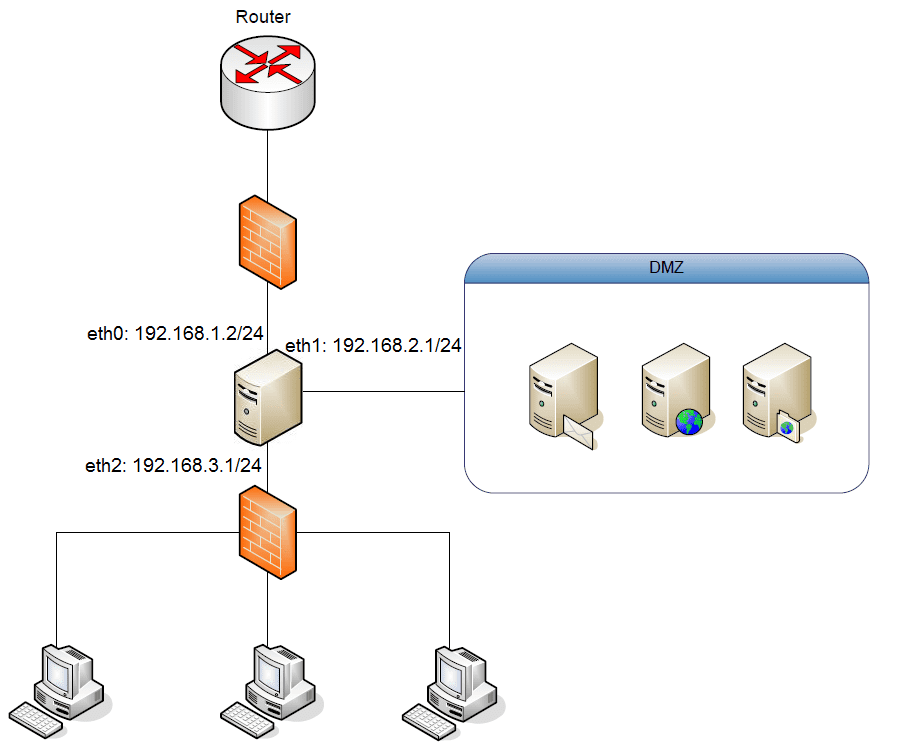
As you see the objective is very clear, in my opinion, it is quite understandable. The issue is that, generally, to achieve such a purpose, we would require a firewall or a switch with these capabilities. This usually requires an economic investment and we cannot do that sometimes. Fortunately, we can choose to make a DMZ with a computer that simply has 3 network cards and Linux installed. Specifically, with the same configuration as shown in the diagram above, that is to say:
- A network interface named eth0 with mask 255.255.255.0 IP 192.168.1.2 and that would be connected to the router.
- A network interface name eth1 with mask 255.255.255.0 IP 192.168.2.1 and that would be connected to the DMZ, that is the area which will receive a “special” treatment.
- A network interface name eth2 with mask 255.255.255.0 IP 192.168.3.1 and that would be connected to the local network.
Having this clear network interface layout, we need to be clear on what goal to achieve and how to do it. With the above schematic and clear network interfaces, knowing the purpose of a DMZ we would see that the objective would be:
- The requests to certain ports of the interface eth0 will be redirected to eth1 (DMZ).
- The traffic coming from the eth0 interface to eth1 interface, pass without any problems.
- The traffic going from the eth1 to eth0 interface, traffic is only in response to requests that have been made to the servers in the DMZ.
- The traffic coming from the eth2 interface to the eth1 interface also pass without any problems.
- The only traffic that can come from the DMZ (eth1) to the local network is caused by the responses to requests from the local network (eth2).
Could we achieve all this? With IPTables of course! Everything discussed above, we would achieve with this simple script that only had to be executed to have our DMZ operational. It should be noted that this configuration would be intended for a DMZ that has a web server and a DNS server, i.e., it would be prepared to redirect the requests to ports 53 and 80. The script in question could be called DMZ.sh
#! / Bin / bash

#BASIC RULES

Echo  1  >  / proc / sys / net / ipv4 / ip_forward

iptables  -F

iptables  -t  nat  -F

iptables  -A  INPUT  -j  DROP

iptables  -A  FORWARD  -j  DROP

iptables  -A  OUTPUT  -j  ACCEPT

#FORWARD'S RULES WE WISH

# LET'S ALL TRAFFIC GO FROM ETH0 TO ETH1

iptables  -A  FORWARD  -i  eth0  -o  eth1  -s  state  --state  NEW, ESTABLISHED, RELATED  -j  ACCEPT

# LET'S THE RESPONSE ONLY GO TO PETITIONS FROM ETH1 TO ETH0

iptables  -A  FORWARD  -i  eth1  -o  eth0  -s  state  --state  ESTABLISHED, RELATED  -j  ACCEPT

# LET'S ALL TRAFFIC GO FROM ETH2 TO ETH1

iptables  -A  FORWARD  -i  eth2  -o  eth1  -s  state  --state  NEW, ESTABLISHED, RELATED  -j  ACCEPT

# LETS ONLY PASSES RESPONSES TO PETITIONS FROM ETH1 TO ETH2

iptables  -A  FORWARD  -i  eth1  , or  eth2  -s  state  --state  ESTABLISHED, RELATED  -j  ACCEPT

#PRIORITIZE REDIRECTIONS FROM THE OUTSIDE TO THE DMZ

# REDUCTED POINTS 53 AND 80

#IPS FICTICS THAT ARE WITHIN THE ETH1 RANGE

#PUT 53, TCP AND UDP

iptables  -t  nat  -A  PREROUTING  -i  eth0  -p  tcp  --dport  53  -j  DNAT  --to  192.168.2.4: 53

iptables  -t  nat  -A  PREROUTING  -i  eth0  -p  udp  --dport  53  -j  DNAT  --to  192.168.2.4: 53

#PUERTO 80 TCP: WEB

iptables  -t  nat  -A  PREROUTING  -i  eth0  -p  tcp  --dport  80  -j  DNAT  --to  192.168.2.5: 80
With this little script, we would already have the equipment ready to act as a firewall and to convert the zone connected to the eth1 interface in a DMZ.
As you see, the creation of this type of environments is not excessively complicated. It simply requires having certain bases of IPTables to be able to develop us with freedom, which demonstrates, once again, the enormous utility of this tool.
I hope you have found it useful.
What are Key Differences Between DMZ, Firewall and VPN?
| Parameter | DMZ | Firewall | VPN |
| Primary Intent | Network Architecture & Isolation. | Access Control & Traffic Security. | Data Privacy & Secure Transit. |
| Core Function | Isolates public-facing assets from the private internal network. | Filters incoming and outgoing traffic based on defined security policies. | Establishes an encrypted tunnel across untrusted or public networks. |
| Data Encryption | None (Relies on native application layer encryption like HTTPS). | None (Inspects and filters traffic, but does not natively encrypt it). | Enforced (End-to-end payload encryption via protocols like WireGuard/IPsec). |
| Deployment Layer | Network Layer (Subnets): Segmented physical or logical boundary zone. | Packet/Application Layer: Inline inspection checkpoints at network boundaries. | Transport/Network Layer: Point-to-point cryptographic tunneling between endpoints. |
| Target Use Case | Hosting external-facing web, DNS, or mail servers safely. | Preventing unauthorized perimeter access and malware propagation. | Securing remote employee access to private corporate infrastructure. |
Conclusion
Setting up the DMZ with Linux doesn’t need expensive hardware, just a machine with three network interfaces, a solid understanding of iptables, and a clear segmentation strategy. As covered in the blog, you can effectively isolate the public-facing services from the internal network. The network is an effective step to take to limit the blast radius of a potential breach.
Covered in this guide, separating your public-facing services from your internal network is one thing, but the DMZ’s strength lies in those behind it. Check your IPTables rules regularly, review the logs of traffic coming in to or out of the DMZ for any unusual activity, and supplement your setup with SSL certificates and vulnerability scans. Security is not something that can be set up once; with a well-maintained Linux DMZ, you have a clear and accountable base for practicing security.
FAQs
What is DMZ in networking security?
A DMZ, or Demilitarized Zone, is a subnetwork that sits between your internal network and the public internet. Think of it as a controlled zone where you place resources accessible from the internet, while keeping your sensitive internal network isolated. Firewalls tightly control access to the DMZ, making it an extra layer of security.
Why should I set up a DMZ?
There are several reasons to set up a DMZ: Enhanced Security: By isolating internet-facing services in the DMZ, a breach there won’t easily compromise your internal network where critical data resides. Improved Performance: Separating internet traffic from internal traffic can improve network performance for users on your internal network. Flexibility: The DMZ provides a space to host external services without jeopardizing internal security.
What is the difference between a DMZ and a firewall?
A DMZ is a network segment, while a firewall is a security device that controls traffic flow between networks. The DMZ creates a physical or logical separation, whereas a firewall filters traffic based on pre-defined rules. You can think of the DMZ as a walled premises, and the firewall as the security guard at the gate, only allowing authorized access.
Which Linux distributions are recommended for setting up a DMZ?
Many distributions are suitable for setting up a DMZ Linux network, depending on your needs and expertise. Some popular choices include:
– Ubuntu VPS Server
– CentOS/Red Hat Enterprise Linux (RHEL)
– Debian
– openSUSE
What kind of service is best placed in a DMZ?
Services that need to be accessed from the internet are good candidates for the DMZ. This could include:
– Website hosting servers
– Email servers
– DNS servers
– FTP servers
– VPN servers (depending on configuration)