Jackson Lane

Each web application, website, or other web property, such as APIs, has a distinct IP address. But when you navigate to these web properties, you don’t type the series of numbers. Instead, you search for a domain name that is easily memorized. This mechanism, which is associated with the webpage and IP address, is called DNS.
This mechanism is optimized for a single device, but if multiple devices are connected, the system automatically assigns IP addresses to the new domain. As IP addresses cannot be used for multiple devices, DDNS (Dynamic Domain Name Service) maps the website’s name to your IP address.
Key Summary — What is Dynamic DNS?
- 1 What is DDNS Dynamic DNS maps a fixed hostname to your changing IP address, so services remain reachable even when your ISP reassigns your IP.
- 2 How it works A lightweight client on your router detects IP changes and instantly updates DNS records with providers like Cloudflare, No-IP, or DuckDNS.
- 3 Common use cases — Remote access to home servers, security cameras, game servers, VPNs, and IoT devices on dynamic IP connections.
- 4 DDNS vs Static IP — DDNS is free or low-cost (£0–£18.71/yr) while static IPs cost an extra £7.48–£22.45/month from ISPs, making DDNS ideal for home users and small businesses.
- 5 Security risks — Compromised update credentials, exposing your network via a fixed hostname, and shared dynamic IP pools are the key vulnerabilities to watch out for.
💡
This article comprehensively discusses about Dynamic DNS.
Table of Content
The Problem It Solves: Static vs. Dynamic IP
Understanding the Core Challenge
Every device connected to the internet is labeled with an IP address. It signals the exact location of devices. However, not all IP addresses are created equally. The fundamental difference between static and dynamic IP addresses is precisely the problem that DDNS solves.
How Dynamic DNS Bridges the Gap?
Dynamic DNS solves the issue by providing a stable hostname (such as yourname.ddns.net) that serves as an IP address alias. A lightweight DDNS client running on the router automatically detects WAN IP changes and updates DNS records instantly, eliminating the manual tracking.
| Scenario | Without DDNS | With DDNS |
|---|---|---|
| IP changes after router reboot | All connections break | Hostname auto-updates, connections resume |
| Remote access to home network | Must manually look up new IP | Always connect with fixed hostname |
| Self-hosted server on home internet | Unreliable for external users | Consistently reachable |
| Cost of static IP avoided | Must pay ISP premium | Free or low-cost DDNS service suffices |
What is the Working Mechanism of Dynamic DNS?
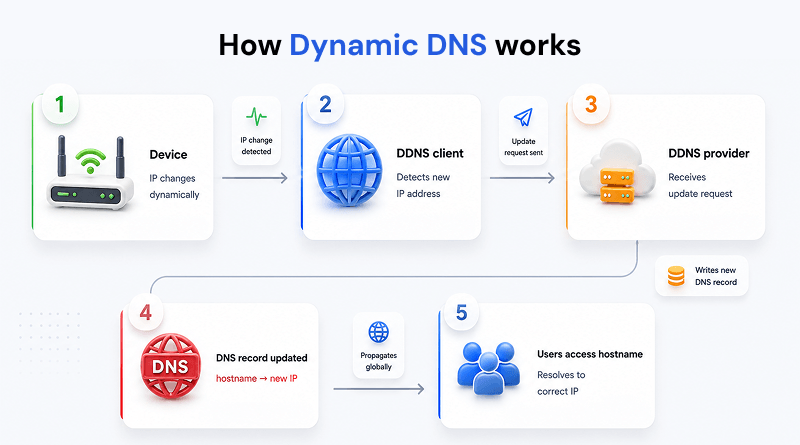
- Step 1: The DDNS client polls the public IP, since devices often don’t know their own WAN address directly.
- Step 2: Cloudflare, No-IP, and DynDNS DDNS providers use a simple HTTPS GET/POST API. RFC 2136 (DNS UPDATE) is unfamiliar for consumer DDNS, but it is technically correct as an option.
- Step 3: The A/AAAA distinction is the right detail to include here.
- Step 4: Though worth noting, propagation depends on downstream resolvers respecting the TTL. Most ISP or public resolvers respect low TTLs and cache for the specific period, which aligns with the TTL promises.
What Are the Types of Dynamic DNS (DDNS)?
1 / 4
1. Standards-based DDNS
Dynamic DNS, also referred to as standards-based DNS, involves a network protocol with an integrated security system. Standards-based DNS services are frequently used as extensions of the dynamic host configuration protocol (DHCP) system.
2. Router-Based DDNS
Several routers feature native DDNS support. If the ISP (Internet Service Provider) changes the IP of the router's WAN port. The router synchronizes network changes automatically with the DDNS provider after the ISP updates the WAN IP address.
3. Proprietary/HTTP DDNS
Unlike standard DNS protocols, the method leverages standard HTTPS requests with user credentials. Consumer DDNS providers widely use this type of DDNS to quickly log in and update DNS records over the internet.
4. API/Custom DDNS
API/Custom DDNS relies on built-in custom scripts or automation tools interacting directly with the API's DNS providers. Advanced users, custom domains, or serverless environments primarily utilize it.
Dynamic DNS Use Cases
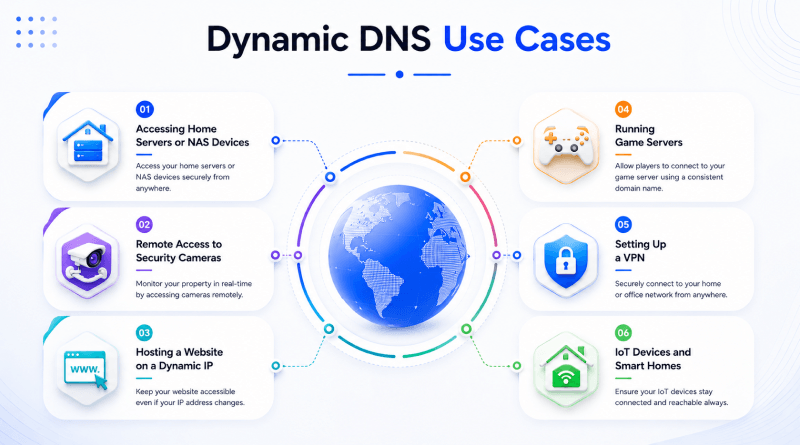
1. Accessing Home Servers or NAS Devices
Home servers or NAS devices (such as the TerraMaster F8 SSD Plus NAS Enclosure) use a DDNS service. As a domestic internet connection uses a dynamic IP address, it is overwhelming to establish a consistent connection.
With a DDNS service, you assign a domain name to the home server. Even if your IP address changes, dynamic DNS providers will automatically update the domain name's DNS records.
2. Remote Access to Security Cameras
CCTV cameras need access to your home IP address. If there is any change in the IP address, the remote connection gets disrupted. DDNS facilitates remote access to your in-house security cameras. It simplifies the monitoring process of property from anywhere.
Dynamic DNS eliminates the manual hassles of tracking IP updates. This service rigorously updates the domain name with the current IP address. It makes it easier to access security cameras from anywhere using the domain name.
3. Hosting a Website on a Dynamic IP
DDNS allows hosting websites from a small office or home without a static IP. It causes website accessibility disruptions every time your ISP assigns a new IP address with the dynamic IP address.
A dynamic DNS provider can overcome this by updating DNS records often as the IP address might change. It makes the website accessible by a changing IP address. This sophisticated feature creates multiple redundancies and offers a budget-friendly solution for small to medium businesses.
4. Running Game Servers
Dynamic DNS delivers optimized networks for gamers using home networks or changing IP addresses. Frequent IP address changes disrupt the gaming experience, making it challenging for gamers to connect with the network.
You can set up a domain name that always points to your server, as IP addresses change, using a DDNS service. It is easier for players to connect to the server using the generic domain name than changing the IP address across server updates.
5. Setting Up a VPN
Virtual Private Networks (VPNs) are frequently used to securely connect business and home networks from remote locations. For example, you might use a free VPN service to access the company's internal systems or to connect to the home network while traveling.
However, VPNs require a consistent IP address to establish the connection. If your home and office use a dynamic IP, a DDNS service ensures you still connect to the VPN by providing a domain name that automatically updates with the latest IP address.
📘
Knowledge Base
Accessing cPanel From A Dynamic IP Address
Quick access guide of cPanel through dynamic IP address.
6. IoT Devices and Smart Homes
IoT devices and smart home device systems are becoming popular, but they demand remote access to control or monitor devices outside the home network. Several IoT systems are installed on home networks with dynamic IP addresses, which makes remote access challenging.
Using a DDNS service ensures you get a channel to connect smart home devices or IoT systems. For example, you use a dynamic DNS domain name to control your smart lights, thermostat, or remote cameras without needing to track the IP address every time it changes.
Dynamic DNS vs Static IP — Which One Do You Need?
| Option | Infrastructure | Key Features | Key Strength | Pricing Model |
|---|---|---|---|---|
| DDNS (Dynamic DNS) | Client on router or NAS; hostname updates automatically when ISP reassigns IP | Custom hostname (e.g., home.ddns.net); Let's Encrypt SSL; low TTL propagation | Free tiers available; zero ISP dependency | Free to £18.71/ yr |
| Static (Static IP Address) | Fixed IP leased directly from ISP; always public and routable; no client software | Permanent IP for firewall allowlists; reliable SSL issuance; no DNS lag on reconnect | Rock-solid uptime; ideal for IP whitelisting | +£7.48–£22.45 / mo |
Benefits of Dynamic DNS
1. Always-On Remote Access with a Changing IP
Most residential and small-business ISPs assign dynamic IP addresses that change with every reboot. Without Dynamic DNS, every IP change breaks remote access setup, forcing manual reconfiguration each time. DDNS fills the gap by automatically updating the domain's DNS record the moment the IP changes enabling you to connect to the right address.
Dynamic DNS (DDNS) is particularly valuable in regions such as South Asia, Southeast Asia, and parts of Africa, where obtaining a static IP address from an Internet Service Provider (ISP) can be costly or unavailable to individual users and small businesses. A DDNS hostname keeps your servers, cameras, or home network reliably reachable regardless of how frequently the IP rotates.
2. Cost Savings Over Static IP Subscriptions
Static IP addresses from ISPs come at a premium, requiring a business-tier plan costing significantly more per month than a conventional connection. Dynamic DNS eliminates the need for standard upgrades by making dynamic IPs work for hosting and remote access. Several reputable DDNS providers offer free tiers, which aligns with the functional requirements of small businesses and personal usage.
Emerging economies such as India, Brazil, Nigeria, and the Philippines have restricted operating margins, and static IPs can inflate billing costs. DDNS offers a technically sound, budget-friendly alternative, bringing balance to your self-hosting infrastructure.
3. Enables Home Server and Self-Hosting Setups
Dynamic DNS makes it practical to run your web server, media server, game server, or VPN from a domestic connection. Instead of paying for cloud hosting, you repurpose hardware ownership and make it publicly accessible through the consistent hostname. This is a foundational component for the self-hosting community worldwide.
In regions such as Eastern Europe, South Korea, and parts of Western Europe with high-speed broadband, DDNS-powered home servers are particularly common. Users serve personal websites, run Nextcloud for private file storage, host Plex media libraries, or even run small e-commerce backends—all on residential connections that would otherwise be inaccessible without a static IP.
4. Faster Failover and Redundancy for Small Businesses
Dynamic DNS can be configured with low TTL (Time to Live) values. It means DNS records propagate changes globally within a few minutes. This makes DDNS a lightweight failover mechanism; if a primary server or connection goes down, an automated script updates the DDNS record to point to a backup IP almost instantly, minimizing downtime without expensive load balancers or enterprise DNS contracts.
For small and medium businesses, and countries like India, Indonesia, Vietnam and Mexico, the DDNS based failover mechanism is a great solution for resilience. It can be used in combination with multi-WAN routers and dual ISP configurations, ensuring business continuity even if an ISP fails.
5. Security Limitations of DDNS
Compromised Update Credentials: DDNS needs a client to notify the provider of IP changes. If the update process is not well authenticated or encrypted, the attackers obtain the credentials and change DNS records. This can be used for them to redirect traffic to malicious servers.
The "Dinner Bell" Effect: Publishing a dynamic IP to a fixed domain name advertises your network. Handles it in a way that enables malicious bots and DDoS attacks to penetrate your system, resulting in security breaches.
No Authentication of Origin: Note that IP addresses do not guarantee identity. Dynamic IP pools are shared, which means it's possible that a hacker or infected machine may get the same IP address as you had for an extended period of time, causing sensitive data to be sent to the wrong place.
How to Set Up Dynamic DNS (Step-By-Step)?
Select a DDNS provider: Choose from No-IP, Dynu, DuckDNS (free), Cloudflare DDNS, and ClouDNS. Here’s a quick comparison:
| DDNS Provider | Core Strengths | Free Tier & Features | Key Considerations |
|---|---|---|---|
| DuckDNS | Exceptional simplicity | Purely free with no account nagging; utilizes dead-simple URL-based updates. | Ideal for Raspberry Pi or custom scripted setups. |
| Dynu | Most generous features for free | Includes unlimited hostnames, MX/TXT/SRV records, and wildcard support at no cost. | Advanced DNS record management without paying. |
| Cloudflare DDNS | High power and performance | Offers anycast speed, 1-second TTL, and a full API; requires you to bring your own domain. | The obvious choice if you already use Cloudflare to manage a domain. |
| No-IP | Broadest hardware support | Free tier is available, but the 30-day confirmation requirement is a known vulnerability. | Standard setups utilizing built-in options in most consumer router firmware. |
| ClouDNS | Balanced middle ground | Provides a decent free tier backed by a reliable Anycast infrastructure. | Well-suited for mixed or general DNS hosting needs. |
- Create a hostname: Register a hostname (myserver.ddns.net or personal domain name, e.g., home.yourdomain.com).
- Set up or configure the DDNS client: Most routers have built-in DDNS; demonstrate a generic router UI example. You can also install a client on Windows, Linux, or macOS.
- Alter your domain to point to the hostname: Map the service destination hostname and update firewall protocols to the DDNS hostname.
- Check the setup: Use nslookup yourhostname.com or an online DNS checker to confirm that the record is hosted by the current IP address.
The Closing Line
Remote access is a part of today’s digital ecosystem. Home network speed determines the devices' accessibility. According to reports, global broadband speeds average approximately between 93 Mbps and 113 Mbps. Hence, home networks support remote accessibility of workloads, from VPNs and SSH tunnels to live camera feeds.
Dynamic DNS (DDNS) is a critical link in the chain of speed and access, guaranteeing that there are no obstacles when IP addresses are often changing. The update interval can be set to as short as 30 seconds, and DNS propagation is as quick as 60 seconds, so you can be sure that your hostname is always up to date with real-time accuracy. DDNS is set up with a contemporary router framework which decreases arrangement weight and permits far off access.
FAQs
1. What is the purpose of Dynamic DNS?
Dynamic DNS (DDNS) automatically updates a fixed hostname with a device's changing public IP address in real time. It ensures seamless, uninterrupted remote access to local networks and private servers without requiring a costly static IP.
2. What is an example of a Dynamic DNS?
A classic example is using No-IP or DuckDNS to map a custom domain like myhome.ddns.net to a residential router. A lightweight script instantly updates the DDNS registry whenever the ISP changes the router's public IP address.
3. Is Dynamic DNS better?
Dynamic DNS is not better than a static IP setup, but it is the most cost-effective and flexible solution for variable network environments. While static IPs are superior for enterprise stability, DDNS is ideal for home labs, remote workers, and small business VPNs.
4. What is the difference between Dynamic DNS and standard DNS?
Standard DNS maps domain names to unchanging, permanent static IP addresses that must be updated manually by a system administrator. In contrast, Dynamic DNS maps domains to frequently changing dynamic IP addresses and updates records instantly using automated software clients.