Jackson Lane
Software used to demand years of training before anyone could build something functional. That barrier has quietly collapsed. Vibe coding tools and vibe coding platforms now let anyone describe an idea in plain language and watch it take shape as working software, turning what was once a specialized skill into something closer to a conversation.
This guide covers the full spectrum of options available today, from browser-based platforms to IDE extensions, without narrowing the focus to free tiers alone or turning into a comparison of underlying AI models. Once a project moves past the prototype stage, it eventually needs a reliable web hosting setup to go live. The sections ahead break down what vibe coding actually means, which platforms lead the space right now, and how developers pick the right one for apps, websites, or quick utilities.
Table Of Content
What Are Vibe Coding Tools?
Vibe coding tools refer to the software, IDEs, and browser extensions that let developers describe an outcome in natural language and receive working code in return. Vibe coding changes how developers build software, moving away from writing every line manually and toward guiding an AI through conversation and iteration. The tools play a role, but the mindset behind them is what actually drives this shift in rapid development. Not everyone using these platforms taps into what makes vibe coding AI unique. Some just want faster typing. The real value shows up when a developer treats the AI as someone to direct, not a shortcut to skip typing altogether.
Related Read: What Is Vibe Coding? Meaning, Definition & How It Works
What Features Should You Look for in a Vibe Coding Platform?
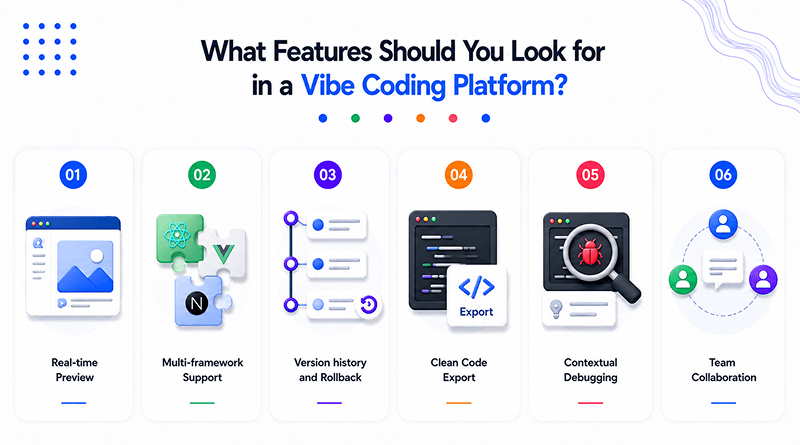
A fast platform means little if the output can’t be shaped further. Developers need room to guide, adjust, and rework what a model produces, rather than accept the first draft as final. The six features listed below distinguish platforms that are genuinely worth adopting from those that only appear impressive in a demo video.
Related Read: Build a Website Without Coding : Best 13+ No Code Tools to Try
What Are the Most Popular Vibe Coding Tools?
A few platforms have outpaced the competition by seamlessly integrating speed with true flexibility for both developers and non-technical builders. Each one approaches the same core problem, turning plain language into working software, but the execution and target user differ enough to matter.
1. Replit
This platform runs an entire development environment inside the browser, letting anyone spin up a full-stack app without installing a single tool locally. Database provisioning, hosting, and version control all live within the same interface, which removes a significant amount of setup friction that traditional development normally demands from a new project.
2. Cursor
Built directly on top of a familiar code editor, this tool adds profound codebase awareness that helps it suggest changes with real context rather than guesswork. It reads across an entire repository before generating a suggestion, which means recommendations tend to follow existing patterns instead of introducing inconsistent styles into an established codebase.
3. Bolt.new
This platform takes a single prompt and produces a functioning application structure within seconds, favoring speed over granular customization. Developers testing early product ideas often reach for it specifically because the gap between typing a description and seeing a working interface stays remarkably short.
4. v0 by Vercel
This tool focuses specifically on front-end components, generating polished, production-ready UI pieces that plug into existing projects. Design teams working alongside engineers find it useful for closing the gap between a visual mockup and functioning code, since the output tends to need minimal cleanup before release.
5. Lovable
This platform targets founders and product managers who need a working app without ever opening a terminal window. It handles both front-end and back-end scaffolding together, suited more to validating a business idea quickly than to building software architecture patterns.
6. Windsurf
This tool handles agentic, multi-step tasks, planning out a sequence of actions and executing them with minimal hand-holding. Rather than responding to one instruction at a time, it breaks a larger goal into stages and works through each one in order, checking its output along the way.
Related Read: Generative AI Vs. Agentic AI Vs. AI Agents: Key Differences Explained
Best Vibe Coding Tools & Platforms Comparison
The choice between these platforms ultimately depends on aligning the technical depth with the specific project requirements. The table below breaks down each option by its ideal use case, general pricing tier, underlying model support, and one standout capability.
| Platform | Best For | Pricing Tier | Model Support | Standout Capability |
|---|---|---|---|---|
| Replit | Full-stack apps | Free + Paid | Multiple LLMs | Instant cloud dev environment |
| Cursor | Professional developers | Paid | Claude, GPT | Deep codebase context |
| Bolt.new | Rapid prototyping | Free + Paid | Claude | One-prompt app generation |
| v0 by Vercel | UI generation | Free + Paid | Proprietary | Component-first output |
| Lovable | Non-technical founders | Paid | Claude, GPT | Full app scaffolding |
| Windsurf | Agentic workflows | Free + Paid | Multiple LLMs | Multi-step task execution |
| GitHub Copilot Workspace | Enterprise teams | Paid | GPT | Repository-wide edits |
| Claude Code | Complex codebases | Paid | Claude | Terminal-based reasoning |
Related Read: Best Hermes Agent Hosting Providers
Which Tools Work Best for Building Apps and Websites?
The output someone needs determines which platform fits best, and treating every project the same way often leads to the wrong choice.
Replit works best for full applications that need backend logic and a database operating together right from the start.
Windsurf handles complex, multi-step app builds where several components depend on each other.
Lovable is a genuine vibe coding app builder for founders who need a working product without touching the infrastructure.
V0 by Vercel is the strongest choice for website vibe coding, generating clean front-end components quickly.
Bolt.new fits small utilities and one-off tools that don’t need long-term architectural planning.
Scattered notes across different documents rarely work once a team has several client projects running at once. Airtable solves this problem by giving everyone a single shared workspace to track build status and deployment updates.
How Do AI Coding Assistants Support Vibe Coding?
AI coding assistants sit inside the workflow rather than replacing it, suggesting completions, catching bugs, and explaining unfamiliar code as developers work. GitHub Copilot reviews code alongside the developer, catching issues in every file as they work. Agent Zero AI takes this concept further, taking a single prompt and carrying out multi-step tasks with limited supervision. This distinction is relevant for anyone comparing vibe coding vs agentic coding, since agentic systems plan and execute independently, whereas assistants respond to direct requests. Teams running these assistants at scale often pair them with monitoring setups like Zabbix to track performance across deployed environments.
Which IDEs and Editors Work Best for Vibe Coding?
Not every editor blends AI assistance the same way, and the difference shows up quickly once a developer starts relying on it daily.
Staging deployments during active builds need somewhere to run, and a lightweight VPS hosting plan usually covers this without pulling in the overhead of larger infrastructure. The difference between vibe coding meaning and prompt engineering questions comes up often in this context too, since editors handle execution while prompt engineering shapes the instructions that guide it.
What Are Our Ranked Picks for Vibe Coding Tools?
The ranking of these platforms is determined by comparing ease of use with technical depth, as the ideal vibe-coding platform for a beginner often differs from the requirements of an experienced team. Here’s how they stack up based on that balance.
Replit — Best for full-stack beginners
Cursor — Best for professional developers
Bolt.new — Best for fast prototyping
Lovable — Best for non-technical founders
Windsurf — Best for agentic, multi-step builds
v0 by Vercel — Best for UI and component design
Claude Code — Best for large, complex codebases
Concluding Insights
Vibe coding has moved past its experimental phase and into daily practice for teams that value speed without sacrificing structure. The platforms compared here each solve a different piece of that puzzle, whether that means full applications, clean websites, or quick internal utilities, and the right pick depends entirely on the output a team needs and how much manual control they want to retain along the way.
The next stage of this shift will likely bring tighter integration between assistants and autonomous agents, narrowing the gap between vibe coding and agentic coding even further. Developers who experiment early with these platforms today position themselves to build faster as the tools evolve.
Frequently Asked Questions
1. What should I look for in a vibe coding tool or platform?
Real-time preview, multi-framework support, and clean code export top the list. Version history and rollback are equally important, as experiments may not always succeed on the first attempt. A platform missing any of these tends to slow a team down rather than speed it up.
2. Are vibe coding platforms suitable for production apps or just prototypes?
Depends on the platform. Replit and Cursor hold up fine in production settings, but something like Bolt.new was built for speed, not for running a live business. Matching the tool to the project’s actual lifespan avoids a costly rebuild later.
3. Do vibe coding platforms integrate with existing codebases and version control?
Cursor and Claude Code both do, reading through an entire repository instead of starting fresh each time. Newer or lighter platforms sometimes skip this integration; it’s worth checking before committing to one. Teams working on established codebases should confirm this integration before adopting any new tool.
4. How do I choose between a chat-based tool and an IDE-embedded one?
Chat-based tools like Bolt.new work well for non-technical users and quick, standalone builds. Developers who want to stay inside their existing setup usually prefer Cursor or Windsurf instead. Whether the workflow needs to fit around existing tools or start from scratch usually decides the right pick.