Jackson Lane
The day ChatGPT was introduced, it redefined our connection with AI. It stopped being a futuristic concept and became a capable co-pilot for everything from drafting emails to brainstorming our next big project. However, let’s be clear: the era of ChatGPT being viewed solely as a clever chatbot is rapidly being outgrown because it is shifting its focus from conversation to powerful action and high-utility tasks. The real profound transformation lies in its ecosystem of plugins and integrations. These aren’t just extra features; they’re the external hooks and functional connectors that turn a language model into a true operating system.
For any firm that relies on robust digital infrastructure, mastering these extensions is no longer optional. Just as a high-performance application demands reliable web hosting to function under pressure, ChatGPT requires these plugins to surpass its initial information database and perform real-world, actionable tasks. This guide isn’t about listing generic tools; it’s a strategic brief on the ten most transformative plugins that can accelerate your research, streamline your production workflow, and unlock unprecedented productivity.
Table Of Content
Why Plugins Aren’t Just Add-ons—They’re Operational Accelerants
The truth is, regular ChatGPT has clear limitations. It can’t browse the live web, run complex statistical analysis, or connect directly to your project management suite. ChatGPT plugins bridge this critical gap. They effectively grant the AI the ability to:
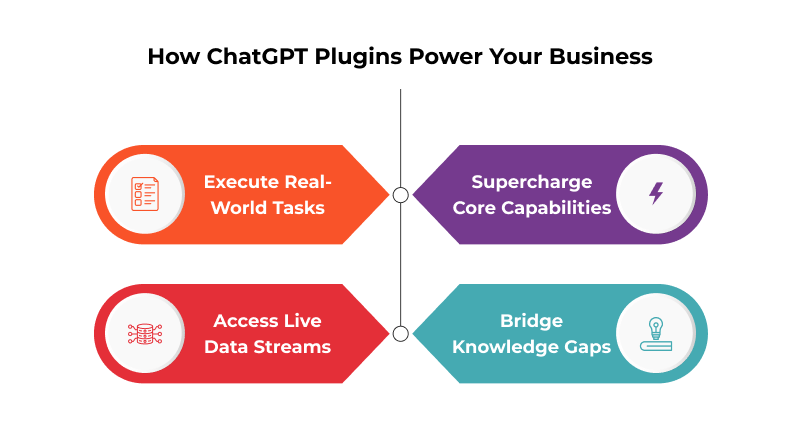
Execute Real-World Tasks: ChatGPT Plugins take the AI to the next level, enabling it to shift from purely theoretical ideas to immediate actions, such as organizing presentation files or draft responses for the accounts on your business email hosting.
Access Live Data Streams: They link the model directly to the latest information, ensuring it can access live data, whether it’s a fluctuating market price or details locked within a new PDF.
Supercharge Core Capabilities: These plugins act as a prompt engineer, instantly refining your input to yield the highest-quality, most precise output possible.
Bridge Knowledge Gaps: These tools connect directly to specialized information sources, instantly providing expert knowledge across virtually any professional domain.
By truly understanding these plugins, we move past simply ‘using AI’ and start ‘managing a digital workforce.’ Consequently, understanding and utilizing the best ChatGPT plugins is now a mandatory skill.
The Top 10 ChatGPT Plugins That Will Redefine Your Workflow
We feature tools that deliver immense functional value and operational efficiency. These chosen plugins fundamentally change the speed and scope of capabilities available for daily work.
1. WebPilot
What it does: WebPilot acts as the indispensable browser for your AI. It facilitates the reading of specific URLs, allowing you to turn live web content into interactive summaries using WordPress quiz themes for engaging quizzes.
The Bottom Line: Need a rapid competitor analysis, a summary of a breaking news report, or a deep dive into an industry whitepaper? WebPilot retrieves data with precision, effectively consolidating multiple hours of manual research into a single answer.
2. Wolfram
What it does: It integrates the immense computational resources provided by Wolfram Alpha and Wolfram Language. This means validated answers for advanced math, physics, economics, and real-world data retrieval.
The Bottom Line: Wolfram transforms the AI from a clever word processor into a quantitative authority. If your work involves data analysis, complex metrics, or generating accurate, auditable quantitative results—not just probabilities—you need Wolfram.
3. Zapier Integration
What it does: This plugin is the definitive tool for workflow automation. Zapier Integration connects ChatGPT to over 5,000 apps—from Gmail and Slack to Salesforce and Trello. The AI can now initiate actions in your existing tech stack based on your conversational prompt.
The Bottom Line: It eliminates context switching entirely. You can draft an email, summarize it, and then instantly prompt the AI to “Send this via Gmail and create a follow-up task in Asana.” It’s the key to making the AI an operational assistant.
4. Ask Your PDF
What it does: Ask Your PDF enables you to upload (via URL or ID) a document and treat it as a searchable database. You can use ChatGPT prompts for writing to query contents, summarize chapters, or extract key figures directly from the file.
The Bottom Line: Think about all the time it usually takes to analyze those complex contracts, annual reports, or academic papers. This plugin converts that static text into an interactive resource. For research teams, being able to instantly analyze and combine data from several PDFs is a massive boost to efficiency.
5. Smart Slides
What it does: Smart Slides takes your inputs, research summaries, or reports and converts them into structured presentation drafts. Pair this with an AI website builder to maintain a consistent look across both your slide decks and your live web pages.
The Bottom Line: Presentation design often creates a major slowdown. This tool eliminates the ‘blank slide’ problem, freeing up your team to focus on refining the narrative and the core message.
6. Link Reader
What it does: Link Reader is highly versatile, capable of reading and summarizing content from virtually any URL—including web pages and various file formats embedded within those links.
The Bottom Line: It’s an assurance policy. If you have a link, this plugin can process it, extract the necessary data, and summarize the key findings, guaranteeing that no piece of external research remains inaccessible in an incompatible format.
7. VoxScript
What it does: VoxScript is primarily used to transcribe and summarize the content of videos, most commonly from YouTube. You can use a ChatGPT prompts list for marketing to turn those video transcripts into key quotes, social posts, or main ideas.
The Bottom Line: A massive amount of modern intelligence is encapsulated within the video format. This plugin instantly turns spoken information into searchable, quotable text, massively speeding up content review for marketers, strategists, and analysts.
8. Speak
What it does: Speak acts as a sophisticated language tutor and translator, teaching you how to phrase things naturally in foreign languages, explaining grammatical intent, and providing crucial cultural context.
The Bottom Line: Global teams and international business demand more than literal translation. This plugin makes sure your team communicates effectively and appropriately, so you won’t have major cultural or language misunderstandings.
9. ShowMe Diagrams
What it does: ShowMe Diagrams creates visuals—things like flowcharts, user flows, and network topologies—directly from your text prompts. This allows you to eliminate manual drawing entirely, giving you a clear visual reference for the whole team, right away.
The Bottom Line: Text descriptions of complex processes are prone to error. This plugin solves that issue for technical teams, allowing them to use ChatGPT prompts for UX designers to quickly map out architecture or workflows with high precision.
10. Advanced Data Analytics
What it does: The Python feature—which used to require a plugin—is now built right into newer ChatGPT models, where it executes Python code in a secure environment. This tool cleans up your data, runs regressions and statistical tests, and then easily creates professional charts based on the files you upload.
The Bottom Line: This is the model’s secret weapon. It allows the AI to move from pure language prediction to concrete data science. For anyone exploring ChatGPT prompts to make money through consulting or specialized data analysis, mastering this integrated tool is the fastest way to high-value insights.
The Non-Negotiable: Security and Infrastructure
Asking AI to interact with sensitive data introduces new, non-negotiable security and performance requirements.
Fortifying the Ecosystem
Every plugin activation creates a new data path, introducing operational liability. This makes strict adherence to SSL security protocols across every data exchange and external link an absolute, non-optional requirement.
The Foundational Role of Performance
AI executions (such as Advanced Data Analytics or WebPilot real-time scraping) rely on external computing power. If your internet connection is slow, the AI will perform slowly. High-performance, scalable cloud hosting provides the necessary bandwidth, low latency, and instantaneous scalability required to handle the parallel processing demands of these advanced plugins. Your infrastructure directly determines the AI’s speed and reliability.
Concluding Insights
Here is the essential takeaway: The age of the tiny, single-purpose plugin is being superseded.
For anyone architecting serious production workloads — whether it’s a high-traffic website, a machine-learning pipeline, or a private cloud — KVM delivers the control, trust, and performance that simply can’t be matched by a hosted hypervisor.
The technical reality—confirmed by internal checks—is that the most valuable functions, such as Advanced Data Analytics (which used to be a separate plugin), are becoming a standard part of the model itself.
This strategic shift changes our focus:
A. Focus on External Connectivity
Plugins like Zapier integration and Wolfram will retain their immense value because they provide external connectivity and computational validation—functions the AI’s core language model simply cannot replicate.
B. The Imperative of Prompt Quality
As the AI’s capacity grows, the quality of your input becomes the ultimate bottleneck. Spending time to write better ChatGPT prompts isn’t just smart—it’s become a necessity. This is the most effective way to turn our potential (capabilities) into real, high-impact results (maximum value).
C. Security Rises with Power
With plugins that allow access to sensitive documents (such as Ask Your PDF) and engaging in financial transactions, the emphasis on protecting user data is paramount. All system connections and links must deploy sturdy security to ensure that ease of use never compromises safety.
Instead of gathering numerous plugins, the key to future productivity is combining a small number of core, highly useful tools to unlock new and advanced capabilities. By following this advanced method and choosing a reliable cloud platform, we can ensure our strategic business goals are met while completely avoiding the complexity of traditional IT management.
FAQs
1. What are ChatGPT plugins?
They are specialized add-ons you can link to ChatGPT. They give it superpowers, allowing it to do things it couldn’t normally do, such as checking the current weather or actually ordering food from a restaurant. Without them, ChatGPT lacks access to any real-time data.
2. How do ChatGPT plugins work?
It’s surprisingly simple. When you ask a question, ChatGPT knows it needs up-to-the-minute information to provide the answer. It then secretly sends your request over to the specific app (the plugin). That app does the real work—such as looking up flights—and sends the final answer back to ChatGPT, which then reads it out to you.
3. Are ChatGPT plugins easy to use?
Yes, totally easy. Once you activate them, you don’t have to do anything else. You just engage with ChatGPT conversationally. It recognizes automatically, on its own, when it needs to secretly call in one of those external tools to get you the best answer.
4. Are there any limitations to ChatGPT plugins?
Absolutely. The biggest pain point is that if the app the plugin connects to goes down, the plugin stops working. Additionally, ChatGPT struggles to efficiently select the right plugin to use; sometimes it picks the wrong one or overlooks a great one altogether.