Jackson Lane
When setting up servers professionally, choosing between KVM vs VirtualBox is about more than simple features like snapshots or a slick interface. The real depth lies in the hypervisor’s fundamental design, which truly dictates the performance and reliability of your entire KVM hosting infrastructure.
These two platforms represent a total divide in cloud infrastructure strategy. One is a bare-metal, kernel-integrated engine designed for hyperscale, minimal-overhead cloud environments. The other is a hosted application built for cross-platform desktop convenience and development sandboxing. The raw performance, I/O latency, security model, and inherent scalability of your infrastructure are all irrevocably determined by this initial choice.
At its core, the difference lies in how deeply each system can interact with the machine’s hardware. You have to ask yourself: Are you building a bulletproof, high-security server that can’t ever go down? Or are you just running a desktop app that lets you try out a secondary program? It’s a huge gap—the difference between reliable infrastructure and a convenient side-tool.
To really understand KVM vs VirtualBox performance, we need to move past beginner guides and look at what truly sets them apart.
Table Of Content
The Architectural Divide: Rethinking Type 1 vs. Type 2
The Type 1 vs. Type 2 distinction gets mentioned all the time—it’s valid, but it only scratches the surface. Let’s explore how this actually affects the way hardware and the hypervisor communicate.
KVM: The Kernel Advantage
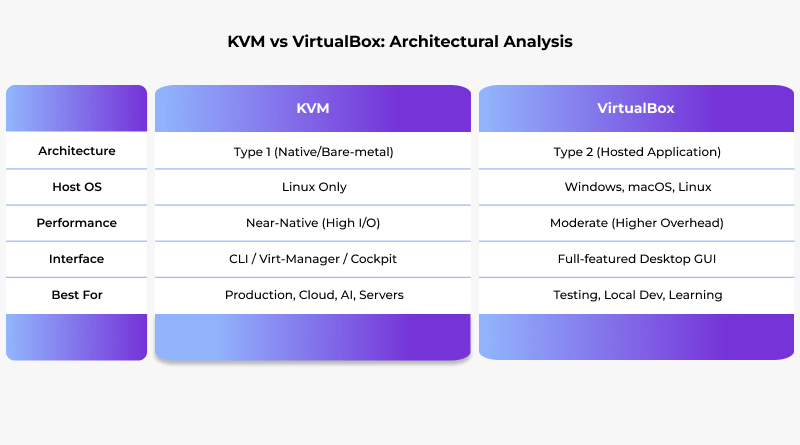
Since KVM is built right into the Linux kernel, the kernel becomes the hypervisor. This native integration allows major Linux distributions such as Ubuntu, RHEL, Debian, and CentOS to eliminate unnecessary layers, delivering near-native performance across any enterprise Linux environment.
Near-Native Performance Achieved: The Linux kernel’s highly optimized scheduler and memory management directly serve the guest VMs. When a KVM guest needs CPU time, it doesn’t wait for a host OS process to be scheduled; the kernel’s scheduler handles the guest’s vCPU threads directly, just like any other high-priority kernel process.
The QEMU Partnership: KVM provides the crucial hardware acceleration (the core CPU/memory virtualization via VT-x/AMD-V), but it’s QEMU that provides the device emulation. QEMU operates in user space and simulates the virtual hardware, including components like VGA, BIOS, and the PCI bus. The strength comes from keeping things simple: QEMU handles the control tasks, while KVM takes care of the actual data, making input and output faster and more efficient.
VirtualBox: The Application Overhead
VirtualBox for development is another classic example of a Type 2 hypervisor: it runs as a regular application on top of an existing and fully functional host OS, which might be Windows, macOS, or Linux.
The Double Scheduling Penalty: When a VirtualBox guest needs to perform an I/O operation (like writing to disk or sending a packet), the request must first exit the guest, get processed by the VirtualBox application, and then be passed down to the host OS’s kernel for actual execution. The OS scheduler views the VirtualBox application as just another process, which adds latency and inconsistent processing time.
Emulation Reliance: While VirtualBox utilizes hardware acceleration (VT-x/AMD-V) for CPU and memory, its device emulation—handling virtual graphics cards, disk controllers, etc.—is more contained within the application layer. This is why, for production I/O, KVM’s design, which leverages the core Linux kernel for path optimization, is inherently superior.
That’s exactly why, when you’re running major tasks, the KVM vs VirtualBox speed battle usually leans toward KVM.Many IT teams also evaluate KVM vs Hyper-V when choosing a hypervisor for Linux workloads.
Comparing I/O Speeds: VirtIO vs. VirtualBox
The real difference in speed isn’t about how fast the processor is. It comes down to how quickly the system handles things like file transfers and network traffic, and each virtualization method deals with that problem differently.
KVM’s VirtIO & Vhost-Net
KVM utilizes paravirtualization via the VirtIO framework.
The Workflow: The VirtIO drivers are installed inside the guest OS. They are aware that they are in a virtualized environment. Instead of trying to communicate with an emulated Realtek network card or an IDE disk controller, the driver talks directly to a specific, high-speed virtual interface provided by KVM/QEMU.
The Zero-Copy Magic: This is where the magic happens. Thanks to tools vhost-net, KVM can skip the usual software steps and push network tasks straight to the main host kernel. This significantly reduces the context switches and critically eliminates multiple data copies between the guest, QEMU, and the host kernel’s network stack, resulting in near-bare-metal networking performance.
VirtualBox’s Guest Additions
VirtualBox also uses a set of Guest Additions for performance optimization, but the underlying mechanism has higher friction.
The Workflow: The Guest Additions provide paravirtualized disk and network drivers. But since VirtualBox is just another program on your machine, it has to wait for the host operating system to handle all the requests and its drivers.
The Cross-Platform Trade-off: The strength of VirtualBox lies in its wide compatibility. Its Guest Additions must be designed to work equally well on Windows, macOS, and Linux hosts. KVM, being built right into the Linux kernel, is free from this cross-platform burden and can optimize to the max in its native environment.
Security and Isolation: Enterprise-Grade Hardening vs. Desktop Sandboxing
In a multi-tenant environment, the hypervisor is the primary security boundary. The mechanisms for this isolation are fundamentally different.
KVM’s Linux-Native Isolation: Leveraging decades of Linux security development, KVM fortifies its native kernel isolation with integrated SSL encryption.
sVirt/SELinux Integration: KVM treats each virtual machine like a QEMU task, and security tools like SELinux can lock them down individually. In this way, even if a malicious attacker is able to break out of a VM, they would still not have access to the memory, processes, or disk images of another VM or the host itself. This kind of mandatory access control is very hard to bypass.
Kernel Trust: Since KVM is part of the Linux kernel, its trusted base is the highly audited and transparent kernel itself.
VirtualBox’s Hosted Isolation: VirtualBox primarily depends on the security features of the host OS to sandbox its process. Security is crucial when managing servers, websites, or sensitive workloads, which is why choosing KVM for enterprise vs VirtualBox matters.
Useful Read: KVM vs LXC: Top Virtualization Technology for Hosting Environments
Automation and Management: The API That Powers the Cloud
The management API is what determines if a hypervisor is just a simple tool for a single user or a robust system for managing multi-data center clouds.
KVM’s libvirt Ecosystem
KVM is managed almost exclusively via the libvirt API.
The Enterprise Standard: libvirt is an open, stable, and language-independent API designed to manage multiple hypervisors (KVM, Xen, LXC).
Power of Scripting: libvirt allows complex automation, such as managing live migration of VMs across hosts, defining sophisticated virtual networks, and storage pools—all through a single, stable XML-based configuration model. You can script a new VM with tools like Ansible or Terraform using libvirt, a capability critical for building an AI infrastructure or a robust, scalable backend for an AI website builder.
VirtualBox’s VBoxManage
VirtualBox uses its own command-line tool, VBoxManage.
Limited Scope: While useful for managing a single system, VBoxManage is a proprietary, all-in-one CLI/API designed for the desktop environment. You can automate the creation of virtual machines on a single host, but building a true, multi-host, failover-proof cloud cluster is complex and often impractical.
The Future-Proof Advantage: KVM and Hardware Passthrough
For the heavy lifting in specialized fields—AI, Machine Learning, or complex computing—you must be able to give the workload its own, specific physical hardware.
SR-IOV and VFIO in KVM: KVM supports full PCI Passthrough via the VFIO framework and is the gold standard for Single Root I/O Virtualization (SR-IOV). This means a VM can talk directly to a physical hardware, completely bypassing the hypervisor for I/O with practically no speed loss. Anything that truly needs bare-metal speed—like handing a GPU over to a VM for training AI models—makes this feature essential.
VirtualBox Limitations: While VirtualBox offers some basic USB and PCI passthrough capabilities, they are often unstable, require the paid extension pack for full functionality, and lack the complete control and driver stability necessary for enterprise-grade hardware and high-speed networking.
Concluding Insights
The choice between KVM or VirtualBox depends on what you’re setting up. VirtualBox is the go-to choice when you just need a quick test ground— a place to run a few checks, or try new software without touching your main system. It’s easy to handle, runs almost anywhere, and doesn’t expect you to be a system admin to get things done.
For anyone looking for the best virtual machine for Linux, KVM stands in a league of its own. It’s made for people who live inside terminals and care about uptime more than convenience. It’s the tool you pick when you’re running production servers or handling workloads that can’t afford downtime. Once it’s tuned properly, it just runs — quietly, efficiently, and for months without a hiccup.
For anyone architecting serious production workloads — whether it’s a high-traffic website, a machine-learning pipeline, or a private cloud — KVM delivers the control, trust, and performance that simply can’t be matched by a hosted hypervisor.
At its core, this isn’t just a technical choice; it’s a strategic one. Your hypervisor defines how far your infrastructure can grow — and whether it’s ready for tomorrow’s demands.
FAQs
1. Which hypervisor, KVM or VirtualBox, is easier for a beginner to use?
VirtualBox, no doubt. It’s straightforward — install it, pick your OS, and you’re up and running. You don’t need to deal with permissions or command lines. KVM is more powerful but takes some Linux know-how to get going smoothly.
2. Does KVM or VirtualBox consume more host resources (CPU and RAM)?
VirtualBox allocated more CPU and RAM because it runs on top of your regular system. KVM is lighter since it’s built into Linux. Multiple VMs run better on KVM.
3. When should I choose VirtualBox over KVM?
If you just need to test an OS real fast, just grab VirtualBox. It’s super simple to get running, and if something goes wrong, it’s no big deal to restart. KVM is for servers or setups you need to keep running reliably.
4. How do I manage virtual machines (VMs) in KVM without a command line?
Tools like Virt-Manager or Cockpit give you a nice graphical dashboard for handling KVM. You can create, start, stop, or monitor VMs without typing commands. Once you’ve got one of these tools running, managing VMs feels as easy as using VirtualBox.