Jackson Lane
Name any AI tool, and it has assisted in the best way to maximize business operations. You have to choose the best AI tool for managing automation and streamlined operations. Two major contenders we will be discussing today are n8n and UiPath. The comprehensive comparison blog of n8n vs UiPath will give you insights on the strengths and limitations of both tools.
Will you opt for n8n’s developer-focused adaptability or UiPath’s enterprise-grade automation for transforming businesses in this UiPath vs. n8n comparison? Ready with your verdict after reading this blog.
Table Of Content
UiPath’s Overview
UiPath Inc. is a publicly listed company that originated in Romania in 2005 and develops RPA (Robotic Process Automation) software. UiPath is a revolutionary enterprise automation tool in the growing UiPath vs. n8n market. It has a comprehensive platform to build, deploy, and manage software robots. The company has launched its flagship product called UiPath Platform to automate repetitive tasks and complicated workflows across operations. UiPath caters to a diverse audience, from developers and IT professionals to business users seeking to streamline processes with minimal coding effort in the broader n8n vs. UiPath comparison.
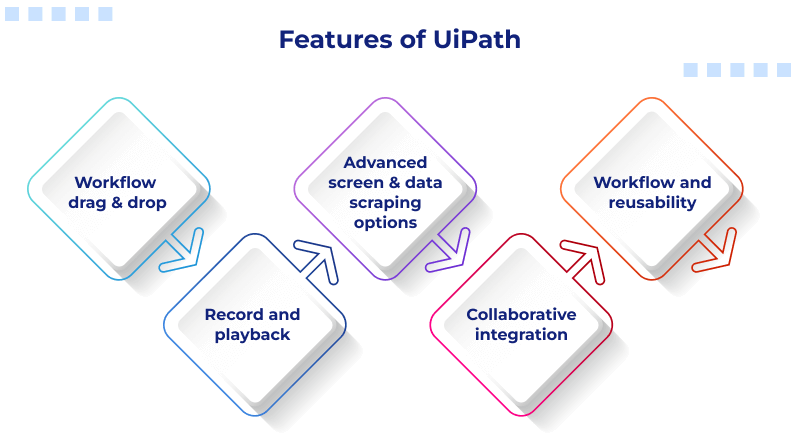
Features of UiPath
1. Workflow Drag & Drop
UiPath has an intuitive drag-and-drop feature to create a visual path process, making the UiPath vs. n8n comparison easier for enterprise users. By using its properties, the user can then convert these process steps into visual workflows. Recorder wizards can also be used to develop web-based workflows or applications.
2. Record and Playback
Workforce uses record and playback features to record specific actions and convert them into an automation process series. Besides, the workforce can record the automation process in the following ways.
- A basic recording automates a single activity and creates a full selector for each activity.
- In multiple recordings, activities mainly related to application development are performed.
- Various kinds of web activities and occurrences are recorded by web recording.
- For automating virtualized environments, Citrix records visuals.
3. Advanced Screen & Data Scraping Options
UiPath’s Screening Scraping feature allows users to extract or scrape the structured data or documents from web pages. Additionally, the data scraping feature scrapes from repetitive structures like tabular content, search queries in search engines, and others.
4. Collaborative Integration
UiPath is easy to integrate with ERP and DMS (Document Management Systems) software and applications, which strengthens the UiPath vs. n8n comparison for enterprise integration. Another secondary tool within it, UiPath Orchestrator, is easily integrated with desktop tools. Also, it is integral to the MS-Office suite. Integration of web browsers provides advanced web page features like Java and JavaScript.
5. Workflow and Reusability
Intact your original workflow by saving it as a template. UiPath saves all modifications in a copy in production. Users can also copy the sizable templates, manageable chunks of standard automation. In doing so, users can merge the smaller workflow chunks for more extensive activities related to complex automation scripts.
n8n Overview
n8n is a free (open-source workflow) automation platform compatible with different applications and acts as a powerful digital assistant in the evolving n8n vs. UiPath comparison. It is similar to Zapier but with more flexibility, including self-hosting at zero cost and a strong focus on AI-driven automations. The in-depth comparison of both is given in our n8n vs Zapier blog.
Users then use a visual canvas to assemble “nodes” and construct workflows to process anything, including emails and databases, AI chatbots, and document generation. It allows technical and non-technical users to automate complex processes without extensive coding.
Glossary: A node is essentially a modular component that encapsulates a specific task. Rather than writing lines of code to perform a task like sending an email or querying a database, you simply drag a pre-made “email node” or “database node” onto a canvas.
n8n Features
1. Self-Hosted and Open-Source “Fair-Code” Model
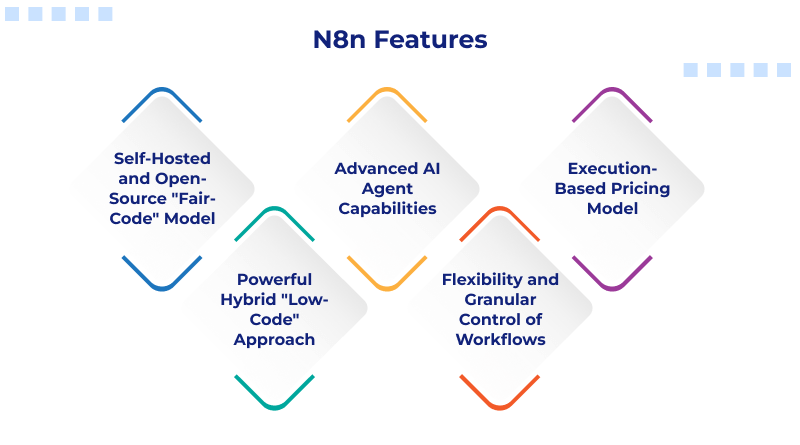
n8n has an open-source or ‘fair-code’ licensed version that can be self-hosted, which is a major differentiator in the UiPath vs. n8n comparison. It offers users complete control over data, infrastructure, and security. Its operational capability is similar to our managed VPS hosting servers. Businesses handling sensitive information or operating under strict data privacy regulations eliminate the cyber threat concerns with n8n.
2. Powerful Hybrid “Low-Code” Approach
Non-technical users can tap into the potential of the visual canvas of n8n in this detailed n8n vs. UiPath comparison. It has a unique low-code feature to insert custom JavaScript or Python code directly within workflows. It means that if a pre-built node doesn’t exist for a specific function, a developer easily creates custom logic, handles complex data transformations, or connects to a proprietary API, ensuring that the platform never becomes a limiting factor for sophisticated projects.
3. Advanced AI Agent Capabilities
n8n deploys advanced AI Agents to make real-time decisions, analyze data, and perform dynamic actions without human intervention. This feature allows for creating sophisticated applications like automated customer service, content generation, and predictive analytics that are far more complicated than the “if-this-then-that” logic of traditional automation tools.
4. Flexibility and Granular Control of Workflows
n8n gives a great level of control over the direction and reasoning of automation. Users are given the ability to create intricate branching paths, handle errors, and do loops to handle large data sets. This is unlike some of the competitors, which restrict the number of steps or the complexity that can be allowed in a workflow. Facilitating the use of n8n, e.g., through parallel execution, event-driven automation, etc., also ensures that a workflow is resilient, performant, and able to handle the real world, regardless of size.
5. Execution-Based Pricing Model
n8n price quotations charge per “task” or “action” instead of monthly or annual billing. Users who build complicated workflows with several internal actions perform thousands of tasks within a single execution without incurring escalating costs. This model encourages the creation of more comprehensive and powerful automations.
N8n vs UiPath: A Quick Glance
| Feature | n8n | UiPath |
| Core Functionality | Workflow automation, API integration, and process orchestration. Excellent for connecting cloud applications. | Robotic Process Automation (RPA), automating desktop applications and legacy systems by mimicking human actions. |
| Target Audience | Developers, technical users, and small to medium-sized businesses (SMBs) who want control over their infrastructure. | Large enterprises and organizations that require comprehensive, scalable automation solutions for complex business processes. |
| Pricing Model | Open-source with a free self-hosted version. Paid cloud plans are based on the number of workflow executions. | Complex enterprise-focused pricing, often with custom quotes. Costs are typically based on the number and type of robots (attended, unattended), users, and licenses. |
| Deployment | Flexible deployment options: cloud, self-hosted (via Docker or Kubernetes), or desktop. | Typically deployed on-premise or in the cloud for enterprise-wide management via the Orchestrator. |
| Integrations | Over 350+ native integrations (nodes) with a strong emphasis on API-based connections. Allows for custom node creation. | Over 300+ built-in activities, including robust integrations for enterprise applications, Excel, SAP, and legacy systems. |
| Ease of Use | Features a visual drag-and-drop editor but may have a steeper learning curve for non-technical users, particularly for complex logic or custom coding. | Designed with a user-friendly, drag-and-drop visual interface. UiPath’s comprehensive documentation and training make it easier for new users to get started. |
| Support & Community | Strong, active community support with forums and extensive documentation. Professional support is available with paid plans. | Comprehensive enterprise support, including dedicated support teams and account managers. Has a large user community and extensive learning resources. |
| Security | Provides basic security features, with a strong emphasis on data privacy through its self-hosted model. Auditable source code allows for transparency. | Offers comprehensive enterprise-level security features, including robust data encryption, audit logs, and role-based access control (RBAC). |
Which Tool Should You Choose?
When deciding between n8n vs. UiPath, especially for use cases, think about your business objectives, technical knowledge, hardware needs, and =automation needs. Both platforms have their own strengths, but to really understand this n8n vs. UiPath comparison in 2026, you need to look at the examples of how they have been used in the real world.
You should consider using n8n if…
- You want to use an open-source automation platform and host it wherever you want.
- Most of your workflows will be API-based or involve SaaS apps, databases, and AI tools.
- You have a technical team that works well with low-code alterations and scripting.
- You want to save money and control your infrastructure.
- You want to have flexibility for the overall workflows orchestrated (especially for a startup or SMB).
- You want to create AI-based automations, chatbots, and custom integrations without the cost of an enterprise license.
In many of today’s modern automation scenarios, n8n is a great solution for business owners who need a scalable and flexible workflow solution but do not like the complexity of traditional RPA solutions.
You should consider using UiPath if…
- Your organization has a significant reliance on desktop apps or outdated enterprise systems.
- You require high-end Robotic Process Automation (RPA) features capable of executing high-end tasks.
- Governance, compliance & security are critical to your organization’s operation and success.
- Your workflows comprise a large number of transactions across numerous departments.
- You desire dedicated enterprise support, orchestration of workflows, and centralized management of automation tools.
- Your organization needs to deploy both attended and unattended bots to support complex operations.
UiPath is the most prominent leader for organizations that have large volumes of automation transactions across finance, healthcare, HR, and customer operations.
Best Overall
There is no definitive winner in comparing n8n vs. UiPath because each product exists to address separate automation needs. UiPath provides a full suite of enterprise-grade RPA solutions and support for legacy systems. On the other hand, n8n focuses on providing API-first workflow automation with flexible developer capabilities.
Ultimately, your choice will depend on whether you want flexibility and cost-effective solutions or enterprise-level scale and sophisticated robotic automation.
The Closing Line
UiPath and n8n follow a unique approach to automate workflows. Both automation powerhouses have different target audiences. UiPath excels in RPA with strong security features. Whereas n8n offers an accessible platform for API-based integrations. So, which tool fits your automation journey depends on the workflow.
Enterprises looking to scale with robust RPA solutions prefer UiPath. N8n is the first choice for developers seeking open-source workflow automation. By aligning with your business goals, be it security, scalability, or flexibility, you unlock the true potential of business automation.
FAQs
1. How do n8n’s open-source nature and UiPath’s enterprise model compare?
n8n’s fair-code distribution allows for self-hosting and more flexibility, while UiPath’s enterprise model is built for large-scale, complex RPA deployments with dedicated support and robust security features.
2. Can n8n perform the same type of desktop automation that UiPath is known for?
n8n is primarily a workflow automation tool that excels at API and web-based integrations, and it does not have the native, robust desktop automation capabilities that UiPath is known for.
3. When would n8n be a more cost-effective and flexible option?
n8n becomes more cost-effective and flexible for individuals or small to medium businesses that prioritize API-based integrations, have a technical team capable of self-hosting, or want to create complex workflows with custom code.
4. Can n8n be used to automate tasks that require interacting with a desktop GUI?
n8n cannot directly interact with a desktop GUI; it requires integration with other tools or scripts, like PyAutoGUI or UI Vision RPA, to perform actions that mimic human interaction with a desktop application.