Jackson Lane
Are you aware of two popular web development names that are creating the buzz? Webflow and Bubble are impeccable no-code website development tools. You might have heard these names for the first time, because popular AI website builders are scaling their market share exponentially.
Both tools follow unique strategies and cater to different user needs and preferences. This article gives a comprehensive comparison of Webflow and Bubble. This ultimate guide highlights their features and key differences that help you decide which platform suits the project requirements.
Table Of Content
What is Webflow?
Webflow enables you to create device-responsive websites without coding. It is a powerful visual code editor and a boon for users who have expertise in HTML, CSS, or JavaScript. Webflow caters to a broader user base that covers experienced and beginner developers.
What is a Bubble?
Bubble is a code-free development software platform; it has focused on building different types of web applications and dynamic websites. It produces database-based applications with user authentication, business processes, and complicated logic. The system offers visual development tools and a wide range of integrations with third-party services and is more focused on functionality than on design.
Use Cases: Webflow vs. Bubble
Who Should Use Webflow?
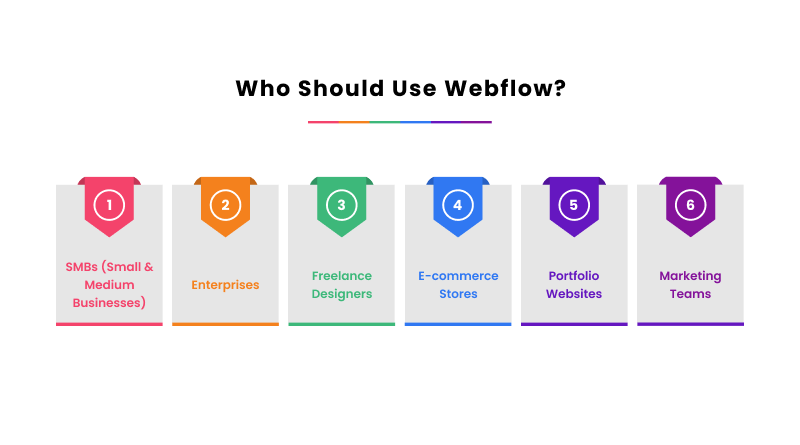
- SMBs: Small and medium-sized businesses will be able to use Webflow to update their content without writing any code.
- Enterprises: This no-code tool can be used by organizations with dynamic websites in order to create websites that are attractive to look at.
- Freelance Designers: Due to the ability to create custom websites, Webflow’s use makes the creation process very flexible, and the need to have an expert in the field of coding is eliminated.
- E-commerce Stores: It is possible to organize the product inventory and updates through the creation of appealing online stores using Webflow.
- Portfolio Websites: Photographers, artists, and designers need high-quality websites combined with striking visuals and personalized designs.
- Marketing Teams: These teams need to develop and build landing pages fast using A/B testing and search engine optimization tools to generate leads.
Who Should Use Bubble?

- Startups: Startups that build a minimum viable product with minimal functionality and interactivity with the user can work with Bubble.
- SaaS Companies: Bubble can be useful to companies that need to integrate web applications with third parties and APIs.
- Entrepreneurs/Non-Technical Founders: Bubble can be selected by individuals who need to create fully operational web software with no extensive background in the field of coding and are interested in the scalability of the software.
- Organization-Specific Business Applications: Organizations that have the need of an internal tool and a dashboard that has strong data processing and user management features may consider Bubble as an option.
Best Features of Webflow
Like other graphic design tools, Webflow has a user-friendly interface. Its graphical interface, which is similar to WordPress, has drag-and-drop capability, which makes it easy to customize the webpage.
1. Responsive Design
Seamlessly design responsive websites with Webflow. Design it for multiple devices like desktop, tablet, and mobile views. A large template gallery and extensive customization options make it visually appealing. If you are an SEO geek, designing plays a crucial role in website rank, and Webflow extends a helping hand in it.
2. Customizable templates
Webflow has made customization easier by offering professionally designed templates. Users can customize and edit content according to their requirements. The templates cover various industries and design styles, providing a solid foundation for building a unique website.
3. E-commerce Capabilities
WooCommerce and Webflow share the same eCommerce capabilities. You can set up product catalogs and customized shopping cart/checkout processes and manage orders directly from the platform. The no-coding tool is integrable with HubSpot, Salesforce, Pipedrive, and more.
4. Hosting and publishing
The Webflow platform has an in-built web hosting feature. You can set up domains, SSL certificates, and password protection for enhanced security.
Best Features of Bubble
1. Full-Stack Development
Bubble allows building of end-to-end web apps, including front-end and back-end logic. This means that a separate development environment is not needed and the development process is simplified.
2. Responsive Design
The bubble applications are picked to suit different screens and devices. You can make visually appealing websites that captivates user’s attention.
3. Database Integration
The system has an integrated database to enable users to store and manage application data. The user is able to create custom data types, create relationships among them, and perform complicated queries without necessarily having to write any SQL code.
4. Plugin Ecosystem
It has a thriving ecosystem of plugins, which extends the functionality of Bubble. The use of the Bubble marketplace by installing the associated plugins gives a simple way through which users can add features to their applications like maps, social media support, and payment processing, among others.
5. Authentication and Security
Any application can have a secure login system developed based on the in-built authentication protocols offered by Bubble. The user can use password authentication, social logins, and role-based access control without the need to code them.
Webflow vs. Bubble: Template Comparison
Webflow Templates
Webflow has a massive catalog of 2000+ templates fueled by its active user community. Most of them are for marketing purposes with wide categories and styles. The advanced template filtering feature eases the search process, and you get the perfect match for your project. Once selected, you can easily transfer the template into the Webflow Designer and start customizing.
Webflow has a freemium model when we talk about templates. This flexibility of templates gives it the competitive edge in every designing aspect. From language and style to features and content, you have complete control over how the template looks and functions.
Bubble Templates
Bubble offers over 1300 web application templates. These templates are largely centered on the development of functional applications, unlike the marketing websites. They comprise blog implementations, customer relationship management systems, dashboards, online shops, and so on. The Bubble templates are also very customizable, and one can determine the design and functionality to meet the unique needs of the requirements.
These templates are often pre-built workflow and style templates, providing a rapid prototyping platform to build web applications. However, these applications are usually fully deployed with the help of a Bubble developer who can be competent in the proper configuration.
The Closing Line
Bubble and Webflow are the brightest examples of coding-free web application and website development. Webflow is the right option to choose when a user is more concerned with design, flexibility, and visual control. On the other hand, when you are required to develop intricate web applications, including database services and dynamic workflows, it might be the perfect platform that you can use to bring your ideas to life.
Irrespective of any website development platform you choose, you opt for MilesWeb as a web hosting partner. You can choose our AI website builder that functions the same as both website development frameworks.
FAQs
1. Should I choose Webflow or Bubble for my next project?
Webflow is appropriate for attractive, design-focused web pages, while Bubble is intended for sophisticated, functional web applications with customized logic.
2. Is Bubble or Webflow more appropriate for creating advanced, data-driven web applications?
Bubble provides component functionality in advanced data-driven applications due to its full-stack functionality, workflow application platform, and native database management that performs at high levels.
3. How do the backend and database functionality differ for Webflow and Bubble?
Bubble provides an integrated application database with customizable backend workflows, whereas Webflow uses a robust content management system mostly simply to store content, that does not have sophisticated logic and user accountability.
4. How do they differ in native integrations and API?
Bubble has more complex API integration by default as well as customizable workflows, while Webflow needs a third-party automation tool like Zapier to achieve advanced application functionality.