Jackson Lane

For years, the industry standard for tracking has been heavy, cookie-reliant software that slows down page performance while casting a wide net over user data. As privacy regulations tighten and user expectations shift, digital teams are reconsidering their approach to web analytics for website tools. The modern priority is no longer just ‘more data,’ but rather smarter, faster, and more transparent data collection. This is where Ackee enters the conversation.
Ackee transforms how you track engagement by shifting the entire process to your infrastructure. You can see how people use your website without handing your analytics data over to someone else. By deploying this on cloud hosting, you ensure that every interaction remains within your private environment, protected from outside parties.
When you shift to a self-hosted analytics stack, your daily workflow changes. You stop fighting with cookie banners and trying to interpret the vague, ever-changing privacy rules imposed by global software giants. Keep all your data inside your network. Your data pipeline lives entirely within your network, transforming your traffic history from a commodity traded by ad networks into a private asset that stays under your control. This guide gets into the technical setup of this platform, showing how you can keep a clear view of your website traffic while actually honoring the privacy of your audience.
What is Ackee at a glance?
Ackee serves as a Node.js-based analytics engine built for privacy. Instead of relying on third-party scripts that inject tracking files into your visitors’ browsers, Ackee gives you a simple dashboard. It highlights the metrics that matter—such as visitor volume, referral sources, and session duration—all without tagging individuals with unique identifiers or cookies. Since every bit of that traffic data is processed right on your server, you don’t have to worry about some external agency scraping your logs or building profiles on your audience. The information stays exactly where you put it, completely under your sole authority.
Table Of Content
What is Ackee?
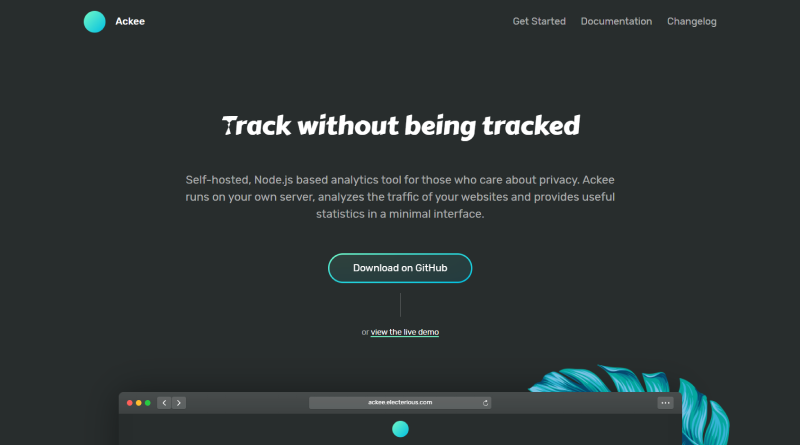
Think of Ackee as a private logbook for your web properties. While enterprise-grade analytics suites often bury you under hundreds of complex filters, heatmaps, and funnel-tracking tools, Ackee focuses strictly on recording the basics: who visited, where they came from, and how long they stayed.
This is not a tool designed to build invasive user profiles or track a visitor across different websites. Instead, it offers a reliable way to monitor content performance across your domains. Because the software is open-source and self-hosted, the barrier between you and your information disappears. You manage the database, control the retention cycle, and determine the exact use of all metrics. This clarity is why many technical professionals now prefer this platform over conventional, high-friction software offerings.
Related Read
How To Check Website Traffic? Tools & Insights
How does Ackee work?
The operational logic relies on a compact JavaScript snippet embedded in your website’s HTML <head> section. When a browser loads your page, it triggers a quiet request to your private Ackee instance.
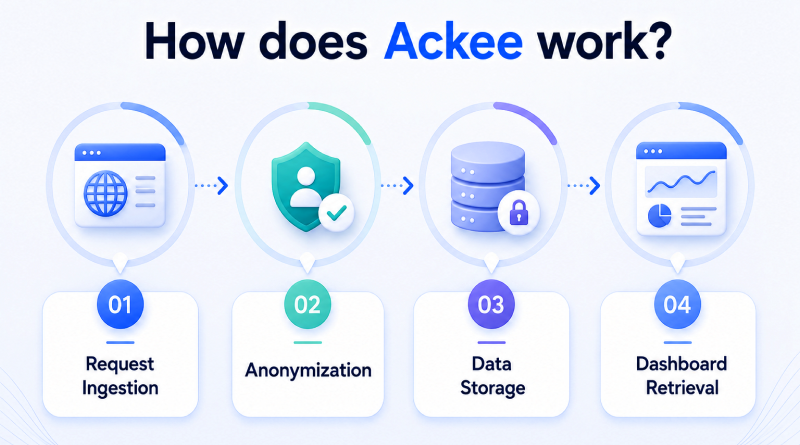
1
Step One
Request Ingestion
The server logs visitor browser types, screen dimensions, and referral paths as they click through your pages.
2
Step Two
Anonymization
The system applies a daily-rotating key to incoming IP addresses, which severs the connection between a request and an identifiable person.
3
Step Three
Data Storage
These cleaned, anonymized metrics land directly in your MongoDB instance.
4
Step Four
Dashboard Retrieval
You open your local dashboard, which pulls data from the database to display grouped counts on a screen free of sidebars or extra menus.
Because this entire workflow runs within your server environment, the website stays free of external third-party dependencies. Visitors never see a cookie consent prompt because there are no cookies involved. You see the exact numbers you need to track your audience size without cluttering your workspace.
What are the key features of Ackee?
Ackee is designed for people who want useful website analytics without adding unnecessary complexity.
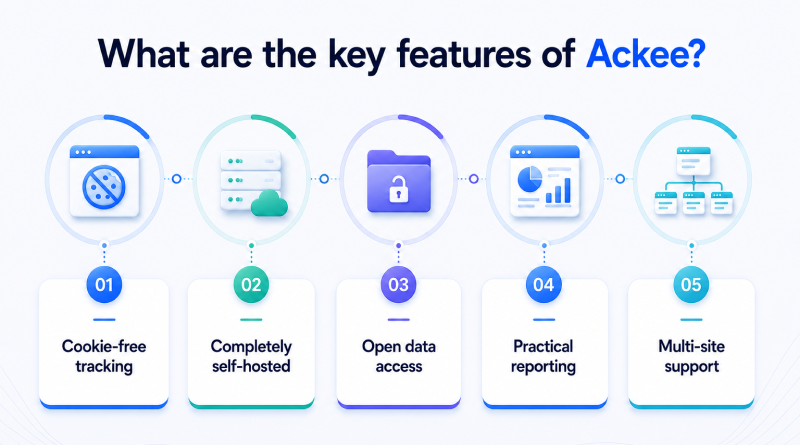
Cookie-Free Tracking
No cookies are placed on your visitors’ browsers. You still get a clear picture of your website traffic.
Completely Self-Hosted
Ackee stays on your hosting. Your analytics aren’t stored on someone else’s platform.
Open Data Access
Analytics data can be queried through GraphQL and incorporated into existing applications or reporting workflows.
Practical Reporting
Reports cover the metrics that explain how people use your website without filling the screen with secondary numbers.
Multi-Site Support
If you manage more than one website, Ackee brings their analytics together under the same installation.
Why do developers use Ackee?
Engineers often select this platform to remove third-party friction from their production environments. When launching a new website, analytics become just another service—much like a database or a caching layer—that resides securely under your domain.
The codebase of Ackee is open-source which means that it is fully auditable. Any person worried about hidden tracking or secondary data collection can read the source code to verify that only intended metrics remain. Reliable insights depend on knowing exactly how your analytics data is collected and stored. Ackee stays lightweight enough to run comfortably in containerized setups. You can securely manage active, version-controlled, and private code alongside your main modern application code.
How does Ackee’s privacy model work?
Anyone inspecting the stored analytics will notice one thing first: complete IP addresses are absent. Ackee replaces them with short-lived hashed values generated from random data that changes every 24 hours, so separate visits never become long-term identity records. The stored records reflect website activity without preserving details that could identify the people behind those visits. That leaves administrators reviewing anonymous traffic records while meeting GDPR expectations without maintaining collections of raw request logs.
How to install Ackee?
Ackee fits comfortably into container-based environments, so the installation follows a familiar path for teams already managing modern server infrastructure. Node.js 18+ and MongoDB 7 form the runtime environment behind every Ackee deployment. The Docker Compose file brings the application and database online in a single deployment. Each website receives its own tracking script, which sits inside the HTML <head> and starts reporting page activity. Domain registration finishes the setup by defining exactly which websites can exchange analytics data with the Ackee server.
What are the limitations of Ackee?
While the platform excels at its specific mission, it intentionally avoids the bloated feature sets found in commercial marketing tools.
Complex Heatmaps
Forget about tracking cursor paths or click-density heatmaps; this tool ignores that data entirely.
Session Replay
Recorded data maps only to collective totals, meaning you cannot trace or reconstruct specific paths taken by individual visitors.
Manual Maintenance
You own the deployment, so take full responsibility for patching the software and running your database backups alongside your existing server chores.
Custom Reporting
There is no native email-digest system, which requires a small custom script if you need automated performance reports sent to an inbox.
What are the common use cases of Ackee?
Data accuracy and uncompromising privacy standards define the core value of this implementation for high-stakes projects.
- SaaS monitoring: See which features customers actually use without sending their activity to companies that build advertising profiles.
- Technical documentation: Track how people use your documentation while keeping all analytics within your environment.
- Professional portfolios: Show clients how your website is performing while leaving every visitor anonymous.
Ackee vs Google Analytics vs Plausible: which analytics tool is best?
Selecting a web analytics tool means managing three competing priorities: the depth of your data, the speed of your website, and your duty to your visitors’ privacy. Google Analytics remains the leading platform, but because of its heavy reliance on cookies and third-party tracking, many now prefer using more transparent, lighter-weight alternatives for monitoring web visitors.
Two of these alternatives are Ackee and Plausible. Both offer a privacy-protecting design and maintain visitor anonymousness but will not provide as much insight as Google Analytics does to help you grow your website.
Use the table below to compare the three platforms across the areas that matter most.
| Feature | Ackee | Google Analytics (GA4) | Plausible |
|---|---|---|---|
| Open Source | Yes | No | Yes |
| Self-Hosted | Yes | No | Yes |
| Cookie-Free | Yes | No | Yes |
| Pricing | Free (Open Source) | Freemium | Paid (Cloud) / Free (Self-Hosted) |
| GDPR Compliant | Yes | Requires Consent | Yes |
| Data Ownership | You Own It | Google Owns It | You Own It |
| API Access | GraphQL API | REST API | Stats/Events API (HTTP) |
Concluding Insights
Ackee shows that meaningful website analytics do not depend on collecting more personal information. Running the platform on your infrastructure gives you a clear view of website activity while keeping ownership of both the data and the analytics process exactly where it belongs. That balance makes Ackee a practical choice for teams that value transparency as much as technical capability.
As privacy expectations continue to shape modern websites, having direct control over your analytics becomes a long-term advantage rather than a temporary preference. Every visit contributes useful insight, every record remains under your management, and every improvement builds on data you fully understand. By maintaining total control over your own data, you keep your project’s growth steady and ready for a more open and secure web.
FAQs
1. Is Ackee really GDPR compliant?
Ackee is built to handle data privacy by ignoring cookies and keeping personal markers out of your visitor records from the start. You retain full responsibility for verifying that your final configuration and data handling practices satisfy the legal standards required by your specific region and business activities.
2. Does Ackee use cookies?
Not at all. Ackee builds its traffic reports using raw, anonymized request logs instead of dropping tracking files into a person’s browser. This approach clears out unnecessary weight from your website and does away with annoying scripts that track users across the web.
3. Is Ackee free to use?
Yes, it is open-source, so you can access the code, tweak it, and run it on your hardware without paying anyone a cent for a license. You only pay for the server space you choose to rent, which puts you in charge of your hosting costs.
4. Can Ackee track multiple websites?
Yes, you can hook as many websites as you want into a single installation. Each project stores its stats in its separate silo, allowing you to navigate between different websites inside one tidy dashboard to keep your work organized.