Jackson Lane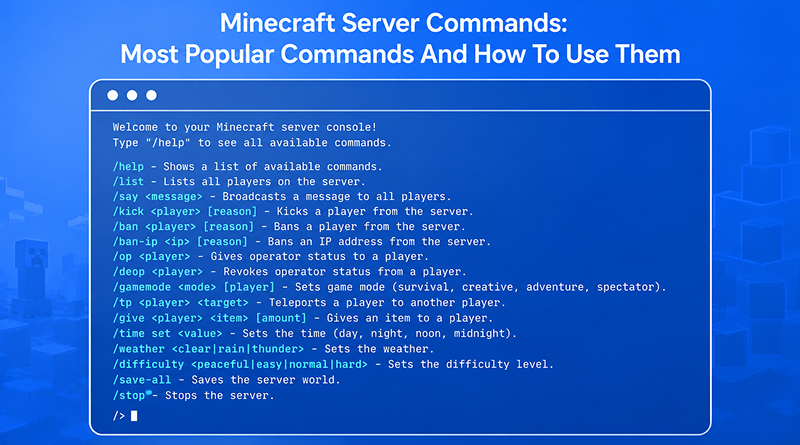
Owning a Minecraft server feels like holding the keys to a digital kingdom, but the real control starts when you open the console. You aren’t just another player on the map; you are the architect of the experience. You command the server’s backend instead of just experiencing the front end. With a few keystrokes, you transform a fixed environment into a responsive system where you dictate the flow of time and physics.
Managing this level of control requires a reliable foundation. If your backend lags, your commands won’t execute when they matter most. Choosing a high-performance cloud hosting plan ensures that every /tp or /weather request processes instantly. When you move your server to a dedicated Minecraft hosting environment, you gain the stability needed to run complex scripts without crashing the session.
Table Of Content
Summary (TL;DR)
Mastering Minecraft commands provides total control over your server, allowing you to automate routine tasks and maintain a secure environment for every player.
Digital Authority: Minecraft commands offer a direct link to the game’s engine, removing survival restrictions.
Streamlined Management: Automate the removal of excessive dropped items or reset the game clock to keep performance high and focus on the gameplay.
Community Protection: Use administrative access to remove players who violate rules and keep the server environment under your control.
Efficiency: Learning the syntax enables you to build on a large scale or manage many players without manual effort.
What Are Minecraft Server Commands?
Minecraft commands act as the text-based instructions you provide the game to initiate specific events. Most players spend their time building with blocks, but admins work directly with the logic behind them. By entering these instructions into the chat or console, you gain the power to customize the server immediately. It is the difference between simply playing and actually governing how the server functions. Developing this level of technical oversight is the ultimate step in moving beyond the interface to influence the very architecture of the digital space.
The Three Main Control Hubs
- In-Game Chat: Press the ‘/’ key to open the window for entering Minecraft in-game commands while you play. This allows you to change settings on the spot without leaving the game or stopping what you are doing.
- Command Blocks: These work as physical triggers for automation. You place one, add a command, and it runs whenever it gets a signal. They are the primary tools for building custom mechanics into the world.
- The Server Console: This is your main dashboard for control. It works independently of the game client, so you can still run things even when the server is empty.
Related Read: Best Minecraft Server Hosting Providers
What are the Key Benefits of Mastering Minecraft Server Commands?
Mastering the internal administrative interface provides total authority over the operational dynamics of your multiplayer environment. Moving past basic player menus and implementing terminal automation allows you to regulate every structural layer, from real-time environmental variables to specific user behaviors, instantaneously.
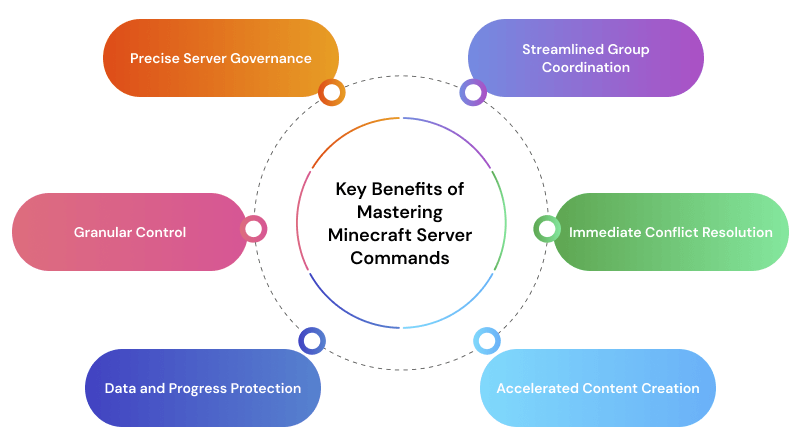
- Precise Server Governance: This setup keeps your building area exactly how you want it, so you never have to deal with rain or lightning ruining a project. It lets you lock in the environment you need, meaning you can just focus on building without constantly fighting the weather.
- Streamlined Group Coordination: Teleportation prevents players from losing their way in expansive environments. Instead of endless trekking, you can gather the whole team at any coordinate instantly, keeping the group focused and saving everyone time.
- Immediate Conflict Resolution: Administrative tools let you freeze, remove, or block users instantly from the console. You don’t need to be near a player to stop them from causing trouble.
- Accelerated Content Creation: Building a massive arena by hand takes weeks. Using the /clone or /fill commands allows you to construct entire cities within hours.
- Data and Progress Protection: Manually triggering /save-all writes your data to the NVMe storage of your bare-metal server immediately, preventing loss from power cuts.
- Granular Control: Commands let you track player stats, create custom shops, or grant permanent status modifiers to reward your most active members.
How Minecraft Server Commands Works?
Every console command acts as a direct code instruction that modifies active server memory in real time. The server application validates your permission level, parses the text string, and instantly updates the world data or player files. This process bypasses standard gameplay limitations, allowing you to alter systemic variables without a server restart.
A command fails if you miss a single space or bracket. The standard flow is /command <target> <action> <value>. For instance, /difficulty peaceful tells the game engine to remove hostile mobs immediately. Learning this structure is the first step to mastering the list of commands in Minecraft.
How to Enable Commands on a Minecraft Server?
Standard survival worlds usually start with Minecraft cheat commands turned off. Most survival setups start with Minecraft cheat commands locked. To use them, just toggle the “Allow Cheats” setting in your server menu to gain access. On a multiplayer server, you must “OP” yourself. Open your server console and type “op yourusername.” This grants you full administrative permissions.
If you manage your server through Windows VPS hosting, you can use RDP to access your console from anywhere. To control who enters your environment, use the Minecraft whitelist command.
Typing /whitelist on activates the security gate, and /whitelist add playername lets your friends in while keeping everyone else out.
Related Read: What is Windows VPS? A Comprehensive Guide
What Are the Essential Admin Commands for Server Owners?
As the owner, you are the final judge. These commands keep your community safe:
- Remove Players (/kick): Use this command for minor offenses. It disconnects the player, but they can come back after reflecting on their actions.
- Permablock (/ban): This command is for griefers. It blacklists the account from your server entirely.
- Unban (/pardon): Use this command to grant someone a second chance after an appeal.
- Shut Down (/stop): Always use this command instead of just closing the console window. It forces the game to save all server data and player inventories before turning off.
Related Read: Master List of Top Windows Commands
What Are the Basic Minecraft Commands for Beginners?
To manage a busy server, you need a deep list command Minecraft library for quick reference. Here are the tools you will use every day:
| Command | Function | Use Case |
|---|---|---|
| /gamemode |
Changes player mode. | Switch to Creative to fix a building error |
| /tp |
Teleports a player | Move a lost player back to the spawn point |
/give | Spawns an item |
Gift a diamond sword to a contest winner |
|
| /weather |
Changes the weather | Clear a thunderstorm that is causing lag |
| /time set |
Changes the time | Skip to morning so everyone can see |
| /spawnpoint | Sets a new respawn | Ensure players reappear at your new city gates |
| /kill @e[type=item | Clears dropped items | Reduce lag by removing thousands of loose blocks |
| /setserverspawn | Changes global spawn | Move the starting point of your entire server |
| /difficulty |
Changes game hardness | Switch to Peaceful if the server is overwhelmed by mobs |
What Are Minecraft Command Blocks?
Command blocks let you automate the Minecraft command block commands you use most often. You cannot find these in the creative inventory; you must use /give @p command_block to obtain one. This level of automation is similar to how a developer uses Ollama to run local AI models—it’s about creating a system that does the work for you.
- Impulse (Orange): Runs once when it gets a Redstone signal. Use this command for one-time buttons like “Get Starter Kit.”
- Chain (Green): Only runs if the block behind it successfully executes its command. This is how you create complex “if/then” logic.
- Repeat (Purple): Runs every single game tick (20 times per second). This is perfect for “Area Protection” zones that constantly check for intruders.
What Are the Best Tips for Using Commands Efficiently?
Writing long strings of text manually leads to errors. To master how to use Minecraft commands, you need to use the built-in shortcuts:
- Tab Completion: Type /gam and hit Tab to see it turn into /gamemode. This saves time and prevents typos.
- Up Arrow: Hitting the up arrow in your chat box brings up the last command you entered. This is perfect for repeating /give commands.
- Command Selectors: Use @a for everyone, @p for the nearest player, or @r for a random player to make your commands smarter.
- Coordinate Shortcuts: Use the tilde (~) to represent your current position. Typing /tp ~ ~10 ~ teleports you 10 blocks straight up into the air.
What Are the Pro Tips for Power Users?
Power users don’t just type commands; they build environments. If you are running your server on a Debian VPS, you can script external triggers to run commands. For those familiar with the nuances of Linux Desktop vs Server, you’ll appreciate the direct command-line control you have over the server.jar.
To keep your server healthy, use Grafana to monitor your CPU and RAM usage. If a specific command block chain is causing a spike, you’ll see it in the data. Hosting Jellyfin on your Minecraft machine lets players stream and share media without stopping their builds.
Final Takeaway
Learning the Minecraft command block codes list takes your server past the basics and turns it into a high-end gaming hub. Whether you are using a game mode command Minecraft to fix a mistake or setting up automatic rewards, these tools put you in total control.
Begin with the basics, get comfortable with the syntax, and experiment within a test server environment to gain confidence. Launching your journey with a Minecraft hosting provider that prioritizes high-frequency hardware ensures every instruction executes without delay.
If you want to scale your community, MilesWeb offers the high-frequency processors and professional communication tools required to manage a high-performance network effectively.
FAQs
1. What is the most useful command in Minecraft?
Many admins rely on /tp more than any other Minecraft in game commands. It eliminates travel time by moving players to exact coordinates or specific team members, making it vital for managing large-scale maps.
2. How do I enable cheats on a server?
To activate Minecraft cheat commands, you must grant yourself operator status. If you are the owner, enter op [yourname] into the server console. For local worlds, you simply toggle the “Allow Cheats” option in the settings menu.
3. Can commands crash a server?
Heavy tasks often strain the system and lead to performance drops. For instance, using a game mode command minecraft to change thousands of entities at once or running a massive /fill operation can overload the processor and force the server to shut down.
4. What is the difference between OP and admin?
An Operator (OP) is a specific rank granted via the Minecraft whitelist command or console to use powers in the game. An admin is a broader role that usually involves managing the actual server files and hardware outside of the game itself.
5. How do command blocks work?
A command block triggers a specific list command Minecraft the moment it receives a redstone signal. They are used to automate repetitive tasks, like giving items to new players or setting up fast-travel stations, without requiring an admin to be online.