Jackson Lane
The shift from passive chatbots to autonomous agents is the most significant architectural transition in the AI space since the release of the transformer model. At the center of this movement is OpenClaw, an open-source framework that converts large language models (LLMs) into active participants in your digital workflow.
However, a raw OpenClaw installation is merely a reasoning engine. To build a professional environment that actually produces results, you must integrate specialized extensions. These plugins provide the bridge between AI logic and your local or cloud-optimized infrastructure. This guide analyzes the essential OpenClaw plugins that define how automated systems operate in 2026.
Table Of Content
What Is OpenClaw?
OpenClaw is a “local-first” AI environment designed for high-stakes automation. Unlike cloud-dependent assistants, OpenClaw operates on your local hardware—whether that is a local workstation or a virtual private server. It acts as a gateway that coordinates communication between your chosen LLM and your system’s resources.
Instead of remaining inactive until you ask for a summary, an OpenClaw agent can watch a specific folder, spot a new file, read it, and then initiate a deployment or send out alerts without manual input. This makes it a go-to choice for devs and sysadmins who need a private, self-hosted setup that actually does the work.
What Are OpenClaw Plugins?
Think of OpenClaw as the brain and OpenClaw extensions as the hands. In this environment, OpenClaw extensions are individual toolkits you integrate into the core gateway to provide new capabilities. Without them, the AI can generate text, but it can’t actually touch your files or interact with your apps.
Each plugin contains the specific logic needed to bridge the gap between AI thinking and software execution. If you add a GitHub skill, you aren’t just giving the AI a manual on how GitHub works; you’re giving it the literal power to open pull requests and merge code. This modular setup keeps the system fast and clean because you only load the exact skills your project requires.
Why Plugins Matter in OpenClaw
Plugins turn a basic chatbot into a dynamic tool. Without the best OpenClaw skills in 2026, your tool does nothing but generate text. Deploying your agent and its OpenClaw extensions on high-performance web hosting is vital. This setup ensures the speed required for real-time API communication and script execution.
Strategic Benefits of OpenClaw Plugins:
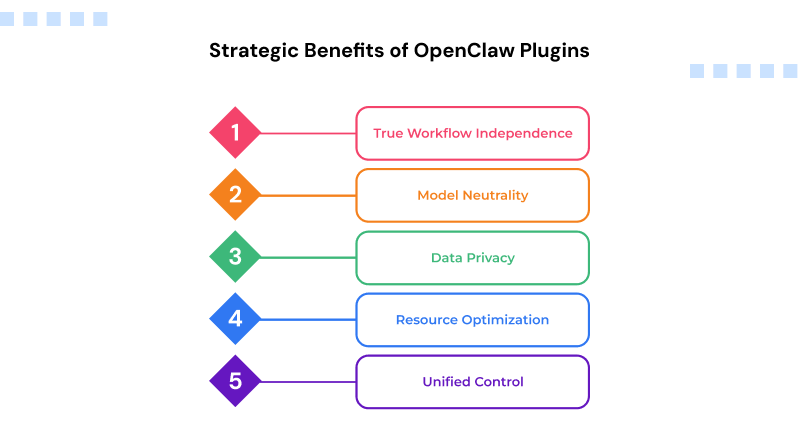
True Workflow Independence: Plugins let your agent handle long, multi-step chains—like fixing a bug and then updating the documentation—without you having to guide every step.
Model Neutrality: You can swap your backend model (moving from ChatGPT-4 to a local Llama 3 instance), and your configured skills stay exactly where they are.
Data Privacy: Using local-first extensions keeps your sensitive company data inside your network, avoiding the risks of sending everything to an external automation platform.
Resource Optimization: You can delegate routine tasks to smaller, cost-effective models via specialized plugins, reserving the high-parameter models for complex reasoning.
Unified Control: One chat interface can manage everything from your Minecraft server to your team’s project boards through different plugin connections.
Top 7 OpenClaw Plugins You Should Know
1. Composio (Tool Integration Engine)
Composio acts as the primary hub for connecting your environment to the outside world. Instead of manually coding dozens of individual integrations, this no-code automation tool connects you with over 850 applications like Gmail, Slack, and Notion through a single engine. This setup eliminates the need to build and maintain custom API connections for every piece of software in your stack. Composio manages the login sessions and access tokens for every application, allowing your agent to run tasks without failing due to expired credentials.
Key Features:
- Automatic OAuth management for 800+ apps
- Dynamic tool discovery for the agent
- Support for local and cloud-based API execution
- Detailed logging of every external action taken
2. memU (Relational Knowledge Graph)
Standard AI memory usually fails once the conversation becomes too extensive. MemU addresses the data retrieval problem by converting past interactions and documents into a structured knowledge graph. Instead of just searching for keywords, the system understands the actual relationships between your projects, servers, and past errors. The system architecture retrieves server configurations and debugging steps from historical records without losing current context.
Key Features:
- Graph-based retrieval for high-accuracy memory
- Proactive context injection into the system prompt
- Dedicated support for long-term project history tracking
- Automatic pruning of redundant or outdated data
3. SecureClaw (Runtime Firewall)
SecureClaw operates as a security layer between the execution engine and the server by scanning every command before it runs. This prevents prompt injection attacks and blocks commands that might delete system files or erase a database. These boundaries maintain shell control during background automation. SecureClaw enforces predefined security policies and prevents unauthorized script execution. A central filter governs every system call to maintain server security.
Key Features:
- Real-time command auditing and whitelisting
- Protection against recursive loop attacks
- Alignment with Top 10 security standards
- Immediate alerts for unauthorized logins
4. Lobster (Workflow Gatekeeper)
Lobster includes manual checkpoints to maintain oversight of automated processes. The system executes preparatory tasks, such as code generation or business email drafting, and then pauses for final verification. Manual triggers provide oversight for all server changes to maintain output accuracy. Lobster remains idle until a manual confirmation signal is received. Mandatory review stages stop unverified scripts. This validation limits automation to a specific scope.
Key Features:
- Customizable approval gates for sensitive actions
- Multi-stage workflow visualization
- Support for Slack/Discord-based approval notifications
- Role-based access control for different team members
5. Memory LanceDB (Vector Storage)
Memory LanceDB manages massive datasets, including thousands of server logs or an extensive codebase. This plugin includes a high-speed vector database for retrieving specific information in milliseconds across large datasets. The indexing system prioritizes data by relevance, delivering technical logs and configuration files without any lag. LanceDB keeps speeds high even when data volumes grow. Unlike traditional databases that lag under heavy loads, this architecture pulls data directly from the disk without slowing down.
Key Features:
- Sub-millisecond vector search capabilities
- Local servers benefit from low-overhead storage.
- Native support covers standard embedding models.
- Automated indexing speeds up data retrieval
6. ClawTerm (Integrated IDE & Terminal)
ClawTerm replaces the standard OpenClaw interface with an integrated editor and terminal. This setup lets you monitor the system while writing and testing code in real-time. This specific workspace creates a visible environment for debugging scripts before they go live on the server. Logging every command creates a history you can actually use. It means you have a straightforward record to check whenever a server setting changes.
Key Features:
- Secure sandboxes for real-time execution
- Syntax highlighting and multi-file support
- Built-in terminal for CLI commands.
- Direct file system access with granular permissions
7. TeleVox (Voice & SMS Interface)
TeleVox links the OpenClaw system with communication networks like Twilio to monitor infrastructure in real-time. This setup enables the system to handle phone calls or send SMS alerts for critical infrastructure events. High-priority server alerts trigger a direct call if a system goes down or requires manual intervention. Every outbound notification generates a unique status log for tracking and verification. Linking these communication channels ensures an immediate response during urgent server-side tasks.
Key Features:
- Interactive voice communication via natural language processing
- Integrated SMS and MMS support for mobile alerts
- Customizable voice profiles and languages
- Call transcription and logging for later review
OpenClaw Plugins by Use Case
For Developers: You should focus on ClawTerm for coding and the GitHub skill for repository management. These tools turn your system into a functional partner that can organize branches and run tests.
For System Administrators: Combine IaC (Infrastructure as Code) plugins with SecureClaw. This allows the agent to monitor health logs and suggest fixes for Terraform or Kubernetes configs while keeping the server safe.
For E-commerce: If you’re running WooCommerce, use inventory-management plugins. Automated systems monitor stock levels and summarize daily sales.
For Technical Content Strategists: Use digital marketing tools through the Composio plugin to monitor SEO rankings or automate the distribution of documentation updates across multiple channels.
Realted Read: Top WooCommerce Hosting Providers
How to Choose the Right OpenClaw Plugins
Check the Model: Look at the models list to see if your LLM supports tool-calling. Some smaller models aren’t smart enough to handle the complex data formats that plugins use.
Watch the Context: Every plugin you turn on uses up a bit of the AI’s “attention span.” If you load too many, the agent starts getting confused or forgets the beginning of the conversation.
Verify the Source: Only get plugins from verified devs on ClawHub. In the Ollama and agentic AI ecosystem, outdated plugins often lead to broken features and serious security gaps.
Related Read: Ollama Models List: Top AI Models You Can Run Locally
Common Errors to Avoid
Running on Your Main OS: Installing OpenClaw and its plugins directly on personal hardware carries risks. Running your agent in Docker or a VM gives you the isolation you need. This strategy prevents a faulty plugin from accessing personal files or impacting the host system.
Giving Too Much Power: Start the system with “Read-Only” access. Only let it write or delete things after you’ve seen it work correctly a few times.
Falling for Prompt Injection: Websites containing hidden text can manipulate a plugin’s execution through adversarial instructions. Always use a security plugin like SecureClaw to clean up the data before the agent sees it.
Using Redundant Skills: Don’t install two plugins that do the same thing, like two different calendar tools. It makes it harder for the agent to decide which one to use.
Future of OpenClaw Plugin Ecosystem
The world of OpenClaw extensions is moving fast toward these trends:
Self-Fixing Logic: Plugins that can see when an API has changed and update their code to stay working.
Agent-to-Agent Skills: Specialized plugins that allow your “Manager” agent to hire other smaller agents to do specific tasks.
Standard Protocols: Moving toward the Model Context Protocol (MCP) so that one plugin works across many different AI frameworks.
Hardware Integration: Expanded plugin support for direct interfacing with server sensors and smart home hardware.
Final Thoughts: Building a Reliable Setup
Picking your plugin stack is about more than just finding cool features; it’s about building a high-authority asset that you can actually trust. An over-configured environment introduces unnecessary complexity, whereas a refined, task-specific selection of plugins automates your routine workflows permanently.
Start by solving your biggest daily headache—whether that’s triaging server logs or managing emails—and pick the two or three plugins that handle it best. As you get comfortable with how the environment thinks and acts, you can start adding more complex OpenClaw extensions. Maintaining a clean environment and updated plugins supports long-term scalability rather than merely managing the immediate workload.
FAQs
1. Where can I find and download new OpenClaw extensions?
Search the community registry at clawhub.ai to find OpenClaw extensions. You can pick out tools on the website or use the terminal to pull them straight into your local environment. This keeps your setup fast and limits overhead by only adding the specific features you want.
2. How do I install a skill directly from the chat interface?
To add the best OpenClaw skills in 2026, just paste the GitHub link for the skill directly into the message box. The environment sets everything up in the background and notifies you when the new features are active.
3. Can I use OpenClaw plugins with a local LLM?
Yes, OpenClaw plugins remain compatible with local backends like Ollama or LM Studio. Updating the provider settings to your local host IP keeps automation private and eliminates the need for external API subscriptions.
4. Is it safe to install third-party skills from ClawHub?
Treat third-party OpenClaw plugins with the same caution as any executable software. While the platform includes basic security scans, reviewing the source code and restricting folder access ensures that the skill only interacts with the necessary files.