Jackson Lane
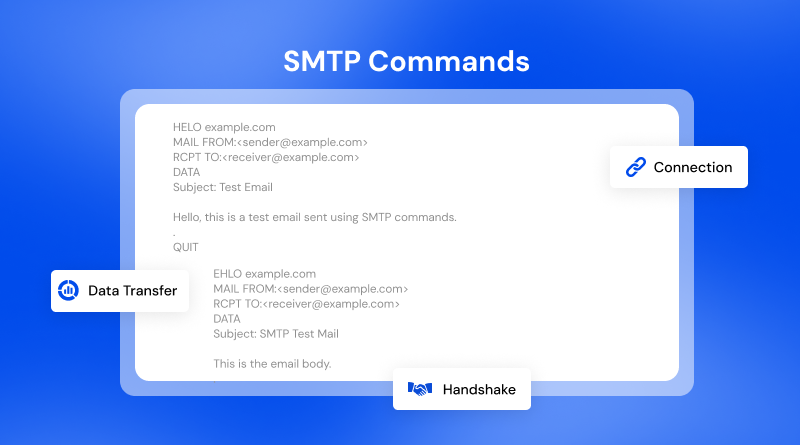
Simple Mail Transfer Protocol (SMTP) is one of the key methods used to send and receive emails through the internet. By understanding and utilising SMTP commands, one can troubleshoot delivery issues, verify the configuration of their mail servers, and conduct email tests directly from the command line interface. It’s a skill especially useful for those managing web hosting environments.
According to Radicati’s Group Email Statistics Report 2024, the number of emails sent and received daily exceeds 361 billion, and is expected to grow to 392 billion emails per day by 2026. Email remains one of the most popular forms of communication for businesses and organisations. All emails are delivered using a basic sequence of SMTP commands that facilitate the exchange of information between mail servers.
This article explains how SMTP commands are structured, how administrators can test their SMTP server through the command line, and how to troubleshoot SMTP email senders and SMTP email configurators.
Table Of Content
Understanding SMTP and Command Line Email Communication
SMTP serves as the primary method to send an email from one server to another. When you send email messages using a mail client (for example, Outlook or Thunderbird), the mail client issues multiple SMTP commands to an email server, be it on shared infrastructure or a cloud hosting environment. It accomplishes the processing and routing of e-mail messages to the appropriate destination.
The 2025 Statista Global Email User Report states that there are 4.6 billion email users worldwide as of 2025-2026. It confirms that email continues to play a major role in the communication infrastructure through SMTP delivery systems.
Developers and system administrators often rely on command line SMTP tools when sending email messages to mail servers. Professionals send commands to SMTP servers through the command line interface in order to test the server’s response and ensure that the mail delivery works as expected.
How Do SMTP Commands Work?
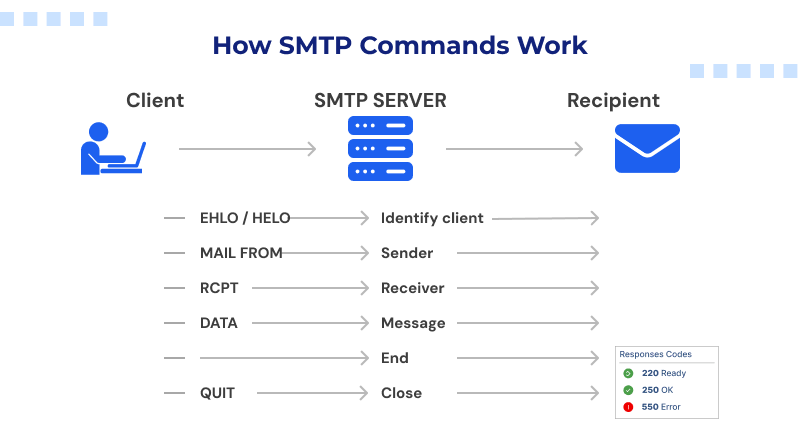
SMTP uses a specific sequence of steps for communication between the client and server at each step, with commands to inform the server about the type of email sent.
The communication process is typically accomplished using one of the command line SMTP tools such as telnet, Netcat, or openssl. Using these types of tools, the admin can send raw SMTP commands directly to the mail server.
Developers also use command line SMTP email methods for testing the email features of their applications. Manually running the commands help to provide an insight into server responses and confirm whether or not emails were successfully delivered.
Why do SMTP Commands Matter for Email Servers?
The SMTP protocol is essential for verifying that an email has been sent correctly and delivering messages between two different mail servers, as well as ensuring that these mail servers communicate with each other correctly.
This information is provided through the Cisco Talos Email Threat Report 2024, which shows that cyber threats are primarily propagated through email (phishing/virus). A properly configured and tested SMTP server will provide an authentication policy and implement a set of protections against spam.
While troubleshooting problems that prevent email from being delivered to users, administrators often use the SMTP command line tools to test their SMTP server by sending emails directly to the command line. By doing this, users can fix issues related to authentication, routing, or domain configuration.
Hosting providers can use this same technique to verify that their email services are working for their customers’ accounts.
Related read: Which Type of Server Would Support the SMTP?
Basic SMTP Commands Explained
Users can interact with mail servers by learning the fundamental SMTP commands, as each command serves a distinct function during an SMTP session.
1. HELO
The HELO command identifies the client to mail servers.
Example: HELO example.com
This command initiates the conversation and informs the server of the domain that is initiating the connection.
System administrators conducting command line SMTP testing will often begin a session using that command.
2. EHLO
The EHLO command is used to enhance the output of the HELO. It provides additional information about server capabilities.
Example: EHLO example.com
When a modern mail server receives an EHLO command from a client, the server responds with details regarding its features, including authentication methods, encryption methods, and size limits.
When developers write SMTP email client applications, they almost always start with the EHLO command, because it provides extended SMTP capabilities.
3. MAIL FROM
The SMTP server uses the Mail FROM command for the sender to identify themselves.
Example: MAIL FROM “[email protected]”
This tells the SMTP server where the message originated from.
When testing the SMTP server through the command line, administrators execute the Mail From commands to check whether the SMTP server accepts the sender’s domain.
4. RCPT TO
RCPT TO is used to send an email to the recipient’s email address.
This is the way to reference the recipient’s email address.
Example: RCPT TO “[email protected]m”
After this command is received by the server, it will attempt to verify if the domain or mailbox of the recipient exists.
The RCPT TO command also plays an integral role in SMTP commands used when sending email in manual testing sessions.
5. RSET
Think of RSET as a clean slate for your SMTP session.
Example: RSET
When this command is sent, the server wipes all stored data including sender details and recipient lists and returns the connection to its starting state.
The session itself stays alive, ready to handle a fresh mail transaction from scratch. The server always responds with a 250 confirmation.
6. HELP
The HELP command lets the client ask the server which commands it supports.
Example: HELP
You can send it as a standalone request or pair it with a specific command name to get focused information about that command, provided the server is configured to handle it that way.
7. DATA
The DATA command indicates that an incoming message has a data portion.
Example:
DATA
354 (server response code)
Date: Wed, 20 March 2026 09:08:42
From: [email protected]
Subject: SMTP Functioning
To: [email protected]
Body text
.
After sending a DATA command, the client will send the subject, headers and message body for the email.
A message ends with a single period in a new line once all data for the message has been specified.
Frequent senders of emails through the command line use this command to verify the delivery of their message.
8. QUIT
The QUIT command terminates the SMTP session.
Example: QUIT
This command closes the connection between the client and the server.
When administrators run command line SMTP sessions, QUIT ensures that the communication ends properly.
Sending Email Using SMTP Command Line
telnet mail.example.com 25

EHLO example.com

MAIL FROM:

RCPT TO:

DATA

Subject: Test Email

This is only a test email being sent using SMTP through the command line.

.

QUIT Example commands are listed in order of usage with SMTP for sending email.
This testing is commonly performed by developers while troubleshooting and debugging an email-related issue.
Many hosting companies also recommend testing through the test SMTP server command line behaviour.
Using Command Line SMTP in Hosting Environments
Email generated by websites requires a web host to have an SMTP server so that emails can be sent. Many emails sent by websites include password resets, order confirmations, and other notifications.
Hosting support teams will run SMTP command line connection tests whenever a customer reports that they are not receiving email messages from their website.
Basic SMTP commands can help to verify:
- Domain authentication configuration
- SMTP port availability
- Mail server acceptance of sender addresses
Hosting professionals commonly send an SMTP command test from the command line during a server’s configuration process, ultimately confirming that messages sent through the hosting platform will indeed be delivered to recipients without error.
SMTP Commands and DevOps Workflows
There are many current development environments that utilise automation through the use of automated testing or monitoring. Most DevOps teams also use email alerts for notification about system notifications, server monitoring, or application logs. Many of these environments use scripts to execute SMTP send email command line functions to create alert messages.
A growth report from GitHub Octoverse 2024-2025 shows that open-source development is growing exponentially, with millions of developers contributing to shared repositories. Many of these types of environments are providing automated notification services using SMTP as the primary means of delivery.
Having an understanding of the commands associated with SMTP enables developers to be more successful in troubleshooting their application’s email functionality. DevOps engineers typically test their SMTP servers for command line access when deploying on VPS hosting or setting up applications.
SMTP Commands in Email Troubleshooting
There are multiple reasons why emails fail to get delivered. Some of the common causes include DNS issues, authentication errors, and blocked ports.
One way to determine if the above issues are problematic is to run tests through SMTP using the command line and send an email through SMTP to manually deliver.
Using the test SMTP server command line, one can receive the response codes that give detailed information about the acceptance or rejection of a particular command.
- Service Ready = 220
- Successful Command = 250
- Rejected Recipient = 550
These codes conduct a quick diagnosis to understand the reasons behind the failed delivery.
Developers can also use the SMTP send email command line testing for configuring applications like WordPress hosting setups, CRM platforms, or other marketing systems.
Security Considerations for SMTP Commands
- According to the 2025 Proofpoint State of the Phish Report, organisations and their employees are still significantly impacted by phishing attacks.
- Security policies must be enforced by the email infrastructure to avoid abuse. Authentication and encryption are frequently required when using SMTP servers.
- Phishing attacks affect organisations globally, and email is often the primary means by which employees encounter phishing attempts.
- Mail administrators regularly check the command line SMTP logs for suspicious activity or unapproved emails.
- When mail administrators send through the command line, they will verify the responses from authentication. If there is an encryption capability available, email server security will be ensured.
Concluding Insights
Email is sent over the internet using standard protocols, and the main protocol for sending email from server to server is SMTP. A basic understanding of SMTP commands can provide an insight into the functioning of email infrastructure behind the scenes.
Manual testing enables IT professionals to send commands to an SMTP mail server through the command line. It validates commands that can be sent and received correctly by the mail server. Developers and hosting providers conduct SMTP send email command line tests as part of regularly scheduled maintenance. These tests verify that websites/applications are able to send out email consistently.
Having a complete understanding of the SMTP commands necessary for sending and receiving email, as well as being able to perform the command line procedures is important. Command line experience in SMTP processing is a vital skill required for successfully managing current email systems.
FAQs
1. What is the importance of SMTP commands for email transmission?
SMTP commands help dictate how email users or email client software sends and receives data from mail servers. It communicates the sender’s address and the address of the user receiving the data, the contents of the email, or how an email session will be conducted, among other things. Knowing and understanding SMTP commands can help administrators verify whether their mail server is properly set up or troubleshoot delivery issues.
2. What is the difference between HELO vs. EHLO in SMTP commands?
HELO is one of the original SMTP greeting commands to let an email user know that their email client has connected to the mail server. EHLO is the extended version of HELO that supports other features provided in SMTP, such as authentication or encryption. Generally, mail servers or email users will use EHLO to initiate all email sessions through SMTP commands today.
3. What is the SMTP response code, and how does it interact with the command?
The SMTP response code is a number sent from the server to the client to inform them of the result of a command. The SMTP response code can provide a client with one of two possible results: the command was either accepted or rejected. If the SMTP response code was 250, for example, the command was accepted, whereas if the SMTP response code was 550, the command was rejected. By using these codes, administrators can check SMTP server command line interactions.
4. Are SMTP commands case-sensitive?
SMTP commands are generally not case sensitive, as most SMTP servers are designed to accept commands written in either case. However, as a means of keeping things clear when performing a command line interaction with their SMTP server, administrators write their SMTP commands in all uppercase.