

 Pravin Dahadade
Are you looking for a free, open-source e-commerce CMS platform? PrestaShop started in 2007 as a student project by Igor Schlumberger and Bruno Lévêque. Today, it’s recognized for its user-friendly e-commerce CMS solutions.
PrestaShop includes essential e-commerce store-building features. A reliable PrestaShop hosting service is necessary for creating the online presence of your digital storefront. MilesWeb offers PrestaShop hosting with comprehensive knowledge base articles for downloading the CMS. This guide provides a detailed overview of PrestaShop’s capabilities.
Key Summary — What is PrestaShop?
- 1 Free & Open-Source — Zero license fees, full control over data, design, and functionality powering 200,000+ stores worldwide.
- 2 Feature-Rich for B2B — Built-in customer segmentation, flexible pricing, bulk discounts, and multi-store management.
- 3 Highly Customizable & Scalable — Custom modules, themes, and integrations without being locked into a proprietary ecosystem.
- 4 Not Beginner-Friendly — Steep learning curve, requires PHP/HTML/CSS knowledge, and premium add-ons can be costly.
- 5 Best For SMBs & Developers — Ideal for small businesses, agencies, wholesalers, and growing brands needing enterprise-grade e-commerce affordably.
Table of Contents
PrestaShop: General Information
PrestaShop is an open-source e-commerce CMS where you create a digital marketplace and modify it for free. It doesn’t levy license charges.
PrestaShop by the Numbers
PrestaShop allows seamless management of products, inventory, customers, and invoices in a unified dashboard. Unlike Shopify, it does not operate on the SaaS base model. Using PrestaShop in a cloud environment gives you complete governance over data, design, and the store. functionalities.
📘What Are Core Features of PrestaShop?
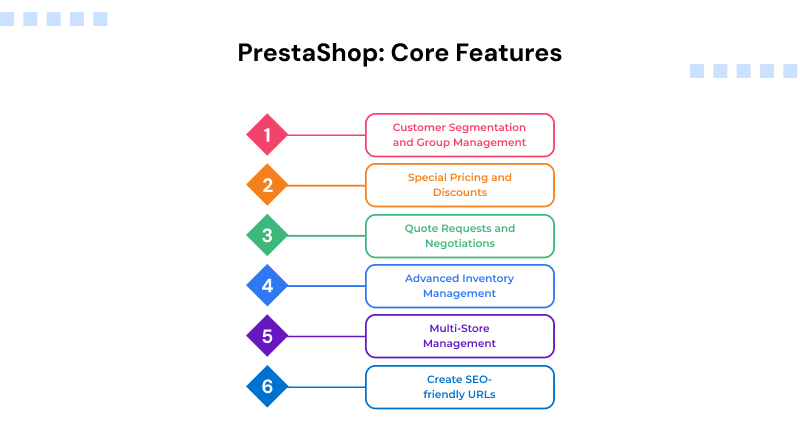
1. Customer Segmentation and Group Management
PrestaShop’s customer segmentation and group management are important features for B2B businesses seeking cutting-edge marketing solutions for improved consumer engagement. It allows business owners to strategize marketing based on demographics and personalized campaigns.
The CMS includes a customer segmentation tool that classifies customers by website activity and gender, order information including frequency and geographic areas based on the address entered on an order. The precise targeting boosts engagement, optimizes resource use, and reveals new market opportunities.
The feature is useful for evolving businesses to make data-informed decisions, which will allow them to keep segmentation strategies effective.
2. Special Pricing and Discounts
PrestaShop features a customized pricing and discount option designed for B2B businesses. It allows B2B vendors to give customers flexible pricing.
It allows adaptation dynamically based on several factors:
- Customer group pricing: Price for different groups of customers, visitors, guests, or registered users with different pricing rates, and apply a special pricing rate for B2B.
- Regional pricing management: Discuss pricing according to the customer’s demographic to consider regional taxes, costs and currency.
- Price setting for currency: Establish competitive marketplace prices for local currency, and use set discounts for products.
- Negotiated product pricing: Negotiation of a price for a particular product.
- Discount for bulk orders: It will recognize a “bulk order” at the checkout stage to apply the discount.
- Loyalty programs and promotions: Launch loyalty programs and promotions to generate customer lifetime value.
Performance Max Campaigns: Use this built-in machine learning tool to run smart ads across Google Search, YouTube, Gmail, and Maps without manual
These features help B2B companies manage complex pricing strategies, increase customer satisfaction, and effectively promote sales growth.
3. Quote Requests and Negotiations
PrestaShop’s quote requests and negotiation part simplifies the pricing and quote administration by way of third party parts. It allows businesses to define and control quote rules per product, category and customer groups, thus providing a personalized pricing solution.
With the price visibility option, businesses can hide prices and hide the add-to-cart button for specific audiences. Rather, buttons such as “Price on Request” or “Enquire for Quotation” can be included for the benefit of VIP clients or business transactions.
A customized page for third-party modules for upload, dropdowns, multi selects, text fields and a place where consumers submit the price offers is included in the feature. Admins can handle quotes via the modules, use the grid view options, adjust, accept and create cart links straight from the modules.
4. Advanced Inventory Management
PrestaShop’s 3rd Party modules take warehouse management to another level. It facilitates the supply and distribution chain alongside location tracking and streamlined warehouse workflow.
This feature manages incoming shipments for various warehouses, bulk consignment and transfers between warehouses. Furthermore, it streamlines customer data by creating orders, updating order statuses and monitoring deliveries.
Compatible with PrestaShop v.8.0, it offers comprehensive controls and management of complicated stock needs.
5. Multi-Store Management
PrestaShop’s Multi-store management section is a helpful feature to effectively manage multiple stores from a single back office. It’s perfect for companies that need multiple locations, each with its own domain name or multiple B2B/B2C identities.
It offers one-of-a-kind labels, design layouts and pricing for each shop so they can effectively direct their marketing campaigns toward distinct customer groups.
For example a high-end retail store is different from a lower priced wholesale outlet and might have a different pricing model.
This feature can be turned on by:
Go to Shop Parameters > General, turn on the Multi-store feature and save your settings in PrestaShop admin. This “Multistore” menu will be under the Advanced Parameters menu and will be the sole entry point to all stores.
This integration provides a single focal point for control and also improves the operations at hand to suit each market’s particular needs.
6. Create SEO-friendly URLs
PrestaShop has an in-built feature, ‘PrestaShop pretty URLs,’ that creates search-engine-friendly URLs.
Instead of messy URLs like
http://www.fakeURLwww.webopedia.com/article.php/tldr009/3831706/
You can have:
www.detroitidigitalmarketing.com
Readable URLs boost SEO and fulfill usability. Users are one of the core foundations of a professional e-commerce store’s success. You might be surprised to hear that many store owners do not even use the option. It is an underrated feature that can optimize your website for search engines and seamless navigation.
Pros and Cons of PrestaShop for B2B E-commerce
Pros
– Flexibility and Customization
PrestaShop’s open-source nature delivers unmatched flexibility. Businesses personalize every online store’s details, from custom pricing and bulk order options to special customer management. You create custom modules and themes, adjusting your website as your needs transform. They can even customize layouts, optimize navigation, and customize dashboards to improve the B2B shopping experience.
📘– Scalability
PrestaShop is scalable. From greater traffic to more transactions, it does not lag in its growth. Enables load balancing by improving the availability of a server’s resources or adding a server. Caching and CDN integration tools ensure your online store remains fast and responsive even as business scales.
– Cost-Effective
PrestaShop is an open-source and cost-effective CMS platform. Start-up prices are lower than proprietary prices, and multiple plugins and modules are inexpensive and available for free. It is also possible to control updates and maintenance, which will help in mitigating the expenses you pay to vendors.
– Community Support and Resources
The PrestaShop community is a supportive and vibrant group. Developers, merchants and enthusiasts provide tutorials and documentation. This network problem solves and adopts best practice. Regularly, it is also updated on the basis of the feedback received from the community to ensure its security and functionality.
Cons
– Higher Customization Cost Of Add-Ons
While the main software is free to download, creating a fully functional shop and professional-looking website calls for a significant investment. The latest version of PrestaShop (9.1) contains no advanced SEO tools, specific payment gateways or professional themes, among the most important. To use key features, you must buy a premium PrestaShop Addons Marketplace.
– High Steep Learning Curve
PrestaShop is a complex platform with a steep learning curve, but unlike most site builders, such as Shopify or Wix, it is not easy to use. If you want to make any changes to a store or fix back-end problems, you should have an understanding of PHP, HTML and CSS. It is not easy to set up and configure for the first time, and even regular updates can cause the loss of existing customizations or integrations with other modules.
– Expensive and Limited Official Support
Since PrestaShop is open-source, it doesn’t have extensive documentation or manual support to get assistance. If you encounter a critical technical bug, you need to rely on community forums or purchase a separate “Support Plan” to get professional assistance.