Jackson Lane
We often discuss internally the right tool for the right job, and few debates are as intense in the web development and design space as the one between Webflow and Shopify. This isn’t just a simple feature comparison; it’s a philosophical debate about control, complexity, and commerce. When a client needs to decide between maximum design fidelity and unbreakable sales reliability, the solution always comes down to understanding the core mission of each platform.
The decision affects more than just the website’s look—it dictates their ongoing budget, how they build the website, and whether they can scale properly three years from now. This blog cuts through the noise, detailing the architecture, strengths, and limits of both systems so we can stop speculating and start making informed decisions.
Before we get into the details, remember that even the most brilliantly designed website requires a trustworthy foundation. For those prioritizing website performance, securing a reliable web hosting is always the critical first step.
Table Of Content
The Core Difference: Selling vs. Building
The most significant difference between Webflow and Shopify lies in their fundamental approach to building a website.
Shopify: The E-commerce Powerhouse
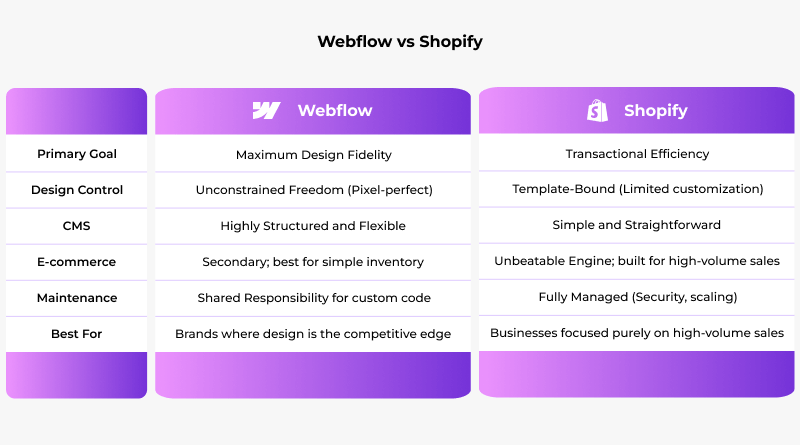
Shopify’s entire system is built around one goal: facilitating transactions. Everything—database structure, payments, inventory, and tax logic—is engineered for flawless, global transactions. They’ve solved the hardest parts of running a store, so you don’t have to worry about the checkout crashing in the middle of the night. This ease of entry often makes the decision for Webflow vs Shopify for beginners an easy win for Shopify.
Focus: Transactional Efficiency. Shopify gives you 90% of what you need to sell on day one.
Best For: Pure e-commerce, clients pushing massive order volumes, or anyone who needs to be 100% sure the platform won’t collapse when they hit 5,000 orders an hour.
Webflow: The Canvas for Creative Control
Webflow, by contrast, is the answer to the Webflow vs Shopify design freedom debate, built by designers who wanted to move past template limitations. It offers visual coding, allowing designers the power to create semantic CSS, HTML, and website interactions directly, without ever needing to touch the code.
Focus: A professional-grade coding studio, with a friendly visual interface.
Best For: Top-tier marketing websites, complex portfolios, any client where the design itself is the main competitive advantage.
Design Control: The Scope of Creativity
This is the moment of truth: Do you prefer assembling with standard components or designing from raw material?
Shopify’s “Good Enough” Aesthetics
Shopify relies on Liquid templates. You get a good starting point, but trying to hit a custom, pixel-perfect layout often feels like you’re working against the system’s structure. You’re always running into the limits of their theme structure. Even trying to customize a simple product page or optimizing a basic landing page builder setup can feel frustrating at times.
Webflow’s Unconstrained Freedom
Webflow hands you the total freedom to execute any design. If you can make it look good in Figma, you can build it in Webflow—and the result is clean, production-ready code.
- The Visual Code Editor: You own every CSS property and every breakpoint. It feels like having a brilliant developer executing your design commands in real-time.
- Interactions: The native interactions engine is seriously impressive. You can build smooth scroll effects, intricate user flows, and subtle visual feedback that would require days of complex custom JavaScript anywhere else. This is the feature that convinces advanced design tools users to switch.
The Core of Commerce: Transactional Features
While both can sell, the fundamental difference—as reflected in the Webflow vs Shopify pricing—is that one is a race car designed for the track, and the other is a highly customized street car.
Shopify: The Unbeatable Transactional Backbone
Shopify’s core competence is transactions. They’ve solved the hardest challenges in e-commerce globally.
- The Checkout Process: That checkout process is Shopify’s defining feature. It’s optimized, and incredibly reliable—replicating that level of trust and efficiency simply isn’t feasible.
- Admin Overhead: The inventory, fulfillment, and complex tax calculations are all handled flawlessly. For anyone exploring WooCommerce alternatives based on simplicity and built-in features, Shopify offers a distinct advantage.
- Ecosystem: The app store is extensive, meaning advanced subscriptions or email marketing programs are usually just a click away.
Webflow: The Designer’s Approach to Selling
Webflow E-commerce is powerful but requires more setup and sometimes third-party integration to match Shopify’s complexity.
- Visual Customization: The ability to design your own product display and checkout is a big win for brand identity.
- Complexity Trade-off: For clients launching with a manageable number of items, Webflow is a perfect fit. Once you start shipping internationally, the real problem is keeping track of all those items and figuring out the logistics. At that point, the lack of native, deep administrative tools quickly exposes the platform’s limitations.
Content Strategy and SEO: Structure vs. Simplicity
Each platform handles SEO well, but its approach to content management defines your long-term content marketing strategy.
Webflow: The Architected Content System
Webflow’s CMS isn’t just for blog posts; it’s a highly structured database tool. You define exactly what fields are required for any content type (case studies, product features, expert profiles).
- Flexibility: Webflow’s structure offers amazing filtering and dynamic content display. You control every single piece of HTML that your CMS content renders.
- SEO Precision: Since you control the HTML structure precisely, you can execute deep, surgical SEO work with sitemaps, canonical tags, and ideal structural markup.
- Content Creation Hook: When creating those custom fields and generating content, leveraging tools like ChatGPT prompts for UX designers can help ensure the tone and structure are perfectly matched to the design.
Shopify: The Streamlined Content Solution
Shopify’s CMS is straightforward. It’s built for standard product descriptions and typical blog posts. It’s easy for a non-technical writer to jump in, but it can feel limited when you need to build a complex, integrated resource library.
Behind the Scenes: Maintenance, Scaling, and Code
The hidden costs and long-term headaches often reside in the operational details.
What Happens When Issues Arise?
Shopify: Security and maintenance are managed entirely by their team. Platform updates, security patches, and server scaling are all handled automatically and guaranteed. Your team focuses solely on marketing and product development to boost productivity.
Webflow: While Webflow’s core platform is maintained, anything complex you build—custom code, tricky integrations, or third-party solutions—is your team’s responsibility. It gives you control, but it imposes the complexity of maintenance.
Scaling Infrastructure
Shopify: Their infrastructure is a massive, purpose-built transactional engine. Shopify can seamlessly manage an overwhelming rush of viral transactions. That’s because it was created to handle massive order volume.
Webflow: Webflow runs on robust infrastructure (AWS and Fastly), making it reliable for handling huge last-minute holiday traffic on your blog or marketing pages. But here’s the catch that defines Webflow vs Shopify scalability: when it comes to massive transactional scaling, you need to make more deliberate architectural choices. You might end up building custom backends that resemble solutions built on WordPress vs HTML.
Beyond the Drag-and-Drop
The great thing about Webflow is how it visually produces clean, production-ready code, effectively eliminating the front-end development bottleneck. However, if your agency is thinking about future-proofing, keep in mind that the Webflow skill set is quite niche.
Shopify is built with the proprietary Liquid language, but its architecture feels more recognizable to most standard backend programmers. Considering new tools like AI website builders that automate coding makes the choice between these platforms more complex.
Final Recommendation: Match the Tool to the Goal
Forget the feature comparison—use these essential benchmarks to simplify the decision and find the definitive answer to the question: which is better: Webflow or Shopify?
Go with Shopify If:
– They require complex inventory, global shipping support, and guaranteed transactional security as a built-in feature.
Go with Webflow If:
– The priority is content marketing, lead generation, and driving traffic, with e-commerce treated as a secondary feature or future plan.
Ultimately, Webflow is the tool for the most demanding creators, while Shopify acts as the most reliable commercial engine. Your priority is to align the platform’s core potential with the client’s biggest business concern.
FAQs
1. Is Shopify the superior choice for a business focused purely on e-commerce sales?
Yes. If the primary goal is just to sell stuff and handle transactions, Shopify is the platform you want. Its infrastructure is designed for stability and managing orders under immense pressure. Shopify is simply more scalable for transactions. Shopify is built to run smoothly even after the massive traffic surges.
2. Which platform is better for a business that needs both a strong blog/CMS and an online store?
For companies that rely on high-quality content and unique landing pages to drive traffic, Webflow is a better foundation. Their CMS is totally flexible; you can build complex content structures that Shopify’s basic blog just can’t handle. You get incredible design freedom, but be aware of the trade-off in backend complexity.
3. How flexible is Shopify’s design customization compared to Webflow’s visual editor?
If you use Shopify, you have to design within the limits of their basic templates. If you want a truly custom, unique website, you need to manually override limitations at every stage. Webflow’s visual editor gives you control down to every single pixel and animation—it’s the tool for zero design compromise.
4. Which platform offers a more intuitive interface for daily product and order management?
Shopify is unequivocally easier for day-to-day work. Its admin panel is a command center built for merchants, making things like inventory tracking, fulfillment, and returns super streamlined. Webflow vs Shopify for beginners in the e-commerce backend is a no-brainer: Shopify requires far less training for a sales operations team.