Jackson Lane

HubSpot’s latest marketing trends report indicates that only 14% of websites saw a drop in traffic from the previous year, while approximately 43% experienced traffic surges. It becomes overwhelming to handle, causing them to crash frequently or slow down significantly.
When a business has too much traffic on its website, the server may become overloaded, causing the website to stop responding properly, take a long time to load pages, and, in some cases, users may receive errors. The best-case scenario is that the website comes back online after an unsuccessful loading attempt. The worst-case is that the website stays offline, resulting in significant lost sales, revenue, and ultimately the loss of customer trust. As a result, it’s critically important to understand triggers of website traffic overload and to take appropriate actions to prevent them.
Managing higher visitor volume in today’s highly competitive business environment is no longer optional. The customer of today wants instant gratification. Search engines are also quick to detect websites with poor uptime, which drops rankings. For these reasons, managing website traffic overload has become an essential component of an effective digital marketing strategy.
Table Of Content
Why Websites Crash During Traffic Spikes?
Websites are only as good as their hosting servers are. Servers have fixed CPU, bandwidth, and memory. If the number of requests exceeds the available resources, this creates a situation known as website traffic overload. Each time a web page is accessed, it consumes a portion of the server’s resources. If several thousand people attempt to access web pages simultaneously, the servers become overwhelmed.
Most problems with high-traffic websites can be attributed to:
- The hosting capacity is too low.
- Too many large plugins.
- Poor database performance.
- The absence of a Content Delivery Network (CDN).
- The restrictions imposed by shared hosting.
- A sudden increase in traffic far beyond what was anticipated.
Instead of continuing to serve visitors, the website will become unresponsive. The best way to avoid an outage is to continually monitor the current usage and to upgrade your web server environment before it’s too late.
Why Do Modern Websites Face Frequent Traffic Spikes?
In the past, traffic spikes were occasional. Nowadays, they are considered to be a normal occurrence. You might experience a sudden surge in traffic due to various factors:
- Viral posts on social media
- Paid advertising
- Holiday promotions
- Email marketing
- Recommendations from influencers
- Press coverage
- Introduction of new products
Even a minor spike in web traffic may overwhelm your server if it cannot handle the volume. Your aim is not to prevent traffic spikes; instead, prepare yourself for them. A solid foundation will empower you to convert incoming visitors into sales rather than errors.
The Most Common High-Traffic Website Issues
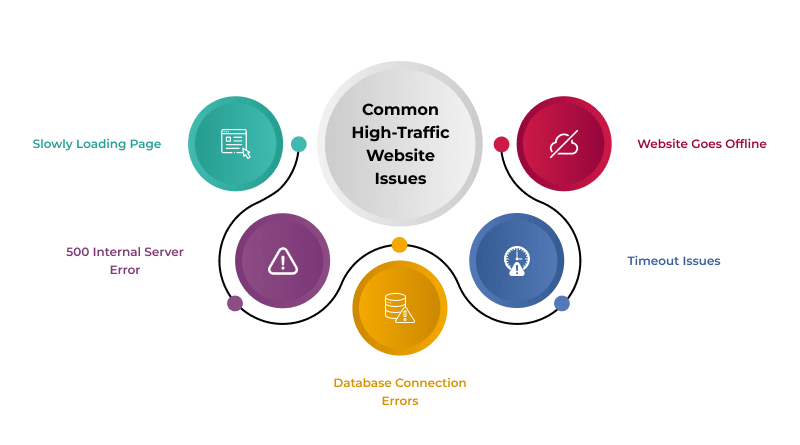
Typically, sudden failures have a defined set of patterns. For example, prior to a total breakdown of the system, it typically displays these warning signs:
1. Slowly Loading Page
Loading time becomes extended to 4-10 seconds per page. This is the first indication that the web page load is near its maximum. This indicates your web server is experiencing difficulty processing the current amount of data.
2. 500 Internal Server Error
An indication that the data server has run out of CPU and/or memory resources.
3. Database Connection Errors
A user sees a message such as “Error Establishing a Database Connection” when the MySQL servers are unable to handle their respective requests.
4. Timeout Issues
The page continues to load, yet it never appears. This is a frequent sign of a high-traffic website issue.
5. Website Goes Offline
When the limits reach 100% usage of the servers’ hardware, the website simply fails. Restarting the web server may be a temporary solution.
Once you become familiar with the warning signs of a potential website crash, you can work to prevent it before users have a poor experience.
How to Make Your Website Heavy Traffic-Ready?
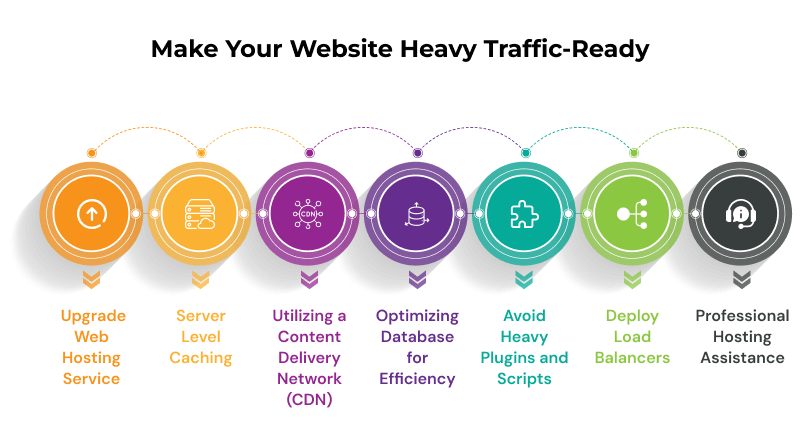
1. Upgrade Web Hosting Service
Shared hosting is inexpensive; however, there are limits on how much you can put on a shared host (the same server resources are shared across multiple websites). When visitor count increases, your website has to compete with other websites hosted on the same server. It causes your website to become overwhelmed with visitor traffic and possibly shut down due to a lack of server resources.
If you are planning to grow, you should upgrade to:
All of these types of web hosting will provide more powerful CPUs, RAM, and more bandwidth for each website being hosted. It reduces issues associated with heavy website traffic by creating your own dedicated hosting environment.
2. Server Level Caching
Utilizing caches can reduce server load, speeding web page loading by serving static content rather than loading data from the database. Proper caching practices ensure you have plenty of bandwidth during periods where your website may experience heavy user demand.
The following types of cache are all recommended to assist you with serving up static content in large quantities:
- LiteSpeed Cache
- WP Super Cache
- W3 Total Cache
- Object Cache
The cache can accommodate thousands of visitors without undue strain.
3. Utilizing a Content Delivery Network (CDN)
Since CDN is by definition used to distribute content across multiple servers globally. CDN servers are located closer to where they are needed; thus, when website traffic increases, users’ requests are served by the nearest server rather than being fetched from the host website. Thus, CDN allows you to reduce the load on your main host.
With the CDN, you will experience less website traffic overload as it spreads the load across multiple servers. A CDN is crucial for websites that operate globally or have many images.
Top CDN choices: CloudFlare, Akamai, Fastly, and BunnyCDN.
4. Optimizing Database for Efficiency
Database inefficiency causes slow website speeds, which in turn causes sudden crashes during traffic spikes. The website slowdown negatively impacts its overall performance.
Keep your database optimized on a regular basis by doing the following:
- Delete outdated revisions.
- Delete spam comments.
- Delete unnecessary tables.
- Optimize the database with optimization tools like WP-Optimize.
- Use index files to speed up the query process.
- Correct slow queries.
If your website gets a lot of traffic, consider using a managed or cloud-hosted database for the best performance.
5. Avoid Heavy Plugins and Scripts
When your website uses heavy plugins and scripts, excessive bandwidth consumption causes slower operations during high-traffic periods.
- Unused plugins
- Duplicate plugins
- Outdated plugins
It reduces website overload due to excessive traffic.
6. Deploy Load Balancers
Load balancing is a method for distributing incoming traffic across multiple servers rather than relying on a single server to handle all the demand.
- Retailers (online stores)
- News websites
- Event listings
- Government websites
- SaaS solutions
If you experience sudden traffic spikes, implement a load-balancing system.
7. Professional Hosting Assistance
If you experience a sudden increase in website visitor traffic, prompt action is essential. A reputable hosting company provides:
- 24/7 website monitoring
- Automated scaling
- Distributed denial of service (DDoS)
- Prevention/detection/security updates
- Backup restoration
- Quality support
Related read: High Traffic WordPress Hosting
Hidden Damage of Overlooking Performance Issues
If you ignore issues that arise during busy traffic periods on your website, the repercussions can be more than just having a slow-loading website. Issues during busy traffic periods often result in prolonged downtime, a frustrated visitor base, lost search rankings, and reduced conversions taking place on your website.
Over time, continuous downtime due to performance issues will not only hurt your revenue but also erode the trust your audience has in your brand. Customers expect their websites to load quickly and operate properly.
Final Considerations
You should never be intimidated by the amount of traffic coming into your website. This means your business is becoming more popular. Unfortunately, with this type of growth comes new responsibilities. You need to improve your infrastructure, enhance your website’s design, and be prepared for a sudden increase in visitor volume.
These issues can be easily resolved if you are aware of the steps you need to take to accommodate a high volume of traffic on your website. For example, you could use caching, CDNs, cloud hosting, system monitoring, and planning for high traffic periods to avoid website crashes.
FAQs
1. How does AI in e-commerce marketing increase sales?
AI in e-commerce marketing helps increase sales by empowering businesses to better understand customer preferences and deliver targeted content through automation. AI can automate content creation, reduce ad spending, and enhance customer engagement through tailored campaigns.
2. Is AI integration too expensive for small businesses to integrate with e-commerce?
Initially, the cost of AI integration was high for small businesses compared to large companies, although the prices of AI tools and platforms have reduced significantly. Setup costs, long-term maintenance, and any formal or on-the-job training will require a significant cash investment. There are ways small businesses can access more affordable AI solutions to reap the powerful benefits without exceeding their budget.
3. How can AI deliver personalized shopping experiences for customers?
AI can create personalized shopping experiences for customers because it can analyze extensive amounts of customer data (for example, browsing habits, past purchases, customer reviews) and use that data to create personalized recommendations. AI has gone way beyond automation; it now predicts what customers may be interested in and provides suggestions for products that meet customers’ needs, thus raising the propensity to buy.
4. How is AI useful for inventory management and supply chain management?
AI is useful for inventory management in predicting product demand, allowing businesses to adjust their stock levels and ensure customers’ needs are met. This can help businesses minimize overproduced stock and receive additional stock in a timely manner when there might have been stockout issues. AI is beneficial in supply chain management, helping minimize overall shipping costs and ensuring timely delivery.