Jackson Lane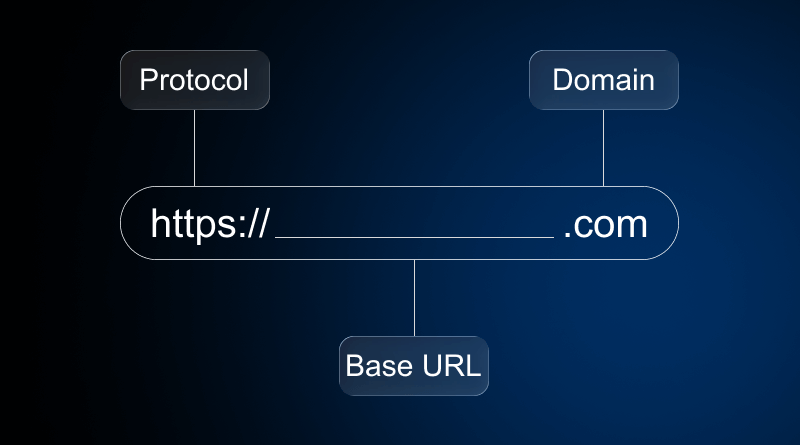
Opened up a web browser, typed the domain name, and the website appeared. Great! You have just navigated to the right URL of that particular domain. Here “https://www.milesweb.co.uk/hosting/web-hosting.”
But beginners may ask, what is a URL?
The strings of characters mentioned above are called URLs (Uniform Resource Locators). Every digital asset you access on a web browser has a unique URL. And this guide will brief you about the URL definition.
The URL—that line of text you barely look at—is not just an address; it’s a full architectural blueprint, a complex instruction set compressed into a single line. To understand the URL meaning, think of it as the digital roadmap that guides browsers to the exact location of your web content. That foundational stability is why the commitment to reliable web hosting is the most crucial choice you make before you even register your first domain. Now, let’s move beyond the basic URL definition and start truly understanding the complex machine that begins with https or www.
Table Of Content
What is a URL? The Architecture of a Web Address?
The URL, or Uniform Resource Locator, is much more than a link; it’s a finely structured command. It provides the specific coordinates and the necessary protocol to locate a resource—be it a web page, an image, or a document—on the extensive global network. A single URL is typically constructed from five or six distinct, mandatory components. Miss one of these parts, and the entire website address simply stops working.
Foundational Components of a URL
Every single web link is actually a precise, structured address that directs your computer. Knowing these parts is key to understanding how internet communication works and why some links are safe while others aren’t.
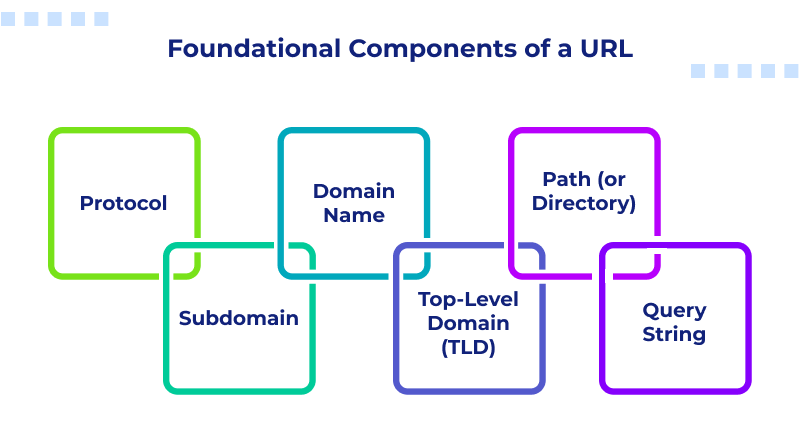
- Protocol: This is the agreement for communication, such as HTTP or HTTPS. The modern, non-negotiable standard is HTTPS, and the ‘S’ signifies that the whole conversation is encrypted. When you see HTTPS, it means the website uses robust SSL—the digital padlock that scrambles data, keeping sensitive user information safe, and builds the trust factor.
- Subdomain: This is an optional part coming before the main domain name (www, shop, dev). It directs the request to a specific section or service within the broader website architecture.
- Domain Name: Your brand’s core identity (Google, brandname). This is the memorable, human-readable name that acts as a proxy for the server’s actual, complex IP address.
- Top-Level Domain (TLD): The suffix (.com, .org). These are mainly used for strong branding now, letting people know what industry or region the site is focused on.
- Path (or Directory): Everything that appears after the TLD’s slash (/about-us/team/ceo-profile.html) represents the exact path to a specific page or file within the website. The Path essentially acts like the folders on your own computer, letting the hosting server know exactly where to pull the file from its storage—no guesswork involved.
- Query String: Holds all the dynamic data, and it’s always introduced by a clear question mark (?). It sends a direct set of instructions to the server, which is essential for things like tracking or showing personalized content.
Types of URLs & Their Use Cases
1. Static URLs
A static URL is a web address that does not change over time. The URL content remains the same unless the admin updates it manually. It is user-friendly, and even search engines easily crawl it.
- Use cases:
- Personal websites and portfolios
- Landing pages and marketing websites
- API documentation
2. Dynamic URLs
A dynamic URL is a dynamically generated URL of a web page. It contains parameters requesting data from the database and is crafted with accurate characters. In this, users can input custom parameters.
- Use Cases:
- E-commerce websites
- User profiles and content personalization
- Database content retrieval
- Booking and reservation systems
3. Friendly vs. Non-Friendly URL
Friendly URLs are descriptive, readable, and keyword-filled web addresses created to enhance the user experience as well as search engines. Non-friendly URLs are extremely lengthy, cryptic, and full of dynamic parameters.
- Examples:
- Friendly URL: https://example.com/shop/shoes/red-sneakers
- Non-friendly URL: https://example.com/index.php?prod_id=50032&cat=5
- Use Cases:
- Content marketing & blogging websites
- Website organization & structure
- E-commerce product pages
4. Shortened URLs
A short URL is a concise web address (alternative to a dynamic URL) created using URL shortening tools like Bitly or ShortURL. It saves space, improves aesthetics, and enables tracking, making long links manageable for different online platforms. Ex: tinyurl.com/live-with-me
- Use Cases:
- Branding websites
- Social media websites
- Print marketing websites
The Strategic Value: URL and Your Business Success
The way you build the URLs on your website directly impacts whether you succeed or fail. If your URL structure is long and messy, it doesn’t just look like unmanged—it actively impacts your search visibility and makes visitors trust you less.
Why is Structure Non-Negotiable?
Search engine algorithms don’t rely on guesses. They read the URL structure to map out your content’s hierarchy and primary topic. A clean, descriptive URL is the cheapest, most effective advantage you have in modern SEO. It serves as an instant summary of the page’s purpose.
- Weak URL: demo.com/item?p_id=987 (This address tells nobody anything, whether they are a human visitor or a bot.)
- Strong URL: demo.com/guide/best-remote-work-laptops-2025 (Clear hierarchy, topic, and year.)
The strong URL provides clear context, contains relevant keywords, and assures both users and search crawlers of the page’s relevance before they even begin reading the content.
User Experience and Trust Building
Visitors barely read the entire address bar, but they scan for verification. When they explore your website, the URL instantly depicts the context. When they see a clear and logical path, they instantly know where they are within your information hierarchy. This simple transparency quickly builds customer trust.
A cryptic, overly long, or heavily character-filled URL breaks that all-important trust instantly. An address that looks broken is a huge flag for potential spam or insecurity; it leads directly to higher bounce rates.
Architectural Efficiency and Scale
For any team building or maintaining a digital property—whether through custom coding or an AI website builder-the URL path must be the internal map of the website. A simple, flat URL structure with few folders deep is easier to manage, update, and deploy than one that is deeply nested and complicated. When developers aren’t dealing with complex path structure, deployment becomes smoother, maintenance becomes faster, and your team remains productive instead of wasting time correcting unnecessary file path errors.
Relative vs. Absolute URLs
An absolute URL has the complete web address accessible from any system. A relative URL is a partial web address pointing to a location relative to the current page’s URL. Absolute URLs are best for external linking, while relative URLs simplify the internal linking within the same domain name.
Absolute URL
- Example: https://www.example.com/products/item1.html.
- Pros: Universally accepted and great to use for external linking.
- Cons: It’s longer, and it requires time to update.
Relative URL
- Examples:
- image.jpg (same directory).
- images/logo.png (in a subdirectory).
- ../about.html (in the parent directory).
- Pros: Shorter and useful for internal linking.st
- Cons: Functions within the same domain name only.
Canonical URLs: Ultimate Duplicate Content Fix
Canonical URLs prevent duplicate content from diluting your SEO strategies. If your URL contains duplicate content, use the rel=”canonical” tag to guide search engines to better rankings.
What Are Canonical URLs?
Canonical URLs are HTML snippets <head> signalling search engines about the master copy version. It prevents duplicate content issues and consolidates search engine rankings.
Duplicate Content Issues
- Duplicate content doesn’t rank on search engines.
- Dilutes link equity and rankings across similar pages.
- Arises from URL parameters, www/non-www variants, or near-duplicates.
How They Fix Duplicates
- Canonical tags <link rel=”canonical” href=”preferred-url”> explicitly signal search engines about the master version of content to rank.
- Point multiple URL variations to the primary domain to consolidate search engine ranking.
- Signalling that all ranking power should be combined into one URL.
URL Structure: Best Practices for SEO-Friendly URLs
– Follow a Good URL Structure
Your URL’s intuitiveness should be higher. Make it simple, logical, and easy to remember that conveys the right meaning to even a layman. There is no set rule defining the absolute URL structure. Different URL structures cater to different websites’ purposes. Incorporating primary keywords can make your URL more SEO friendly.
– Use HTTPS Protocol
HTTPS symbolizes the secure version of the HTTP protocol. SSL encrypts the communication between the browser and the website, making it impossible for the hackers to track or decrypt the data. The HTTPS protocol in the URL protects sensitive information like transaction details, contact info, and more from getting breached. Despite knowing its significance, only 69% of all websites currently redirect to HTTPS.
– Use Hyphens to Separate Words
Best SEO practices demonstrate using hyphens (-) to separate words in a URL. Spaces, or underscores, are encoded with %, which mirrors its ineffective SEO optimization of URLs.
– Eliminate Stop Words
Stop words (the, and, or, of, a, an, to, for, etc.) are not required in URLs. Make your URL shorter and more readable by removing these words. These are not just annoying but also challenging for users to type on web browsers.
Browser Handling of URLs
When you enter a URL in a browser, it interprets the address and breaks it into different parts. These parts include protocol (HTTPS), domain name, and path. Then, the browser retrieves data from the cache if available. Or else, the browser sends a request to the server where the website is hosted.
Once the server responds, the browser processes the received data. Then, it checks and downloads the necessary HTML, CSS, JavaScript files, and images integrated on the webpage. Next, it renders the webpage on screen, ensuring that links, layouts, and scripts are displayed.
What are Semantic URLs?
Semantic URLs are clean, significant, and easily understandable web addresses that presently connote the content of a webpage. Instead of using random numbers or complex parameters, semantic URLs make use of readable words. An example of this is a URL that is
/blog/seo-tips-for-beginners fits the semantic approach more than /page?id=123.
It helps users to understand what the page is all about.
Semantic URLs are highly beneficial in terms of SEO. Search engines easily understand page content, and thus, the probability of a higher ranking is there. Also, they add value to the user experience because people are more likely to visit and post URLs that look reputable and that describe what they are about.
The difference between URL and URI
When people talk about tech, the term URI (Uniform Resource Identifier) always surfaces, but it usually causes confusion. Getting the distinction right is key to understanding exactly what a URL is and how it functions.
The URI is the broader, more abstract concept; it is anything that identifies a resource. The URL is simply a type of URI that specifically indicates the location of the resource on the network and, critically, specifies the protocol required to access it. All URLs are URIs, but not all identifiers (URIs) provide a network location.
Beyond the Address: Security and Evolution
The last decade has seen the URL evolve from a simple address to a guaranteed promise of security, driven entirely by changes in the protocol and changes in user behavior.
The use of the unencrypted HTTP protocol is now a liability. The modern transition to HTTPS is obligatory and should be performed with an authenticated security certificate. This shift, which demands robust SSL security, was necessary to protect sensitive user data-like logins and payment details-and was strongly enforced by search engines, making security an intrinsic part of the address structure itself.
Also, the rapid growth of mobile devices has shifted the way in which we physically interact with the URL. Services like Bitly compress addresses into manageable, trackable strings, and QR Codes instantly encode the full URL into a scannable image. The core structure of the address remains constant; only the method of delivery is adapting to user behavior.
The Infrastructure Problem: When the URL Fails
A URL is a promise that a resource exists at a defined location, and that the host server is up and prepared to deliver it. When this promise is broken, users are met with specific, critical error codes.
- The 404 Error: The classic 404 error is the server responding, “I understood the protocol and the domain, but the specific file you asked for in the path has been moved, renamed, or deleted.” For users willing to fix the 404 error, the good news is that the core hosting engine is still running—it just means the server went looking for that specific file and couldn’t locate it.
- The 500 Error: A 500-level error means the whole system just collapsed. In simple terms, the server is saying, “Something went wrong behind the scenes, and I can’t handle your request right now.” This usually flags serious trouble with the underlying server software or how it communicates with the database. It’s the classic result of a hosting setup that wasn’t built (or maintained) properly.
- The Ultimate Reliance: The ultimate authority and functionality of the URL rests completely on the quality and continuous operation of the server it points to. If the hosting is unstable, if the SSL security certificate expires, or if the path is mistyped, the entire navigational promise fails instantly. The choice of your hosting environment is not secondary to your URL; it is the physical land on which your entire digital property is built.
URL vs Domain Name
| Feature | Domain Name | URL (Uniform Resource Locator) |
| Definition | A human-readable string used to identify a specific website’s server. | The complete web address used to locate a specific page or resource. |
| Scope | Refers only to the main website identity. | Refers to the entire path, including folders and specific files. |
| Components | Consists of a name and an extension (e.g., .com, .org). | Includes protocol (https), domain, port, and file path. |
| Purpose | To make IP addresses easy for humans to remember. | To provide a direct link to a specific piece of content. |
| Example | google.com | https://www.google.com/search?q=ai |
Concluding Insights
The URL is far more than a simple web link. It’s the complex, layered map we rely on—powered by precise rules and critical security. This infrastructure ultimately controls every connection, every search, and nearly every action we take on the web.
As a website owner, every character in your URL is a deliberate, strategic decision that influences everything from search ranking to user trust. And learning how this thing is built isn’t just for techies; it’s the fundamental first step to guaranteeing your space on the Internet is always easy to reach, runs fast, and stays secure. That unassuming web address is the real secret engine of the internet today. Once you understand it, you unlock the true control over your online destiny.
FAQs
1. What are the main parts of a URL?
A URL is the one complete instruction set needed to precisely locate anything you might want to access on the web. It typically includes the Protocol (like https://), the Domain Name (the website’s identity), and the specific file path on the server. This entire structure is what makes up the URL definition.
2. What is the difference between a URL and a Domain Name?
The Domain Name is just the easy name you remember for a website, like google.com. The URL is the full, complete address that tells your browser exactly where to go, which includes the domain name, plus the https:// part, and often a path to a specific page. In short, the domain is the name, and the website address (URL) is the detailed map.
3. Should I use hyphens (-) or underscores (_) to separate words in a URL?
You absolutely should use hyphens (-) to separate words in a URL. Search engines treat hyphens like spaces between words, which is ideal for readability and search results. If you use underscores (_), search engines tend to read the words as one long, meaningless term.
4. What are relative and absolute URLs?
An absolute URL is the full, complete link starting with the protocol and domain. A relative URL only provides the file path (e.g., /images/logo.png), assuming the link is on the website you are currently viewing. Both are types of links, but only the absolute version is a full web address.