 Grace Cornish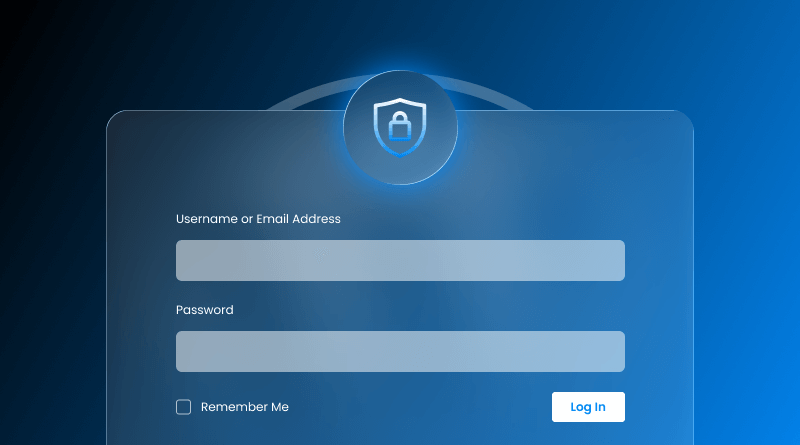
When you have a WordPress website, strong login security is a must.
Beginners often slow their WordPress hosting websites down by trying to protect them with too many plugins. While adding security layers is necessary, too many can quickly kill your website’s speed, which is a major headache for new users.
A simple reality check is that over 45 percent of the brute force attacks target one single page, which is always /wp-login.php. This means attackers are not trying to hack the entire website all at once; they are just trying to hack the one page they know everyone uses over and over again.
With high-traffic WordPress hosting websites, the login page is the weakest link and the most vulnerable. If the bot traffic on a particular page is high and you don’t have a proper set of protection, the bot traffic will affect website performance.
This detailed insight is going to give you a breakdown of how to use the approach in a neat, layered way.
- Server/Network Defenses: This is like the outer wall that stops the attacks from getting to WordPress in the first place.
- WordPress Level Hardening: This creates a layer of WordPress website protection that slows down the attackers.
- Authentication and Monitoring: This is the user side of the software that keeps the intruders out.
With little, reasonable steps, you can learn how to harden your WordPress login security barrier and not have any performance loss, which is the perfect blend of speed and protection.
Useful Read: WordPress Login Plugins: 10+ Best Options for Your
Table Of Content
What is Infrastructure-First Approach? Harden WordPress Login Security
When it comes to safety during the WordPress login step, the first thing that comes to someone’s mind is to use a WordPress security plugin, activate the brute force protection, add firewall protection, and leave it in WordPress’s hands. However, it creates a more subtle issue.
Every single time an automated bot attempts to attack the login page, WordPress has to load a PHP script, make database queries, run the rule for all of the active plugins, run the code for the login, and then finally block an attack. All the while, the server is wasting resources to prevent an attack, which is a massive drain on resources. This leads to slower page loading, higher CPU usage, longer login times, and a drop in performance for genuine users.
This is the reason many enterprise WordPress hosting website owners feel caught between a rock and a hard place, having to make a trade-off between security and performance. Every traditional security plugin attempts to defend from within WordPress. This, of course, means it will be a heavier and slower website. This trade-off seems to last forever: protect the website but lose speed, or retain speed and be left exposed.
Well, the Infrastructure-First Approach solves this problem by moving the protection away from WordPress and shifting it to the server or network level. Instead of struggling and waiting for bots to reach wp-login.php and consume resources, users can effortlessly abide those at the perimeter, before they even touch your PHP files or database.
With this method, attacks are blocked at the network or firewall level, your CPU and RAM are reserved for real users, and your login page stays fast even during heavy attack attempts, giving you the best of both worlds. All-in-all this is known as Infrastructure-First Approach giving your the fastest WordPress hosting experience.
WordPress Login Security: Infrastructure-First vs WordPress-Level Measures
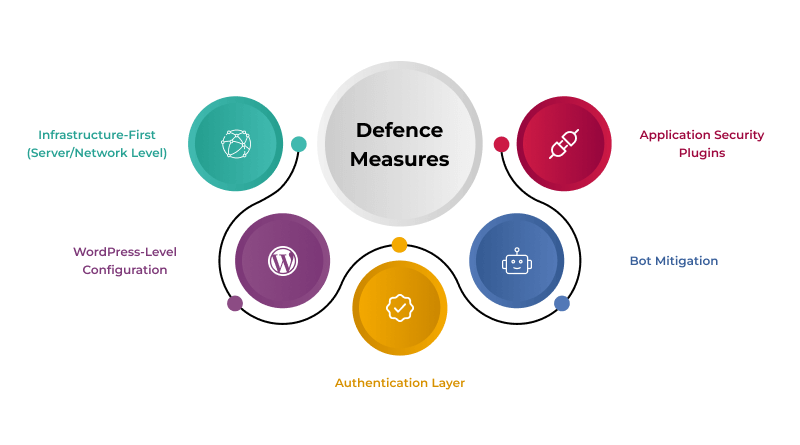
| Security Layer | What It Does | Examples | Impact on Performance |
| Infrastructure-First (Server/Network Level) | Blocks attacks before they reach WordPress | WAF rules, rate limiting, SSL/TLS, virtual patching | Improves performance by reducing load on PHP/database |
| WordPress-Level Configuration | Adds difficulty and reduces exposure points | Change login URL, disable login hints, hide usernames, strong passwords | Neutral impact when done correctly |
| Authentication Layer | Protects user accounts from unauthorized access | 2FA, session timeout, login protection tools | Neutral to minimal load, high security gain |
| Bot Mitigation | Stops automated scripts without impacting users | Cloudflare Turnstile, invisible challenge systems | Improves user experience, avoids heavy CAPTCHAs |
| Application Security Plugins | Handles login protection inside WordPress | Limit login attempts, brute-force blockers | May slow down website due to PHP and database usage |
Infrastructure-First Approach: WordPress Security Best Practices
Deterring and blocking malicious traffic before it reaches WordPress is the most efficient method to strengthen WordPress login security while minimizing the impact on performance. When attacks are stopped outside of WordPress (at the server, firewall, or network layer), WordPress doesn’t have to load, execute plugins, or process any requests. This saves resources and helps your website maintain performance and load times even under the most severe attack attempts, which is the gold standard for high-traffic websites.
A good analogy helps explain this. Think of it like airport security. The server-level tools, like a Web Application Firewall (WAF), function like airport security screening and metal detection at the entrance. They remove threats before passengers even enter the terminal. WordPress is similar to the gate agent verifying your boarding pass.
The gate agent can check documents to see if you are okay to board, but if you are a good actor, they are effectively powerless to stop you from boarding. This is why a protective layer consisting solely of WordPress is inadequate.
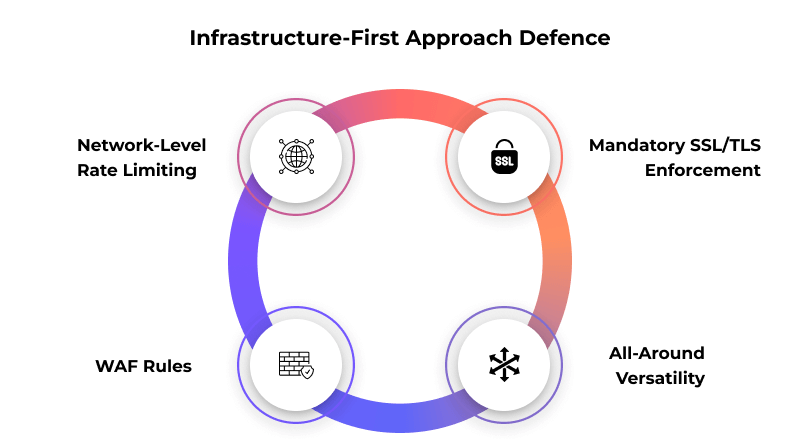
The following are the most important techniques at the server level:
1. Network-Level Rate Limiting
Limitations concerning the number of login attempts made by a single IP address for a brief timeframe. When activated at the server level or Cloudflare/WAF, bots are blocked instantaneously on Layer 7. This avoids several brute force attempts before reaching PHP or the database, which is like cutting them off at the pass, thereby preventing needless strain on the WordPress installation.
2. Web Application Firewall (WAF) Rules
A WAF can exclude attempts of abuse, for example, by XML-RPC, injection attempts, or automated abuse of logons (i.e., bots), which are typical among abusive traffic flows. These requests are prevented from hitting your WordPress files, making your server available and responsive. This is your first line of defense.
3. Mandatory SSL/TLS Enforcement
SSL certificate must be used for login credentials, even passwords, to be protected while they transit the connection. Enabling HSTS makes it impossible for users to spend unencrypted sessions. This step is paramount for WordPress installations, and it’s non-negotiable for modern security.
Tip: MilesWeb’s cheap WordPress hosting plans offer free SSL certificates.
4. Virtual Patching at the Server Level
Patchstack and other automated managed security systems are able to apply virtual patches to vulnerabilities of plugins, themes, or the WordPress core that are unpatched. This allows the website to close the door on zero-day threats before the updates are available, effectively buying you time until a permanent fix is deployed. For this reason, it provides peace of mind.
Essential WordPress-Level Login Security Hardening
Once the server-level changes have been implemented, the next step is to make changes to WordPress itself so that the big configuration changes can be implemented. These changes don’t slow your website down and make it significantly harder for attackers to be able to guess logins or brute force discover admin accounts, giving you peace of mind.
Changing the default location of the login page is a very simple, yet very effective security step. Since bots target /wp-login.php and /wp-admin, and the default login can easily be brute-forced, changing the default login location cuts out the low-hanging fruit for many of the most basic brute-force scripts.
A lightweight plugin can accomplish this, or if you are experienced with server-side scripting, it can be accomplished with a simple redirect. Another important factor is the development of strong password policies. Many users choosing weak or repetitive passwords are the primary culprits of system breaches. Strong server-side password checks, combined with password manager recommendations, will raise the bar and help system admins and users implement strong passwords.
If you are looking for even more protection, you can implement .htaccess password protection on the login page. This provides a preliminary security layer, which can be helpful for sensitive internal websites, adding another layer of polish to your defense. Disabling login hints is very important. Attackers will try to guess passwords, and WordPress leaves hints when users enter login details.
For example, WordPress security best practices will tell users whether the username or password is wrong, giving hints to the attacker when they are wrong and unclear hints when they are right. Removing these helper messages makes username and password guessing significantly harder, making the job much tougher for bad actors.
Helpful Blog: Enterprise WordPress Hosting Upgrade
Mistakes That Weaken Your Login Security
The majority of login security breaches happen because a website admin has done something and not because of the negligence of a security update. Unfortunately, the errors that some admins make have damaging consequences and operate on the sub-optimal processing of the website, causing performance to suffer and the server used to crawl to the point of stopping, which is exactly what we want to avoid, especially on WordPress.
Some website admins think that if security plugins are installed, the website is secured. This is not the case. Each plugin has a cost in terms of performance. There is a limit on the number of security plugins, and performance and stability of your website are some of the reasons for that limit, a fact that often catches people off guard.
Embedding Annoyingly Complicated CAPTCHA
Image CAPTCHAs increase the bounce rate and take longer to log in. It’s because attackers don’t struggle with the letters or the endless puzzle grids while real users do. Simply switching to invisible bot traffic filtering is more secure and improves UX, making it a win-win situation.
Hiding Default Login Forms
Having a visible /wp-login.php and /wp-admin endpoint is an open invitation to automated attempts. Emptying default admin pages results in application login storms that increase CPU usage and throttle even the smallest websites during bot login storms, a situation that can spiral out of control.
Password and Admin Account Mismanagement
Old and inactive user team accounts contribute to a shared admin account with the user. Weak passwords also increase the open doors for attackers to try a bad password, leaving the back door unlocked. The elimination of such preventable mistakes is a net positive for your website in stopping unnecessary issues while also stopping poor performance issues.
Similar Read: How to Protect WordPress Page using Password?
Securing the Login Atmosphere
Even with server and login configuration strengthening, how users behave post-login is a major part of the security puzzle. Poor session management is often more than just an afterthought and is the part of the security puzzle that offers the most access to the most sensitive areas of your WordPress dashboard.
Establishing Idle Session Timeouts
Allowing users to stay logged in forever creates physical dangers, vulnerability to shared devices, and the likelihood of mistaken exposure of sensitive data. Implementing reasonable timeouts, particularly for users with admin privileges, allows unattended admin sessions to expire and significantly lowers the risk of unauthorized access without putting additional strain on your system, which is simply common sense.
Imposing Restrictions on Concurrent Logins
When attackers steal a user’s password, they often expect to remain undetected for extended lengths of time. By allowing only one active session at any one time, you turn a blind spot into a tripwire by increasing the chances of detecting and notifying system users of aberrant attempts to access the system.
Turn on Device and Location Monitoring
Today’s systems can identify a sign-in from a different browser, device, or geographic location. Even simple plugins or tools at the hosting level can provide immediate alerts to system admins. This offers the administrator a first look at potential unusual behavior before any attempts to compromise the system are made, making detection near-instant.
Wrapping Up
A single tactic or WordPress security plugins will not be enough to secure your website’s login page. True protection requires a multi-layered approach. Your server and network will do the heavy lifting of blocking and eliminating threats without negatively impacting website speed, which is the ideal scenario. Then, the WordPress configurations will add critical layers of difficulty and obscurity for attackers. Lastly, players get to control the security over their accounts with tools like 2FA. All of these layers work together to form a balanced and powerful coverage over your WordPress login page, leaving no stone unturned.
An important thing to keep in mind is that performance and security don’t have to antagonize each other. Your login page will remain lightweight, your users’ resources will be preserved, and your website will be fast and responsive, even under attack. All of this ends up satisfying the promises of the Infrastructure-First Approach, which guarantees maximum protection without compromising on performance, delivering on its promise.
To keep up with the standard, check the server-level WAF rules, confirm that rate limiting is successfully on, and verify that all admin accounts have 2FA turned on before the next cycle of security. Small changes can prevent the bigger issues that keep your WordPress website stable and secure, alongside the ability for it to keep growing.
FAQs
1. Why is WordPress login security important?
WordPress login security is important because the login page is the most targeted entry point for users, whether for brute force attacks or unauthorized access. If attackers can guess and/or steal your login details, they can take full control of your website, upload malware, change website text and images, or steal login credentials from other users. In protecting the login page, automating attacks on the website, and reducing risk exposure, server resource damages are avoided.
2. How can I secure my WordPress login page?
You can secure your WordPress login page by incorporating simple WordPress-level configurations and server-level protection. Start with network-level rate limiting and WAF rules to block attacks before they reach WordPress. Then, change the default login URL, enforce strong passwords, apply username hiding, and use .htaccess protection when necessary. Adding these measures makes it far more complicated for attackers to gain access.
3. What steps should I follow to activate 2FA on WordPress?
Activating Two-Factor Authentication on WordPress is quite simple. An excellent security plugin light on resources, or a 2FA option built into your hosting provider, will do the trick. Always enable it for all users first, especially for the administrators. The greatest security is provided by using app-based 2FA authenticators like Google Authenticator/Authy or by using hardware Fido2 security keys. Introducing 2FA means that even if someone were to obtain your password, they wouldn’t be able to log into your account.
4. Do SSL certificates improve the security of WordPress login?
Certainly, SSL is a basic requirement for the security of WordPress logins. SSL or TLS provides security to your username and password by encrypting your communication with the server. This means that your login information cannot be read by attackers. Once the HSTS protocol is activated, it means that the login page is accessed with SSL, thus securing your login.