Jackson Lane
It’s a digital-first world where users demand their apps to be “blazingly fast”, reliable and available, no matter if it is on a desktop browser or mobile. We bring you Progressive Web Apps (PWAs), the sweet spot that offers a blend of web and mobile that demands intense web hosting. PWAs aren’t just hype, they usher in a dramatic change in how businesses can create and deliver seamless, app-like interactions without having to deal with downloads or storefront approvals.
This guide will take you on a deep-dive of everything PWA-related concepts. Not all apps on your phone come under the PWA category. PWAs (Progressive Web Apps) integrate modern technologies like AI, deep learning, and more to make apps affordable for users and businesses.
What’s In
What is a Progressive Web App?
A progressive web application (PWA), or progressive web app, is a type of web app that can be installed on a device as a standalone application. PWA leverages standard technologies like HTML, CSS, and JavaScript to build apps. Introduced in 2016, it has become an alternative to native (device-specific) applications.
PWAs are accessible across devices and their operating systems. They can function on both iOS and Android. PWAs are available on the Apple App Store, Google Play, or the Microsoft Store.
History of PWAs
Google engineers Alex Russell and Frances Berriman coined the term ‘PWA’ in 2015. They both introduced a solution addressing significant limitations of mobile web experiences at the time, particularly regarding speed and performance.
Since then, PWA development has gained significant momentum, demonstrating an alternative to native app development. There are several development benefits to this, including easy coding, reduced costs, and improved user engagement.
Fact Box: A recent survey shows 74% of organisations are investing in PWAs to reduce maintenance costs and increase efficiency. [Statista]
How Do Progressive Web Apps Work?
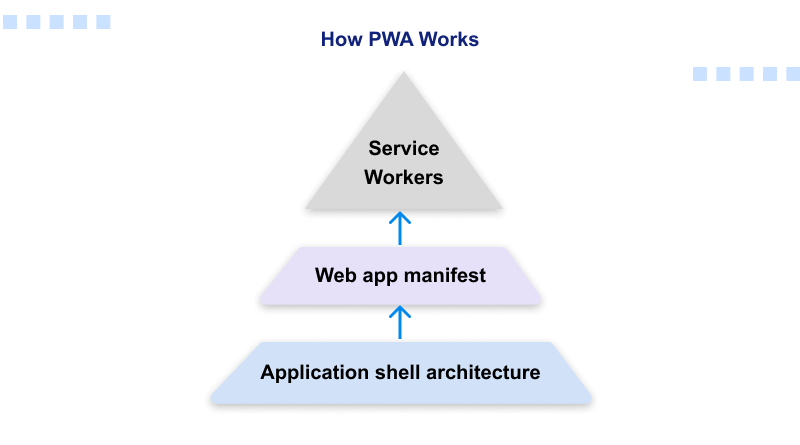
PWAs take advantage of modern web capabilities to deliver traditional app-like experiences across devices. Here are some key components included in this process:
- Service Workers: Scripts that run in the background to enable functionalities like push notifications, background data syncing, and offline functionality.
- Web App Manifest: The JSON file allows developers to control their app’s appearance. Elements like icons, navigation, and CTAs are through the Web App Manifest platform.
- Application Shell Architecture: This architecture ensures PWA users have a smooth, app-like user interface with robust performance. After the first visit, the shell is cached on the user’s device, enabling instant, offline interaction in the future.
Characteristics of PWAs
1. Responsiveness
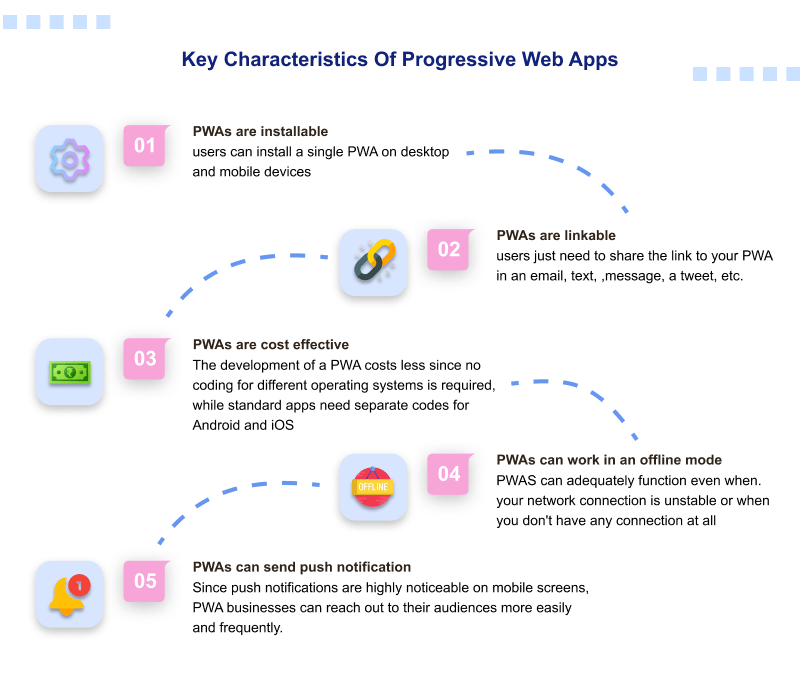
Developers are responsible for developing apps compatible with all screen sizes. It increases the user experience and the engagement rate. So it’s a good idea to make sure your app can be used on any screen size, and its content is available at any viewport size.
2. Installable
Research proves that mobile apps have a higher engagement rate than websites. PWAs are easy to install, as they feel and function like normal apps. A few of these apps don’t require an internet connection as well, so offline accessibility is also easier.
3. Independent Connectivity
Progressive Web App (PWAs) offer a consistent experience without an internet connection. A simple example of this is any music app, where a playlist is accessible offline if you have saved it in your music library. Another good example is the Twitter (X) app, where a user can go back and read through tweets that they might have missed.
4. Discoverability
PWAs can be converted into websites. After all, their fundamental programming languages (HTML, C, and C++) are similar to websites. PWAs are discoverable in search engines, which generates extra traffic to your apps, which native apps cannot do.
5. Appearance
Appearance and customisation will be similar to a normal app. Using the latest UI/UX trends will make PWAs recognisable and user-friendly.
6. Cross-Platform
Progressive Web App (PWAs) follow the web-first approach, which means they are accessible on all browsers/operating systems. So, this cross-platform accessibility allows users to install PWAs on any browser/OS. You can access them on operating systems like Windows, macOS, Linux, iOS, and Android.
7. Safety and Security
Progressive Web App (PWA) incorporate SSL encryption and built-in security features to comply with all safety standards. Data transmitted between the user’s browser and the server is encrypted. It protects the digital infrastructure from MitM (man-in-the-middle) attacks to build the user’s trust.
Benefits of PWA
1. Low on Data
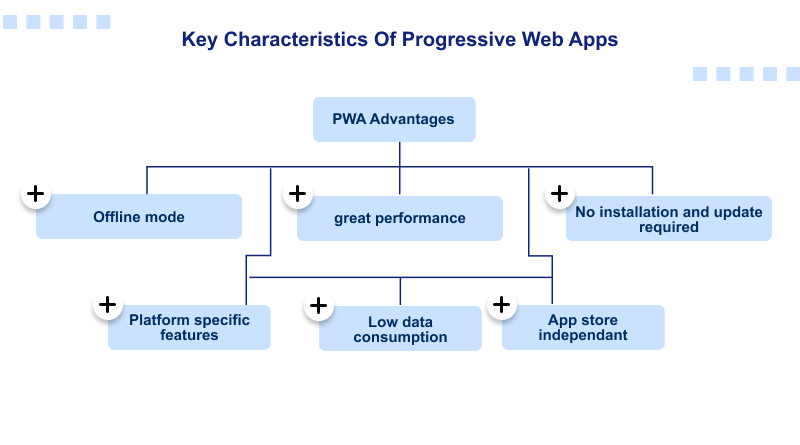
Mobile data is still expensive in emerging markets like India, Brazil, Vietnam, and South Africa, as compared to developed countries. PWAs don’t occupy much more storage and bandwidth than traditional web apps because they use a caching mechanism.
2. No Manual Installation or Updates
Let’s understand it with the example of Twitter. You don’t need to visit the Play Store or App Store to access Twitter’s PWA. Simply visit mobile.twitter.com and log in in no time. Likewise, Progressive Web Application (PWA) ensures seamless updates of apps without annoying users to do it manually.
3. Offline Mode
Progressive Web Application (PWAs) are accessible online due to the caching mechanism. This is a great news for the businesses that have product catalogues because it gives customers the ability to browse them offline. It increases the engagement rates, finally leading to higher revenue.
4. App Store Independent
Developers are not liable to comply with the terms and conditions of platforms like Google’s Play Store or Apple’s App Store. Additionally, not relying on an app store also allows developers to make any app they want without being restricted by Google and Apple’s app store policies.
5. Improved Performance
According to SEO guidelines, “53% of users will abandon a website if it takes longer than 3 seconds to load! And users expect a fast loading time of the interface.” PWAs outperform most web apps on the market because of service workers. Service workers, which are JavaScript files, run away from the primary browser. They also manage the caching of assets, reducing back-and-forth requests and improving load speed.
6. Platform-Specific Functionalities
Progressive Web Application (PWAs) can add themselves to the home screen of users and send web push notifications like normal push notifications. They utilize full screen, change the orientation of the display, have a custom splash screen, and access geolocation, among other functionalities.
Dictionary: Web push notifications are sent through a user’s web browser. These notifications only need a one-time visit to the respective website to opt in. For mobile push notifications, the notifications are routed through a mobile application that the user must have installed on their device.
How to Create a PWA?
Creating this kind of web app is just as time-consuming as creating a traditional web app. There are several additional things that must be done to ensure the app performs like a native app.
Here are the steps for creating your own Progressive Web App.
- Planning: Identify the objective and the main features of your Progressive Web Application. This mainly depends on the issues that need to be covered and to the target audience, including their problems.
- Development: PWAs are developed with an ordinary web development toolkit (CSS, HTML, JavaScript). Also, a service worker is to be introduced in order to handle background activities and provide offline capability.
- Manifest File: Build and create a web application manifest file that details the functionality of the application, and how it will act after being installed on the device of a user.
- Testing: Do this by testing your PWA on a wide range of devices and in a wide range of network conditions to ensure that the application is completely responsive and reliable.
- Deployment: Deploy your Progressive Web Application and place it on a secure server. After release, one must keep tracking its performance and user attraction in order to make subsequent adjustments in case the application does not work as planned.
Best Progressive Web Apps Examples
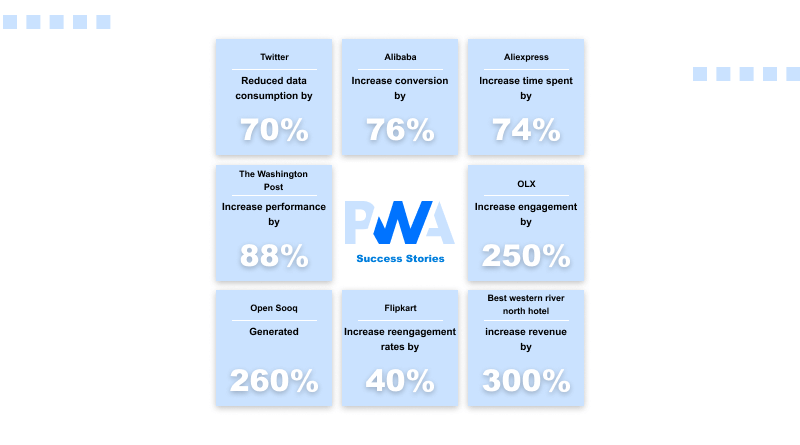
After covering all the characteristics, advantages, and developmental processes of PWAs, it is now time to take some examples of popular examples that have been very successful and popular over the years.
1. AliExpress
AliExpress by Alibaba is an international eCommerce brand. The website is ranked among the best in the world with over 150 million active users. There was a need for a Progressive Web Application (PWA) marketplace to accommodate users who prefer to conduct their business on mobile phones.
As a result of this initiative, daily active users increased by 104%. The average session duration on Alibaba and the number of pages viewed in one sitting increased by 76%. This is yet another proof of the growing influence of the Progressive Web Application.
2. Forbes
Forbes redesigned the mobile experience for its users. The new PWA was designed for users who are continuously on the go. It also offers speed and ease of access to mobile users to improve the overall experience. The company also increased the number of user sessions per engagement by 43%, resulting in a 100% increase in engagement.
3. The Washington Post (Media PWA)
The Washington Post is a prime example of an Offline-First/Media PWA, focusing on providing a lightning-fast, highly readable experience for news consumption. Its primary value is the incredible speed, which saw a reported 90% increase in page loading time compared to its prior site. By leveraging the Accelerated Mobile Pages (AMP) framework within the PWA, it ensures articles load near-instantly, even on poor network connections, and allows mobile readers who install it to return to the application at a significantly higher rate. This Progressive Web Application (PWA) serves as a robust distribution platform that bypasses app store friction while significantly improving user retention and engagement metrics on mobile devices.
4. OLX
OLX’s PWA is a successful model of a high-engagement E-commerce/Classifieds PWA, specifically designed for performance in markets with inconsistent mobile data. By transforming its slow mobile web experience into a fast, app-like PWA, OLX achieved a 250% higher engagement rate and a 146% increase in click-through rates on ads, primarily by addressing slow load times and frequent crashes on older devices. Key features include Push Notifications to instantly re-engage users with context-based alerts about messages from buyers or sellers, and significantly reduced data usage, making the classifieds marketplace experience accessible, fast, and reliable for all users, regardless of their device or network quality.
Writer’s View
Both Progressive Web Application, as well as mobile apps, are here to stay. But, thanks to advances in technology, they are quick and accurate to evolve, and they can work offline. Service workers and caching are details that make it lightweight and available to all.
PWAs provide superior performance, reduced costs, and greater access to businesses and their users. They increase user engagement and help keep users in an organized loop using technologies such as push notifications, cross platform availability.
Wrap Up
Progressive Web Applications combine all the best web-based features and mobile capabilities to enhance the digital presence of users. They’re ideal for people who want speed and reliability, offline access, and an app-like user experience without the price or overhead of a native app. Whether you’re a business owner, developer, or digital marketer, PWAs offer a future-focused path for reaching users across any device in terms of more efficiency and higher conversions.
In an ever-evolving web, PWAs are now a strategic advantage. They minimize development overhead and enhance UX with easy installation. If you’re interested in creating digital experiences that are fast to load, run on every device possible, and keep users engaged, PWAs are among the smartest investments you can make right about now.
FAQs
1. What is a Progressive Web App (PWA)?
A progressive Web App is an app that uses modern web capabilities to deliver interactive user experience without internet connectivity.
2. How does a PWA work?
It uses a Service Worker (a type of script that your browser runs in the background) to intercept network requests and cache assets, as well as a Web App Manifest (a file written in JSON) where you can specify metadata used when installing your app to the home screen.
3. Can PWAs work offline?
Yes, PWAs are accessible offline by leveraging Service Worker and CacheAPI to store key app files and data locally, fetching them without the need for the internet.
4. What are some great examples of PWAs?
Well-known examples of that use case include Twitter Lite, Pinterest, etc. Starbucks and Uber (mobile & desktop speed and reliability improvement).