Jackson Lane
Most people treat artificial intelligence like a distant deity—a powerful force that lives in a massive data center owned by someone else. You send a prompt into the void, wait for a response to travel across the ocean, and hope your data isn’t being absorbed into a third party’s proprietary training model. But what if the “brain” didn’t live in the cloud? What if it lived in your basement, your office, or that laptop you’re using right now?
Welcome to the era of local intelligence. The walls around Large Language Models (LLMs) are crumbling, and for the first time, you don’t need specialized engineering expertise or a million-dollar server rack to deploy a private instance. As you scale your digital presence, perhaps even considering an AI website builder to streamline your workflow, the ability to run these models privately becomes your greatest competitive advantage. This is the moment where “What is Ollama?” stops being a technical query and starts being a strategy for digital sovereignty.
Table Of Content
What is Ollama?
Beyond the marketing hype, Ollama is essentially a bridge between high-level research and local hardware. It is an open-source framework that simplifies local model management. Think of it as a dedicated environment that runs and scales high-performance workloads on your hardware. Just as a media player allows you to run different media files without needing to understand video encoding, Ollama lets you run complex models like Llama 3 or Mistral without needing to be a Python expert.
When people ask what is Ollama AI, they are usually looking for a way to escape the “Software as a Service” (SaaS) trap. Much like how web hosting provides the infrastructure for a website to remain accessible, Ollama provides the local infrastructure for AI to remain private and responsive. It transforms the daunting task of setting up an environment—managing dependencies, configuring GPU drivers, and hunting for weights—into a single-command experience. It is the tool that finally makes local AI accessible to the average developer and enthusiast.
The Architecture of Autonomy: Why Local Beats Cloud
When we discuss how does Ollama work locally, we aren’t just talking about saving a few dollars on API credits. We are talking about the elimination of “digital latency.” In a cloud-based infrastructure, every thought you outsource to an AI must travel through a fiber-optic network, wait in a queue, and undergo external egress before reaching your terminal. That micro-delay disrupts the creative flow.
Hosting logic directly on your hardware removes external dependencies and secures your execution environment. This provides more than a technical advantage; it delivers total operational certainty. When the AI responds instantly, it stops feeling like a “tool” and starts feeling like an extension of your internal cognitive process. For those managing complex workflows—perhaps balancing high-end marketing tools with real-time data analysis—this zero-latency environment is the only way to maintain a true “deep work” state. It’s the difference between having a conversation with someone in the room versus sending letters through the mail.
How Ollama Works Locally
To understand how does Ollama work locally, look at its unified execution environment. It uses a specialized ‘Modelfile’ to consolidate model weights and metadata into a single, high-efficiency package for your machine.
Instead of forcing your CPU to do all the work, Ollama intelligently leverages your system’s hardware. If you have an Apple Silicon Mac or a high-end NVIDIA card, it taps into those specific accelerators to give you near-instant responses. It creates a local API server on your machine, meaning other apps can “talk” to your local AI just like they would talk to ChatGPT. This setup is perfect for integrating with AI-Powered tools or specialized marketing tools that require privacy and speed without the latency of a round trip to a remote data center.
Strategic Benefits of the Ollama Architecture
Let’s move past the standard “Key Features” list. Ollama thrives because of three specific architectural choices:
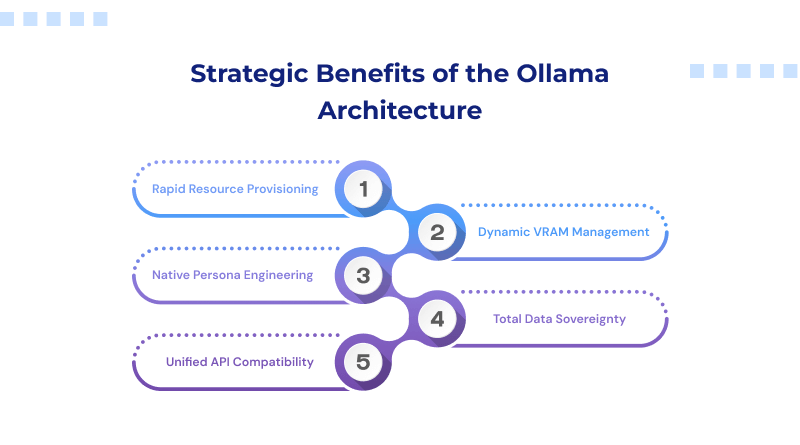
- Rapid Resource Provisioning: Ollama doesn’t just give you a tool; it gives you a library. You can “pull” models down with a single command (ollama run llama3), and the system handles the versioning and updates automatically.
- Dynamic VRAM Management: One of the primary constraints for local execution is VRAM overhead. Ollama is built to load and unload models gracefully, ensuring that your system doesn’t freeze the moment you start a complex task. For more demanding workloads, running models on a VPS hosting environment can help maintain consistent performance.
- Native Persona Engineering: You aren’t stuck with the “factory settings.” Through the Modelfile, you can give your AI a specific persona. For instance, you could develop a customized configuration specifically tuned for complex technical logic, ensuring the response depth and professional tone align with your exact operational standards.
- Total Data Sovereignty: Running these tasks on your local machines ensures your data stays on-site. This closed-network approach keeps your intellectual property secure and away from outside servers.
- Unified API Compatibility: Ollama provides a standardized, OpenAI-compatible local endpoint. This allows you to swap cloud dependencies for local execution across all your existing tools without rewriting a single line of integration code, providing immediate architectural flexibility.
The Ollama Model Library
Ollama isn’t locked into one provider. It’s a multi-model ecosystem. In any guide to Ollama explained for beginners, the first thing you notice is the variety. You can run:
- Llama 3: Meta’s powerhouse for general reasoning and conversation.
- Mistral & Mixtral: The favorites for high-performance coding and logic.
- Code Llama: Specifically tuned for those who want a local pair-programmer.
- Gemma: Google’s lightweight open models that deliver industry-leading performance density.
The beauty here is that you can switch between these models in seconds to see which one handles your specific data best.
Customizing Your Modelfile
One of the most overlooked aspects of Ollama explained for beginners is the power of the “Modelfile.” Most users simply download a model and use it as-is, but the real magic happens when you start rewriting the DNA of the AI.
The model file allows you to set “system prompts” that are hardcoded into the model’s behavior. You can embed specific brand voices, coding standards, or complex logic for ChatGPT prompts for UX designers directly within the local instance. This means you don’t have to “re-teach” the AI every time you open a new chat window. You are essentially building a team of specialized digital employees, each one perfectly tuned for a single department of your business, all running silently in the background of your OS.
Strategic Implementation: Practical Use Cases for Ollama
Why go through the trouble of running things locally?
- Offline Development: Coding on a plane? In a remote cabin? Your AI assistant is right there with you, no internet required.
- Sensitive Data Analysis: If you are a lawyer or a medical professional, you cannot upload client data to a cloud provider. Ollama keeps the data on your hardware.
- Automated Content Pipelines: Link Ollama to your local scripts to summarize thousands of documents or generate meta-descriptions for your web projects without incurring an API bill.
Commercial Licensing: Is Ollama Free?
This is the question that defines the “make or break” for startups. Is Ollama free for commercial use? Yes. Ollama is distributed under the MIT License. This means you can use it within your business, bundle it into your software, and use it to generate commercial value without paying a licensing fee to the Ollama team.
However, remember that the models you run on Ollama operate under distinct licensing frameworks. While Llama 3 and Mistral have very permissive licenses, always check the specific terms of the model you pull to ensure it aligns with your commercial goals.
Security as a Feature, Not a Checklist
In the modern web ecosystem, security is often treated as a series of external patches—things like an SSL certificate or a firewall. While those are vital for your public-facing website, your internal brainstorms and proprietary code deserve a different level of protection.
While the commercial viability of Ollama is a major draw, its most significant value lies in the total data sovereignty it affords. When you run Ollama AI on your hardware, your data never leaves your RAM. You eliminate the risk of exposing your ‘next big idea’ within public training sets or via unauthorized web indexing. In an era where data is more valuable than oil, keeping your “intellectual refinery” local is the smartest security move you can make. It’s about building a fortress around your innovation before you ever push it to a futuristic web hosting provider for the world to see.
Final Analysis: Mastering On-Premise AI
The shift toward local AI is fundamentally about moving from “subscriber” to “host.” By bringing these models onto your local hardware, you stop being a tenant of the cloud and start owning your intellectual infrastructure. You dictate privacy, you eliminate the “per-prompt” tax, and you ensure your most sensitive data never remain exposed on external servers.
Running a local model isn’t about competing with the tech giants; it establishes a private laboratory where ideas grow immune to indexing or external observation. As cloud infrastructure continues to evolve, the advantage goes to those who can balance cloud-scale reach with local-scale security. This strategy empowers creators to build without boundaries while shielding every internal experiment behind a private firewall.
Whether you are refining or deploying, Ollama provides the stability needed to stay independent. It turns what is Ollama AI from a technical question into a roadmap for autonomy. With Ollama, the era of restricted access is over; it’s time to build, innovate, and own your future.
FAQs
1. Which models should I download for a smooth experience?
For most standard hardware, the 8B (8 billion parameter) model class offers the best performance-to-latency ratio. Llama 3.3 8B is the current versatile standard for general logic, while Mistral remains a top choice for efficiency. If your workflow involves technical design or building an AI website builder, look at DeepSeek-R1 or Qwen 2.5. These are specifically optimized for the complex logic required in advanced prompt engineering, ensuring you get high-tier reasoning without the system lag associated with larger models.
2. What is the new Ollama launch command?
The most efficient way to initialize a model is through the terminal. Once Ollama is installed, use the following command to pull and run a model in one step: ollama run [model-name]. For those integrating local intelligence into marketing tools or internal apps, Ollama serves a local API automatically. You can verify your active library by typing “ollama list.”
3. Does Ollama support Windows ARM64 (Snapdragon) natively?
Yes. Ollama now features native support for Windows ARM64, optimized specifically for Snapdragon X Elite and Plus chipsets. This allows the software to leverage the NPU (Neural Processing Unit) directly, which is far more efficient than traditional CPU rendering. This native compatibility provides the necessary stability for running an AI website builder or heavy local workloads on thin-and-light hardware without draining your battery or overheating the system.